HELP!Amiga HD Floppy wont work as HD!

  • Thread starter Thread starter Tajmaster
  • Start date Start date
  • Replies Replies 17
  • Views Views 2962

Tajmaster

Truth, Justice, all that stuff.
Joined
Sep 16, 2009
Posts
5,289
Country
UK
Region
Bradford, West Yorkshire
Hi all

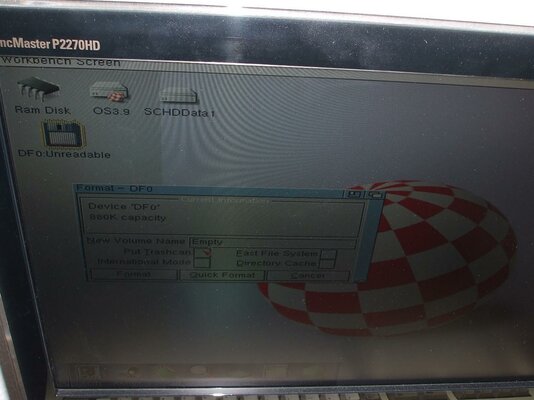
I have an FB357A HD floppy drive I bought off here a while ago. I have never used it until the other day. Now the thing is, it works fine as a DD drive but if I put in a HD disk it doesnt recognise it. It doesnt recognise formatted HD disks and doesnt let me format disks as HD (see pic).

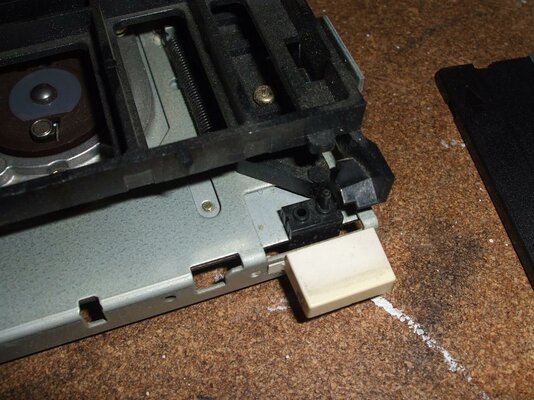
Ive noticed one of the 2 prong things that tell the drive if it has a HD or DD disk in is missing, could this cause the problem?

I havent messed with the jumpers at all and Ive tested my A4000 HD floppy on the same Amiga (A1200T in my sig), any ideas?

Thanks

Taj
 

Attachments

  • DSCF1470.jpg
    DSCF1470.jpg
    122.9 KB · Views: 1
  • DSCF1466.jpg
    DSCF1466.jpg
    198.5 KB · Views: 1
There should only be one microswitch (prong) on the eject button side of the drive. See a pic of my drive here: https://www.amibay.com/showthread.php?t=9992 It's the HD detect switch. The two on the other side are disk inserted, and write protect.

Most likely is the switch is dirty or bad. I had to clean mine as it thought I was constantly ejecting the disk.
 
Thanks for the quick post Lambo :thumbsup:

I just cleaned it with IPA, scrubbed the area around the prong and then put a drop on it and pushed it in and out a few times (ooo er :oops:). I tried a HD floppy again and it was the same :( I tried a couple of DD floppys, works perfectly :blink:

Ive cleaned the heads too with IPA and it made no difference.

Any other ideas? I wonder if the prong/switch bit is knackered?
 
My bet is you have a special cable because you have a escom amiga.

Try another cable without.

It is just a feeling
 
It a Commodore Amiga :)

Also, I tested another HD FDD on it and it worked fine :blink:
 
Any other ideas? I wonder if the prong/switch bit is knackered?

Edited: Do you have an OHM meter or digital multi meter? You could measure across the two pins of the switch both pressed and released. You should have real high resistance when the prong is up and super low when down. That will eliminate the switch as the problem.
 
Last edited:
Ive just formatted a HD disk (with the hole covered) as a DD disk, works absolutely fine :blink: Im a bit confused! LOL!
 
Daft question - has it definately formatted as HD disc?

Dave G :cool:
 
Its never formatted (or read) a HD disk as HD, just DD disks as DD and HD disks as DD (with the hole covered). I connected my other HD FDD to the same cable and it read and formatted disks as HD and DD.

---------- Post added at 21:13 ---------- Previous post was at 21:12 ----------

Any other ideas? I wonder if the prong/switch bit is knackered?

Edited: Do you have an OHM meter or digital multi meter? You could measure across the two pins of the switch both pressed and released. You should have real high resistance when the prong is up and super low when down. That will eliminate the switch as the problem.


Hmm, good idea, Ill have to find my multimeter and give it a go :thumbsup:

---------- Post added at 21:26 ---------- Previous post was at 21:13 ----------

OK, I got my multimeter, I wasnt too sure about the OHM test thing so I tested for continuity. When I have a HD disk in, the outer two points show continuity with each other but not with the centre point. with a DD disk all three have continuity with each other.

So it doesnt seem to be the switch?
 
Yes, thta switch is missing and seems HD-DD switch (right side).

You can solder it up on the back to "always HD", and test HD disks. Then, DD will not work, so you have to replace that switch with some other Chinon switch.

gehtjanx
 
Umm, Im not exactly sure what you mean?? :oops::oops::oops:
 
OK, I got my multimeter, I wasnt too sure about the OHM test thing so I tested for continuity. When I have a HD disk in, the outer two points show continuity with each other but not with the centre point. with a DD disk all three have continuity with each other.

So it doesnt seem to be the switch?

I'd have to take mine apart to confirm for sure, but it seems like the switch is ok. That's really weird.
 
Hello,

Oh, I looked at my Chinon HD, on the RIGHT side (from front) there is ONE (little) sensor/switch/ contact.

Please tell me:
- Does your drive has 2 sensor/switch/ contact on the LEFT side (from front). Your pic is RIGHT side. So on the other side I mean. Maybe it's a different Rev. If you have 1, it's faulty. If you find 2, it*s OK
OR
Post a pic of the left side if unsure.

If drive is OK:
- What's your Amiga Setup? Amiga 4000 now or A1200? Does it work in any of those?

- If jumpered as DS0, it's internal, if jumpered DS1, it's "second" drive.
Jumper in A4000
J351: DF1 Enable
Closed: Enable low-density (880K) floppy as DF1.
Open: No DF1 *OR* for high-density (1.76M) DF1.

- You need a special floppy cable for Amigas, don't use PC ones, or just first past of them ("before" thhe twist).

Also I think you have to run OS>2.0, but that should be done when using A1200/4000 :)


Hope you got what it takse ;)

gehtjanx
 
I swapped the cable with one from my A4000.......IT WORKS!!!!!!!!!!! :bowdown::bowdown::bowdown::bowdown::bowdown:

You guys are frikken awesome, thank you ALL so much :)

Anyone know why the cable I have doesnt work in HD? Is it because of the twist?
 
Is it 3-5 or 4-6 switch in the cable? I used a cable from an A2000 to fix my a3000 to accept dual floppy - no idea they are a bit different.

I am afraid I did hear the bell, and know the solution, but do not know the reason so far.
 
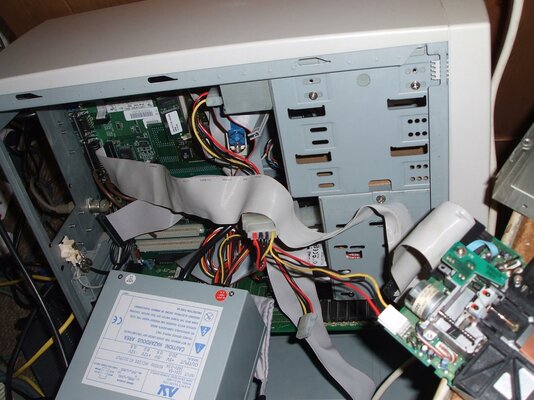
Ive attached a pic, you cant see the twist that well but it has 3 wires, then the twist which consists of 3 wires too then its all normal after that.
 

Attachments

  • DSCF1475.jpg
    DSCF1475.jpg
    192.6 KB · Views: 3
@Jurgen: swapping wires 3-5 will do nothing at all! Pin #4 (in the middle of twisting) will remain #4, the odd pins/wires are always ground...
 
Back
Top Bottom