Hi everybody.
Some months ago I got my hands on a CDTV as I thought it would be a nice way to have one of our beloved amigas in the livingroom. I wanted this to have whdload installed with some games, so when I have some free time I can have a quick 15 minutes of amiga joy
I think this is the only "wife approved amiga" but to get a stock CDTV to be able to load whdload and play some games there are some things that need to be done.
We start with a stock CDTV ...

and change the default 68000 CPU to a 68010 just to give it a little boost and some whdload flexibility

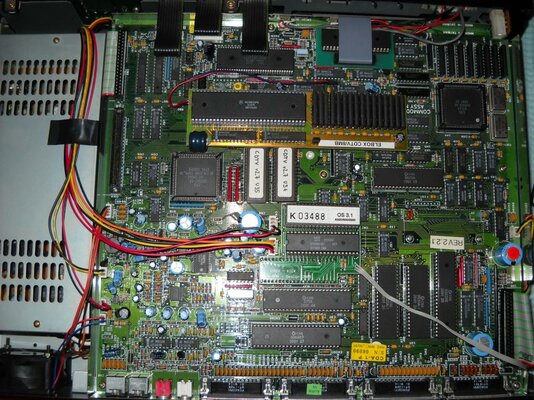
we add a megachip (PAL) to raise chipram to 2ΜΒ

and an elbox CDTV/2 to raise fastram to 2ΜΒ

boot roms 2.30 so we can use a higher version of kickstart and to install OS 3.X

kickstart 3.1 to install OS 3.X

SCSI controller so we can use an HDD


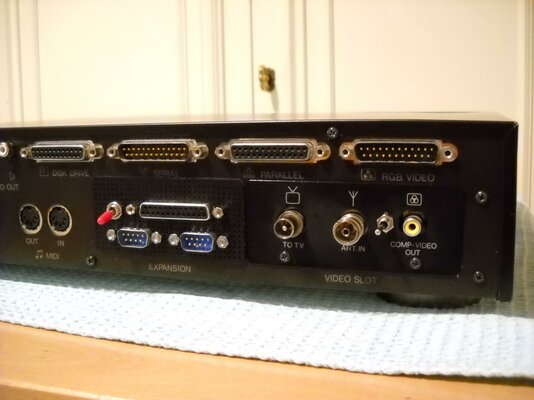
and last but not least, joystick ports as by default CDTV has not got any

There are 2 official solutions when it comes to add some joystick ports.
One is the Briquette and the other is this one from Germany (pretty obvious with such name...Das Vector)
Following this guide (thanks dony) how to install a scsi controller + HDD (in greek but can be really helpful to non Greek speaking folks) we remove the front of the unit and the motherboard so we can install a SCSI HDD...
The 50 pin scsi cable needs to be devided so it can be more flexible to move around the unit so lots of attention is needed there.

A SCSI 50pin 1 GB HDD from ΙΒΜ is installed.
There is another solution using a SCSI->IDE bridge and an IDE-> CF adaptor but the cost for storage is much higher and it will be a pain in the rear to set it up.
We put back the front face of the unit and the motherboard and install all other memory expansions and ROMS


The unit closed with SCSI controller installed and internal HDD connected


Preparing the HDD

1GB partition

I chose ClassicWB as the operating system. It's complete and ready to rock and roll

showconfig

Directory Opus so we can copy the whdload files and games from the CDROM unit (took ages to decompress this from an lha file)

All set. Time to play some games...!

The ultimate logo...

Yeah... shadow of the beast!


Monkey Island anyone?

That's all folks...Thanks for looking
Nikos
Some months ago I got my hands on a CDTV as I thought it would be a nice way to have one of our beloved amigas in the livingroom. I wanted this to have whdload installed with some games, so when I have some free time I can have a quick 15 minutes of amiga joy
I think this is the only "wife approved amiga" but to get a stock CDTV to be able to load whdload and play some games there are some things that need to be done.
We start with a stock CDTV ...
and change the default 68000 CPU to a 68010 just to give it a little boost and some whdload flexibility
we add a megachip (PAL) to raise chipram to 2ΜΒ
and an elbox CDTV/2 to raise fastram to 2ΜΒ
boot roms 2.30 so we can use a higher version of kickstart and to install OS 3.X
kickstart 3.1 to install OS 3.X
SCSI controller so we can use an HDD
and last but not least, joystick ports as by default CDTV has not got any
There are 2 official solutions when it comes to add some joystick ports.
One is the Briquette and the other is this one from Germany (pretty obvious with such name...Das Vector)
Following this guide (thanks dony) how to install a scsi controller + HDD (in greek but can be really helpful to non Greek speaking folks) we remove the front of the unit and the motherboard so we can install a SCSI HDD...
The 50 pin scsi cable needs to be devided so it can be more flexible to move around the unit so lots of attention is needed there.
A SCSI 50pin 1 GB HDD from ΙΒΜ is installed.
There is another solution using a SCSI->IDE bridge and an IDE-> CF adaptor but the cost for storage is much higher and it will be a pain in the rear to set it up.
We put back the front face of the unit and the motherboard and install all other memory expansions and ROMS
The unit closed with SCSI controller installed and internal HDD connected
Preparing the HDD
1GB partition
I chose ClassicWB as the operating system. It's complete and ready to rock and roll
showconfig
Directory Opus so we can copy the whdload files and games from the CDROM unit (took ages to decompress this from an lha file)
All set. Time to play some games...!
The ultimate logo...
Yeah... shadow of the beast!
Monkey Island anyone?
That's all folks...Thanks for looking
Nikos