Burning smell from A500+

  • Thread starter Thread starter -Acid-
  • Start date Start date
  • Replies Replies 19
  • Views Views 4005

-Acid-

Active member
AmiBayer
Joined
Nov 15, 2010
Posts
4,392
Country
England
Region
South Shields
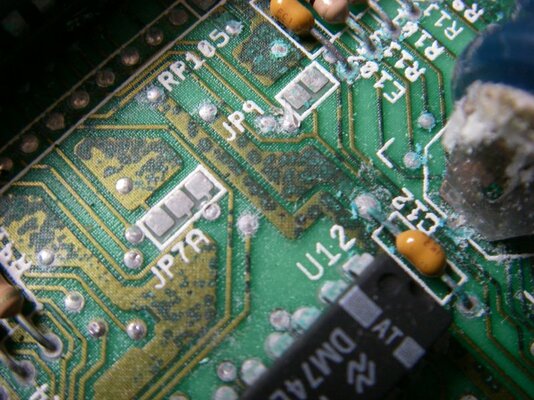
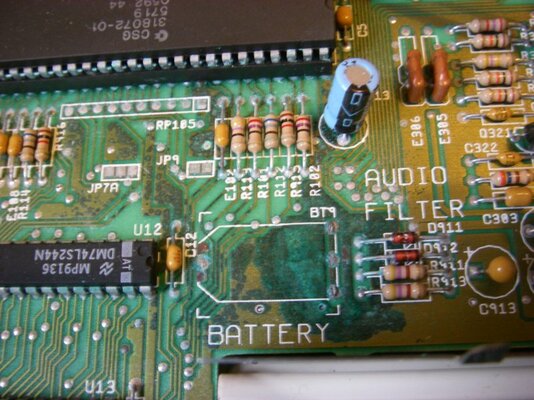
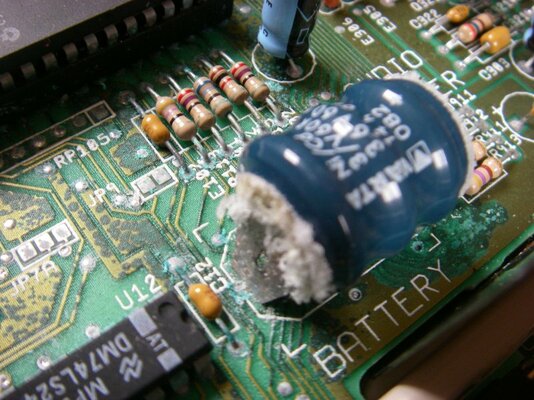
I bought a used A500+ the other day and just got round to trying it today. Switched it on and the rom screen booted but it cut out almost immediately. Switched it back on and it booted again but could smell smoke or something like it (no actual smoke came out of the computer). Quickly switched it off and opened it up to be greeted with the piccys attached.

I know that battery has to come out, but how do I go about doing it without soldering gear? I've tried to take a pic of the board close to it that looks effected, does that look like it will still work okay?

And finally, once I get that battery out will the computer be safe to use again? The smoky smell from it has made me nervous.
 

Attachments

  • Imgp0987.jpg
    Imgp0987.jpg
    106.6 KB · Views: 2
  • Imgp0988.jpg
    Imgp0988.jpg
    114.3 KB · Views: 2
you might have to replace a 74ls244 and gary(maybe gary if your unlucky) during the process.

but it should work ok after if your carefull.:)
 
Hi Acid,

Without soldering gear I'd use a pair of electricians side cutters and carefully cut through the legs. It will leave a couple of sharp pieces of metal to watch out for, but at least the battery will be gone.
 
When I snipped mine in a 2000 I did not have my tools handy
so I used my nail clipper..:lol::lol::lol:


:coffee:
 
If you're careful, it's possible to twist and snap them out. I believe that's Fitzsteve's preferred approach. I'm always wary of damaging the board by doing so, but other folks report successes with that method.
 
I decided to use pliers to remove it, it came off cleanly (decided to record it and put it on my youtube channel as I couldn't see any videos showing how it's done). I've had a look around the board nothing looks burnt or scorched, will it be safe to use again?
 
as long as you clean up the battery leak damage it should be ok as long as you remove it all.
 
I would also check for any bulging tops on the capacitors on the main board, just in case. Any that are discoloured or badly domed at the top when compared to other caps are suspect.

Knackered caps also tend to give more of a 'fishy' odour when they burn out, rather than burnt, just for reference. That is, unless they pop, then they will smell badly burnt.
 
This is me taking it off and closer look at the area, how bad does it look?

[m]http://www.youtube.com/watch?v=O9o5FfKlzC8[/m]
 
Oh no :-/ That looks like major damage to copper tracks on pcb. You should neutralize remaining battery "acid" with vinegar. That stops corrosion caused by leaked alkaline from battery. Clean vinegar from pcb with distilled water. After careful drying, test all copper traces near battery with multimeter continuity test.

PS. Do you give permission to use these two pictures as example of leaked battery damage? I'd like to post these to few places.
 
Oh no :-/ That looks like major damage to copper tracks on pcb. You should neutralize remaining battery "acid" with vinegar. That stops corrosion caused by leaked alkaline from battery. Clean vinegar from pcb with distilled water. After careful drying, test all copper traces near battery with multimeter continuity test.

PS. Do you give permission to use these two pictures as example of leaked battery damage? I'd like to post these to few places.
I'm quite sure I do not have what is required in the house, the closest thing I have which contains distilled water is some alocohol (70% Isopropyl 30% Dist water) would this be on any use? As for multimeter I know what one is but that's as good as it gets lol

Use the pictures anywhere you like, same goes for the video if you have any use for it.

I've had a close look at the capacitors and all of them seem the normal size and intact. The smell coming from the board definitely originates from where the battery was so I think the battery was the main problem.
 
Last edited:
Alcohol is good for generic cleaning.. For alkaline battery leak, you need something that chemically neutralizes that stuff. Alkaline is neutralized by either basic grocery store vinegar or lemon juice concentrate (acetic acid or citric acid). Note this does not apply for leak from battery that contains acid instead of alkaline (not used in Amiga anyway). Distilled water is sold for example as distilled water for serviceable car batteries. It doesn't conduct, so it won't corrode as tap water would.

Basic continuity test in multimeter is the "beep" test: if you touch something that conducts with the probes, it beeps. Testing is done by touching the ends of copper tracks with probes (soldering points for components, vias, etc.. wherever there is exposed metal). Repairing possible broken tracks gets a bit more complicated ;)

Thanks for permission to use photos :)
 
Isopropyl alcohol will do just fine. I use lemon juice to neutralise the battery leakage, then clean it off with IPA. Works a charm!

:thumbsup:
 
I tried booting it and it keeps locking up on the kickstart screen if it even gets that far, sometimes it just stays black. Is it likely cleaning up the battery leak would fix this or am I looking at a disaster here?
 
50/50 is that you might have to replace some logic after.

if you dont clean it up first and still turn it on,then your just askiing for problems.
 
The 74LS chip that was nearest the battery may need to be replaced. This chip feeds into the Gary chip and any faults on or around that chip will cause failure to boot.
 
Ok i've done my best to clean up the area and still it just gives a black screen on boot and won't go any further. I've attached a pic of the affected area everything else looks in order. No caps are bulging and no other corrosion has took place.

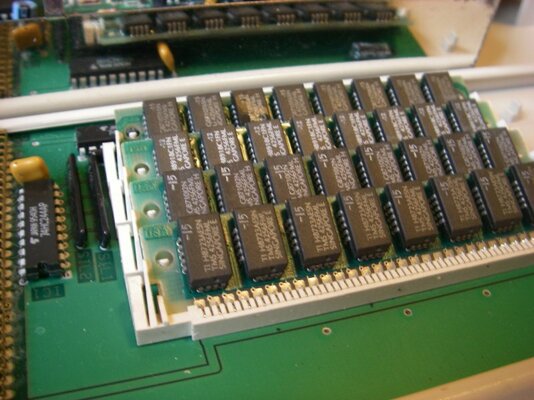
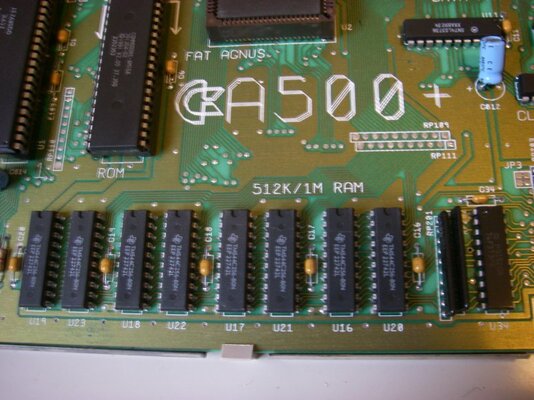
A bit off topic, but how can I tell how much ram is on board this A500+? i've read some early machines only has 512k and need a trapdoor expansion to get to 1mb. This has a board in the trapdoor, but is it an additional 1mb or a 512k upgrade to make the system 1mb? i've included pictures.
 

Attachments

  • Imgp1003.jpg
    Imgp1003.jpg
    105 KB · Views: 5
  • Imgp1005.jpg
    Imgp1005.jpg
    84.6 KB · Views: 5
  • Imgp1006.jpg
    Imgp1006.jpg
    91 KB · Views: 2
Ok i've done my best to clean up the area and still it just gives a black screen on boot and won't go any further. I've attached a pic of the affected area everything else looks in order. No caps are bulging and no other corrosion has took place.

A bit off topic, but how can I tell how much ram is on board this A500+? i've read some early machines only has 512k and need a trapdoor expansion to get to 1mb. This has a board in the trapdoor, but is it an additional 1mb or a 512k upgrade to make the system 1mb? i've included pictures.


it has 1mb on the motherboard and another 1 mb in the trapdoor,i can see it in the pic.:)


it looks like theres a bit of contamination on gary's legs the socket might need replacing as well,and the 74ls244 looks bad.

EDIT: i forgot to ask:) will you be ok doing the repairs on this board? :)
 
Last edited:
Back
Top Bottom