Closed 1MB Trapdoor expansion for A500+

  • Thread starter Thread starter Erik765
  • Start date Start date
  • Replies Replies 9
  • Views Views 1195
Status
Not open for further replies.

Erik765

New member
Rating - 100%
1   0   0
Joined
Jul 27, 2016
Posts
40
Country
United States
Region
Washington
I'm looking for a 1MB trapdoor expansion for my A500+ to bring it to 2MB.

I haven't had any luck getting any sort of response from kipper2k to buy one from him.


Anyone have one they're willing to part with?

Thanks.
 
Last edited:
Apparently a rev 6C can be upgraded to a A501+

http://www.amiga.org/forums/showthread.php?t=38607&page=4


Ok. Im bumping this thread back up, because I like talking about A500 stuff...

Converting a rev 6c A501 into an A501+

So you got a rev 8a A500+ motherboard.. Its got a nice 8375 2meg AGNUS chip, but only 1 meg of chipram on the motherboard. If you want 2 megs of chipram, you generally have 2 options.

1)piggynack 8 more 256k x 4 DRAMs on top of the existing ones on the motherboard.

2)Buy an A501+ (or aftermarket equivelant) that puts an extra meg of chip ram in the trap door expansion slot.

Both of these are fine alternatives.. But if you have an old A501 (512k expansion) laying around that you arent using, you can easily upgrade it to a full meg, providing a third alternative for gaining 2 megs of chipram.
Heres how:

NOTE: This will only work on the rev 6c A501 board. If your A501 is one of the earlier revisions that has 16 DRAM chips, this mod will not work!

1) Find jumers JP2 and JP3 on the A501 card. These are set to enable the "refresh kludge" from the factory. We dont need a "refresh kludge" because our our 8375 generates refresh signals to handle the full 8-bits of row adressing needed by our 256k x 4 DRAMs. So get a razor blade or X-acto knife, and carefully cut the tiny trace that goes between the center and upper pad of JP3. Then cut the tiny trace that goes between the center and lower pad of JP2. Now put a blob of solder to connect the center and lower pad of JP3. Add a second blob of solder to connect the center and upper pad of JP2. CHECK YOUR WORK WITH AN OHM METER!

2) Now get 4 extra DRAM chips. These should be 20 pin DIP package, 256k x 4, 120ns or faster. Bend up pin 4 on each of these DRAMs.

3) Piggyback each DRAM on top of one of the 4 DRAMs on the A501 board. Solder all pins to the chip below, except pin 4 (which should be bent up.)

4) Solder a wire connecting all of the bent up pin 4s, and also connecting to the solder pad directly above JP9. (see picture)
This creates the additional RAS signal we need for the extra 4 DRAMs.
A501mod.jpg


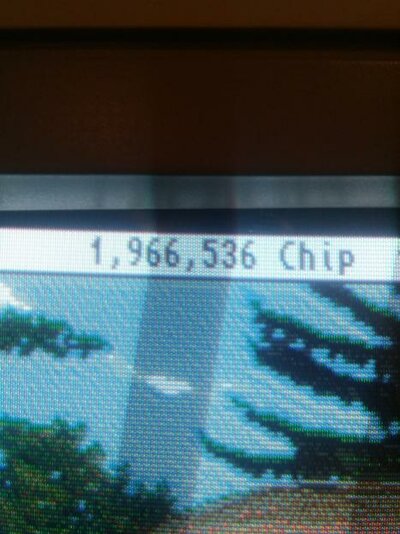
Thats it! Stick it in your A500+, boot it up, and you should have 2 megs of Chip Ram.

What about the Realtime Clock you ask?

By default, your Rev 8a A500+ motherboard will use it's on-board RealTime Clock, and ignore the one on the A501 card. If you would like it to use the Realtime Clock on the A501 card, then close jumper JP9 on the A500+ motherboard.


And a1k.org created their own:

http://amiga68k.de/2014/05/20/aufbau-der-a500plus-speichererweiterung-fuer-den-a500/
 
Last edited:
YAY!!! I just happened to have some of those chips laying around and figured what do I have to lose?!

It worked!!

20161101_2118212.jpg

I guess we can mark this one 'Found' (in a round-about way).

Thanks!!!
 
yeah. took a little troubleshooting (I need better tips for my soldering iron), but it fired right up! Pretty stoked!

Much obliged, good sir ;)
 
Anytime! :)

As for soldering, I had a minor disaster on one of my A2000s, so I'm not one to talk (and I have nice equipment, so I can't blame the tools).
 
Yeah, I fixed 2 A2000s up this year. One needed a new Agnus socket. That was fun. Wish I owned them. Fun machines to restore, for sure.
 
Status
Not open for further replies.
Back
Top Bottom