
A1200 not booting anymore

  • Thread starter Thread starter Skylark13
  • Start date Start date
  • Replies Replies 19
  • Views Views 1599

Skylark13

New member
Joined
Oct 1, 2022
Posts
14
Country
Canada
Region
Québec
Hello,

I recently bought an A1200 locally. It worked fine when I got it, except for an audio problem which I was trying to diagnose and fix. Now I hope I haven't fried something while trying to fix that problem.

The audio problem was that after a while playing sound, the audio would become glitchy (low volume, crackling). I was told that was often a problem with the -12V power, and it just so happened that there was a bodge wire on the board between the negative side of C304 and the positive side of R348, which carries -12V and is related to audio (http://amigapcb.org/index.php shows that line is -AV, and the board schematic shows R348 is part of the audio filter circuit, and C304 is part of the audio decoupling circuit).

So I was in the process of replacing the bodge wire with a new one (with the machine powered on and playing audio, so I could hear the fix worked), which seemed to do the trick, but then I *think* the wire touched a pin on the Budgie chip or something, because the screen became black and sound stopped. Since then, I haven't been able to boot the machine. Even if I remove the new wire.

I have unplugged everything I could to reduce the variables (the machine came with an ACA 1230, an IDE to CF adapter with an 8gb CF card, etc.). The only things I left plugged in are the Indivision AGA Mk2 plugged into a monitor using a DVI to HDMI adaptor (otherwise I wouldn't get any image -- I don't have an RGB monitor or anything that accepts composite video at hand) and the keyboard.

The symptoms as of now are:

* When I turn power on, caps lock blinks on then off. The power LED on the keyboard is on.
* The screen shows only the Indivision splash screen in the top left corner but it's weird, it says 13951Hz. See attached screenshot.
* The rest of the screen is black and stays black no matter how long I wait.

If I plug my IDE to CF adapter back in, the disk usage LED doesn't even light up, which makes me think it doesn't even try to start booting up.

What can I do to diagnose what's going on? Are there any tests I can do to figure out what's wrong? I've got decent soldering experience (modding game consoles and such) and I can test continuity and voltages, and I even have a small oscilloscope I can use to test things, but I'd need guidance because these are literally my first steps with an Amiga.

I really hope it's not fried! :sick:
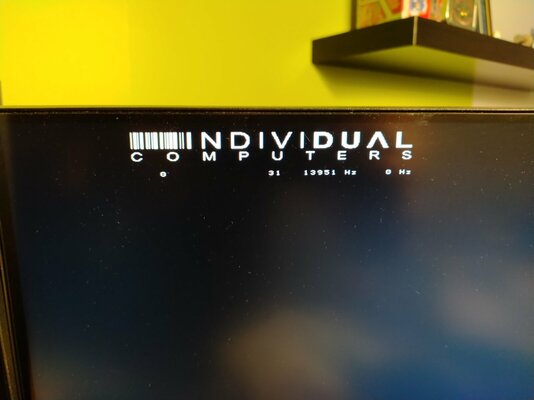
 

Attachments

  • IMG_20221104_174253.jpg
    IMG_20221104_174253.jpg
    103.1 KB · Views: 19
Trying to fix a machine while it's on is dangerous. You probably fried something. You can try DIAGROM over serial.
Also unplug any addon from your Amiga. Check the caps as they leak on the A1200, although this is a secondary problem now.
 
Excerpt taken from the classicamiga wiki.

When the Amiga boots, if it encounters a hardware fault the system will display a solid single coloured screen, or a series of these screens if more than one error is detected.

The following colours are valid for all versions of AmigaDOS since Kickstart 1.3. However, there were several more colours in 1.3 compared to anything included after Kickstart 2.0 was released. However all of the colours listed below are the same for all versions of Amiga kickstart.
  • Red - An error in the Kickstart rom as detected.
  • Green - An error in the Chip Ram was detected.
  • Blue - An error in the custom chip set was detected.
  • Yellow - The CPU encountered an error before the system's error-trapping code (the code the calls up the Guru) was in place.
  • Black - No CPU detected.
  • Grey - CPU Passed the test.
  • White - CPU failure.
Keyboard Blink Codes
  • One Blink = ROM Checksum failure
  • Two Blinks = RAM test failed
  • Three Blinks = Watchdog timer failed
  • Four Blinks = A short exists between two row lines or one of the seven special keys (not implemented)
 
Trying to fix a machine while it's on is dangerous. You probably fried something.
Yeah, that's what I'm afraid of. But I won't just chuck it in the trash :) I would like to find out what is fried, hopefully I can replace it.

You can try DIAGROM over serial.
I would like more info about this. I found this site, is that what you're talking about? https://sites.google.com/one-n.co.uk/amiga-guides/diagrom-serial-output

When the Amiga boots, if it encounters a hardware fault the system will display a solid single coloured screen, or a series of these screens if more than one error is detected.
Thanks for the info, but I'm not even sure it gets to the point of showing a diagnostic colored screen... I have a black screen but as I said the Indivision shows something weird so I'm not even sure I'm seeing an image from the Amiga at all.

Thanks to the both of you for the help, I appreciate it.
 
I would like more info about this. I found this site, is that what you're talking about? https://sites.google.com/one-n.co.uk/amiga-guides/diagrom-serial-output
Yes, check here too: http://www.diagrom.com/
DIAGROM is a diagnostic ROM for Amiga.
In the A1200 you need to remove the 2 kickstart ROMs from their sockets and replace them with DIAGROM.
If the machine can still shows video you'll see the different diagnostics on the screen, if the machine isn't able to output video you can connect a serial cable to a PC and see the diagnostics over the PC screen.

If you don't have an EPROM burner you can order them. You need the A1200 version, they 're 2 ROMs chips.
Also try a different PSU just in case.
 
Thanks for the info. I've ordered the 2 chip DiagROM and the cables I need, we'll see what I get from that.
 
I see, you can check the voltages of your Amiga PSU with a multimeter.
The voltages are good on the PSU, that's the first thing I checked 😁

Edit: I have been continuing this investigation, and cross-posted this call for help on the EAB forum. I can report that I found out R348 was fried, which I replaced, and I'm testing other resistors now too, hoping to find others that might also need replacing. The other thing is I've been learning about the timing fixes done to this board. Some wires and resistor swaps that I didn't understand are part of that. So I'm learning about the machine at least. It still doesn't boot though, same symptoms as before.
 
Last edited:
when powering on without the indivision, you get a pitch black screens or do you see fragments of lines or moving artefacts?
does fat agnus or denise get hot shortly after switching on. hot like you can touch it, but not for long. around 60°C? if so, they are most probably fried. from my experience they get fried easily when 12V are applied on the wrong end.
 
when powering on without the indivision, you get a pitch black screens or do you see fragments of lines or moving artefacts?
I tried connecting a TV through composite, without the indivision, and I got just a black screen.

does fat agnus or denise get hot shortly after switching on. hot like you can touch it, but not for long. around 60°C? if so, they are most probably fried. from my experience they get fried easily when 12V are applied on the wrong end.
None of the chips get hot. Alice and Denise get slightly warm, like I can feel it's just a bit above ambient temperature, but nowhere near a temperature I would call "hot".

(as an update, I am still waiting for my DIAGROM set to be delivered, I guess I'll see what I get with that, hopefully it tells me what I need to know.)
 
Send your Amiga to Chris Edwards Restoration - YouTube. I am not joking since you are on other side of Atlantic.
Diagrom will not show you anything since you fried it. When you sent high voltage to one of the pins, god knows where it all made damage.
You will waste time and money for diagnostic and there is no Denise on Amiga 1200.
 
Last edited:
I meant Gayle not Denise, my bad. But you're right, Diagrom doesn't show me anything. It doesn't seem to boot with Diagrom either.
I want to exhaust all options before sending my board to someone for repair, since it will cost a lot to ship and there's a risk the board will be damaged. Worst case I get another board and keep that one for parts. But I'm still hoping to find someone local who can repair it.
 
Does the power LED on the 1200 go from dim to bright when you first turn it on or does it stay dim. It should switch between dim and bright with in a second or two.
 
I meant Gayle not Denise, my bad. But you're right, Diagrom doesn't show me anything. It doesn't seem to boot with Diagrom either.
I want to exhaust all options before sending my board to someone for repair, since it will cost a lot to ship and there's a risk the board will be damaged. Worst case I get another board and keep that one for parts. But I'm still hoping to find someone local who can repair it.
I understan you. I was also too scared to send Amigas with shipping to services and I waited…until my friend organized major shipping to recap our Amigas. It was all fine and there is nothing to worry about.
According to your damage you can expect that some custom chip will need to be changed. If you buy another board make sure it is recapped. I was lucky that no cap leaked on my waiting time.
I also understand that shipping in Canada is expensive. As for Chris on youtube, he repairs for free. Only question is if you have customs with US. Hope somebody repairs near to you and get it quick due to prices no old Amiga chips are also rising.
 
Does the power LED on the 1200 go from dim to bright when you first turn it on or does it stay dim. It should switch between dim and bright with in a second or two.
It does not change after a second or two like you say it should, it just stays the same brightness all the time. Seems pretty bright to me, but I don't have a basis for comparison... So it could very well be that it's dim and stays that way.
 
I see you tried Diagrom, did you try it over serial? If cpu is ok it could work.
Yeah, unfortunately I get nothing over serial (but I don't know if it's because of the damage or something else I might be doing wrong). My suspicion is that the Budgie chip is fried, and since that controls the bus in the entire machine I think it would make sense that nothing works, but that's just a guess at this point.

I've ordered another refurbished A1200 motherboard, hopefully I won't fry that one and can use it to compare readings and figure out what isn't working on my fried one. Thanks for the help in any case.
 
Back
Top Bottom