A1200 spare out of storage - has issues

  • Thread starter Thread starter arnljot
  • Start date Start date
  • Replies Replies 2
  • Views Views 92

arnljot

Dad, gamer, nerd, amigian
AmiBayer
Joined
Feb 5, 2008
Posts
4,046
Country
Oslo
Region
Oslo
I broke something on my main A1200 while trying to install an IDE harddrive.

Taking my spare 1200 out I notice these things:
  • It's been recapped by someone who used "normal barrel" caps instead of the usual SMD caps.
  • They removed the RF modulator or what it's called. I know it's usual and often preferencial
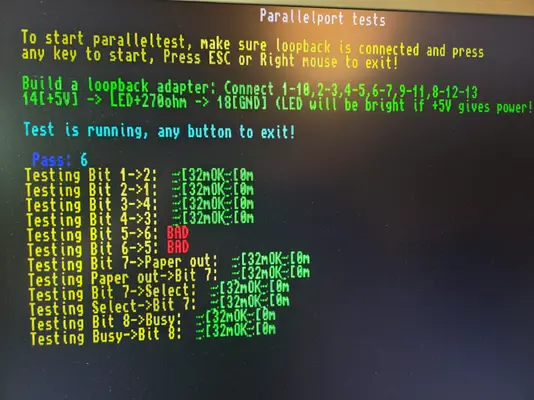
  • In AmigaTestKit 1.21 it fails on Paralellport test with loopback adapter on pin 5 and 6
  • Using PiStorm32 Lite and Diagrom2 it fails the same, only there it's called bit 5 and 6?
  • Using PiStorm32 Lite and Diagrom2 it fails IRQ level 4, rest except 7 is okay. 7 is "special".

And worst of all, it fails to boot PiStorm at all.

I guess it's some hw level bug that's hiding behind the IRQ level 4 issue?

What's good:
  • Chip RAM
    • Soak test of chip RAM of more than 2500 iterations in AmigaTestKit 1.21 shows it's good
    • DiagROM 2 test of chip RAM agrees
  • CIAs
    • AmigaTestKit 1.21 says timings are good
    • DiagROM2 says timings are good
  • Serial port
    • AmigaTestKit says it's good
    • DiagROM 2 says it's good
  • Rest
    • all good
  • PiStorm32 Lite
    • Can kick it into DiagROM2
So PiStorm can't fully boot and these things are bad:
  • IRQ level 4
  • Parallell port pin 5 and 6
  • When DiagROM does the simplest gfx tests there's vertical "dots" as noise down the left hand of the screen
  • PiStorm32 Lite can't fully boot it
 
Using Amiga PCB explorer I see that

Of the three signal paths that relate to IRQ level 4, I see on the pcb explorer:

Paula (U3 on rev 1D.4 board)
Pin 13 signal IPL0 goes to trap door pin 83
Pin 14 signal IPL1 goes to trap door pin 82
Pin 15 signal IPL2 goes to trap door pin 81

On the 68020 (U1 on rev 1D.4) they're located at
Pin 65 IPL0
Pin 66 IPL1
Pin 67 IPL2

The legs on the 68020 are so thin they make me think of a hair... a very thin hair so don't go to the gutter...

This the trap door edge connector is also confirmed by the pin out documented elsewhere on the net
 
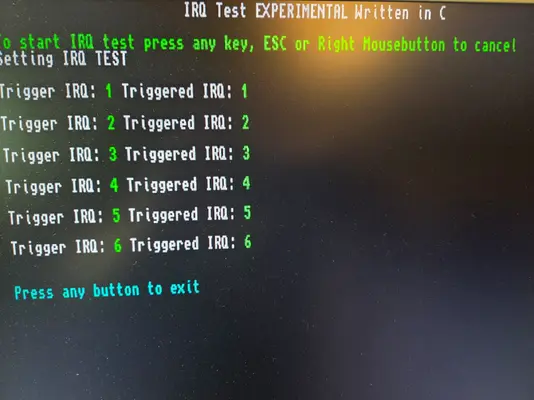
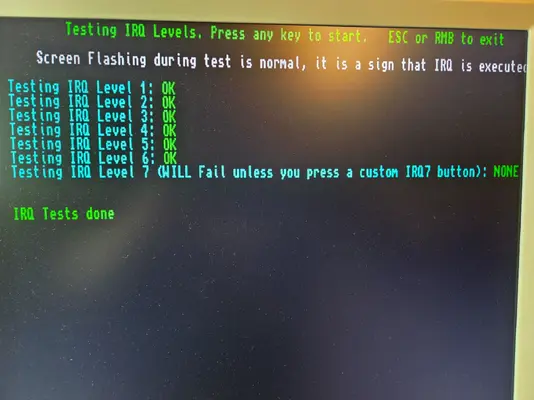
Okay, I was just retesting the machine now to take a picture of the test.

And I couldn't reproduce my previous situation. This good state was not what I had at first.

Some context. The machine has

And when I went to reproduce the error it had worsened. The machine didn't boot to any error, just an intermittent gray screen followed by a black screen. The Indivision output showed that the video output was 0 hz. So something was seriously wrong.

So I did what I usually do when this has happened with this motherboard. I powered down and reseated the Gayle adapter.

Powered on, and the IRQ 4 error is gone.

I guess the Gayle adapter can introduce so much noise that the PiStorm calls it quits?
20260121_205744.webp20260121_205758.webp20260121_205832.webp
 
Back
Top Bottom