A500 VXL*30-RAM 32 trouble

  • Thread starter Thread starter stuo666
  • Start date Start date
  • Replies Replies 8
  • Views Views 1990

stuo666

Member
Joined
Dec 26, 2010
Posts
62
Country
New Zealand
Region
Christchurch
Hi all,

Im getting a black screen when trying to run board with 68030 CPU, i have the jumper left open for CPU on board and FPU jumper lower two pins.
I can boot amiga with CPU jumper bridged,but this will be using 68000 CPU.
I have tried different jumper settings on RAM 32 board but nothing has helped.

The board is V-152707-E200, Manual says this board needs mod to run with RAM 32. I have no idea if this has been done.

There is jumper wire on under side of board,sorry no pic of that as board installed ATM.

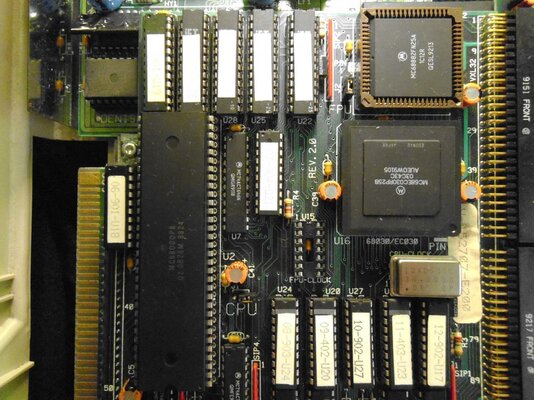
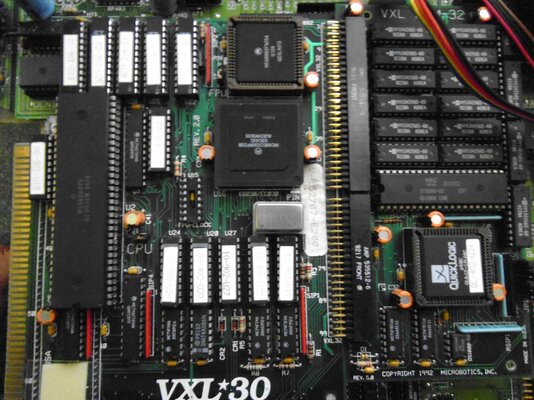
Hopefully pics will help

Cheers for any help:)
 

Attachments

  • P1000072.jpg
    P1000072.jpg
    203.3 KB · Views: 4
  • P1000062.jpg
    P1000062.jpg
    201.3 KB · Views: 4
do you have another crystal or cpu to try ?

I've had 2x crystal die on 68030 boards...

mike.
 
@stuo666

If memory serves you need to add some wire and a track cut to the RAM module. I dont have the spec's with me nor the manual, but it should explain what is needed to be done.

Its unlikely to be the CPU to be honest, a simple way to test this would be to remove the RAM module and power up the Amiga with the 030 selected.
 
Hi Zetr0,

Tested board without RAM-32 installed, still gave black screen:mad:

Will try and find a new crystal, is it possible to de-solder a crystal from A500 motherboard? I have a few boards lying round
 
Thought i would update a few posts. :)
I have orderd some 25mhz crystals, so will try one in my VXL-30.
Some other things ive checked are the heat from the PAL chips and the CPU.

CPU seems ok just feels warm, but two of the PAL's are hotter than the rest.
When i set jumpers on the RAM-32 to set RAM to auto-config i get a grey screen freeze.

Of couse i still get blank/black screen with 030 CPU selected.
 
Becareful, I do not know your A500 motherboard rev. but on the latest one there is a capacitor on the right of the 68k socket. On mine, I had to put a 68k riser otherwise I had black screen or unstability problem due to bad contact between the VXL and the 68k socket.
 
I had to put a 68k riser otherwise I had black screen or unstability problem due to bad contact between the VXL and the 68k socket.

Yup, I can confirm this, I had to do exactly the same for my VXL-30. In fact, I'm going to change the CPU socket on the mobo for one that has the small gold plated sockets on the pins. The reason being, I have to open up my A500 every now and again and reseat the VXL-30 to get the the A500 to boot up again.

Sometimes I also have to reseat the Agnus.

Cheers
 
Thanks "CrashMidnick" and "Orcish75"

Im using the VXL-30 in a REV. 5 motherboard, i will take a good look and make sure the board is seating properly.
There has been a repair to one of the Pins/legs of the VXL-30 and the pin is a little shorter than the rest, maybe this is the problem ?
 
Back
Top Bottom