A600 recapped, no boot, just white screen

  • Thread starter Thread starter CalWhiting
  • Start date Start date
  • Replies Replies 8
  • Views Views 271

CalWhiting

New member
Joined
Sep 6, 2019
Posts
24
Country
United Kingdom
Region
Lincolnshire
Has anyone every come across this before? Got this A600 about a month ago, tried it few days ago with RF and got purple tint to the image. Bought a RGB scart adapter then noticed i can't use it with TV (no scart), so then tried composite and got same purple image but slightly better than RF.

So i've spent the last day recapping this Amiga and i've plugged in composite leads, attached floppy drive and powered it on. Nothing but a white screen. No clicking from the floppy drive just white screen.

Since it was working before the recap has anyone come across this before and can point me in the right direction? I'd rather attempt to sort it myself before sending it off to someone to look at.

Cheers
 
A600 is not my forté but as we all know Amiga's follow a pre-set cold/warm boot sequence and output screens of various colours during it.

When it encounters something it does not like during the sequence, it will stop. The colour(s) on-screen gives the user some indication or guidance of where a potential fault lies.

Red - There is an error in the Kickstart ROM(s)
Green - There is an error in the Chip RAM or general Ram error.
Light Green - CIA problem.
Blue - An error was found in the custom chips Denise, Paula or Agnus.
Yellow - The computer found an error before the error trapping software (the guru) was running. Bad Capacitors, or a bad expansion card can often cause this, as can any other type of untrappable error.
Cyan - Rev 0.x Kickstarts - Kickstart Error.
Black - No CPU detected, or unspecified ROM error. Often means a CIA error if not booting.
Black / Stripes - CPU or ROM error (try pressing down on the chips during power off)
(White) - CPU failure or Denise/Lisa issue.

Hope this helps you in your diagnostics. Good luck!
 
Thanks for that info. Before i recapped it, it was just booting normal into KS screen with purple tint (prob dying cap) and playing games fine.

So i'm suspecting something has gone wrong with my soldering. I did use hot air to remove most of the caps and solder wick then eventually hot air for the through hole caps. I covered everything with capton tape so happy i didn't knock anyother SMD off its place.

Just wondering if there is a way to test how well each cap is soldered onto the board, with a multimeter or similar. Also which caps or group of caps would affect the CPU, possibly on right hand side closest to the floppy drive?
 
Have you checked for shorts ?
Id check the 5v and 12V lines

Pictures of the board (close up ideally) could help identify the issue
 
No haven't checked that yet, I'm not too familiar with amiga hardware so don't know where the 5/12v lines are.
I'll get a few pics put up.
 
You should be able to measure the 5V / 12V rails across the pins of the capacitors you just changed. Also check that you didn't accidentally install any of the caps the wrong way around.

Bryce.
 
Last edited:
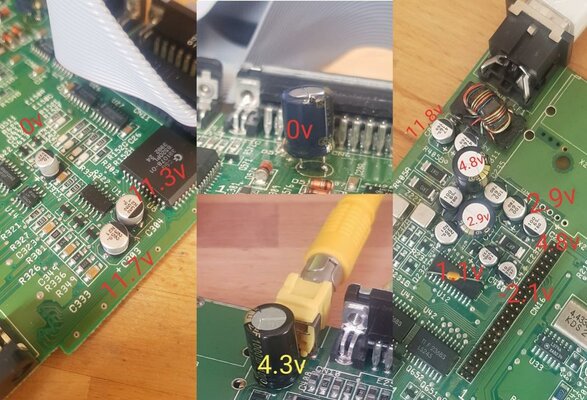
So i whacked the meter on and got these readings, good sign is looks like some aren't making contact so hopefully just a resolder. The through hole cap top middle pic i couldn't get the old cap leg out so i snipped it, then soldered new cap to its leg but i'm not getting anything from that so will likely have to get hot air and long nose pliers to gentle pull out the old leg.

Some of the caps closest to the PSU input i couldn't get a reading on cos they were so close together. I'll give it another bash soon since i've just packed away all my soldering gear and wife needs a day or so with a tidy house lol

Is hot air an option to solder some of these caps on or is it best to use a thin tip iron?

Thanks for your input so far guys appreciate it!

all.jpg
 
Hot air isnt a good idea for soldering the caps in (if youre using standard electrolytic caps). They can overheat and explode (well they go pop really, not an impressive explosion)

Some of the caps need to be resoldered. take your time, make sure theyre all making a solid connection. Use plenty of flux and go slowly.

For the surface mount caps, just try moving them from side to side gently. If theyre not on properly they'll tilt right away. (Dont apply too much pressure, you could pull some pads if you do)
 
Managed to get it working, just had to resolder some caps. I taped needles to the end of each probe to get into the tight spaces to measure the voltage.

Thanks for the help guys
 
Back
Top Bottom