
Hello to all.

Three weeks ago during of the recap of a A1200 for a friend, he told me that he intend to buy a ACA1220 card, mainly for use with WB3.1 and whdload. Also he asked me about my setup. I respond that I use a blizzard 1220/4 with add-on memory full upgraded to 8 Mb. Then surprised propose me to sell him my card, and with the addition of some more funds to buy any newest 030 card I would like.
So it happened.

After some research
 (because I had quit for a long time from all that) I ended to the latest ACA1232 accelerator card from AmigaΚit.
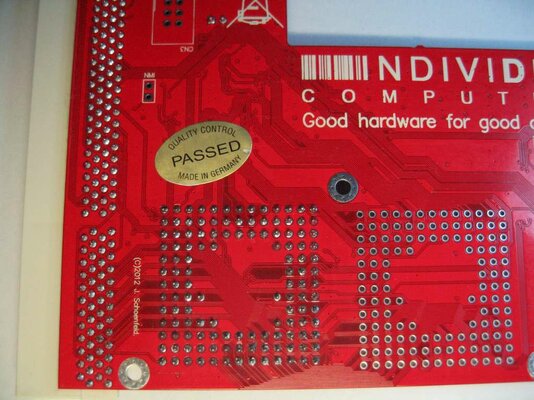
When 1 week later card arrived here, the first thing who impressed me was the compact size, the 2 in 1 PCB design -depending on the intended use as ACA1220 or as ACA1232-, and the quality of construction.
My A1200 mobo was 1D1 revision fully recapped, without any "timing fixes" from me or someone else in the past.
Recapped was also the PSU, the original one from a A600.
Accelerator ran from the first time -without any issues- in Classic WB3.1 ADV, with the whdload games through the amazing “igame” front end.

Another point I would like to focus about this card, is cause although have installed the 030 @ 33 MHz CPU, have a very fast ram which for me
 make all the difference. Because of this I believe the end user forgot at once the 33Mhz clock speed, and focuses on the rapid implementation of applications of this brings. At least to me this happened.

Now the interest part of the story.

Another detail that I noticed when I got in my hands this card, was a silk-screened chart on PCB with jumper settings for cpu and memory clock speed. Showed that could be supported a 030 @ 40MΗz with memory clock @ 80MΗz, and this w/o overclocking
 but in normal operation. For now its stock setting was a 030 @ 33MΗz with memory clock @ 66.6 MHz.
I decide to write
 to the manufacturer about this as to investigate if an upgrade will be possible.
Jens owner of Individual Computers, responded immediately that this card can be upgraded with an 030 @ 40 or even @ 50 MHz ( it easier to find), without any firmware update except to change the on board clock jumpers.
Of course someone to do all that w/o risk, must have skills on electronics, the proper tools (electronic desolder vacuum and hot air station), a new socket and a CPU MC68030RC40 or 50.
Yes all this hassle because Jens for some reason place directly the cpu on PCB w/o a socket. Maybe the final cost or maybe something else, really I don’t know why decided so....

Also he mention me that in all cases after that, you LOST THE ORIGINAL 1 YEAR GUARANTY FROM MANUFACTURER, if anything is happening now or in the future.
Jens replied also in a second part of my question, if I could use a 030 @ 50Mhz in this accelerator?
Yes -he said- but for that I need 1 to 3 days extra work for a new firmware, time that this moment can not afford. Beside that -he said- I must to add some more wait states on cpu, and finally whether it is worthwhile as regards the additional gain speed.
After all that I decide to try this, as in the past with a GVP accelerator card with an XC040@33Mhz, which upgraded with a newest MC series @ 040 Mhz.
That time guided by the hope and some rumors:wooha: that GVP once had released such a version!
But today things were quite different, and besides I had the bless of manufacturer also!!! Or so I would think..
Kipper2k -Brian- member here, was my supplier of a new old stock never used MC030RC50B CPU, plus a new socket for it.
After 10 days I receive his parcel. I must admit that he made amazing packaging. Thank you Brian.
Ok, lets see some pictures about the whole thing!
Goods received.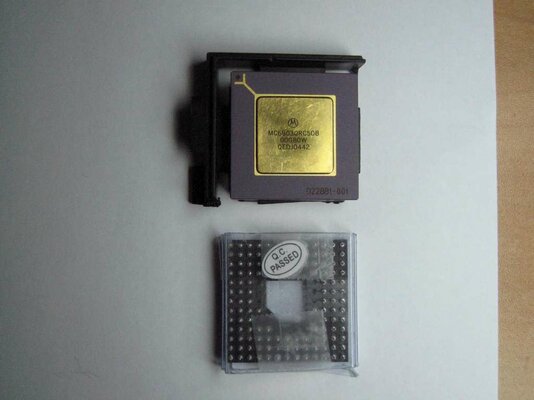
Old plastic CPU desolded from PCB, and gone away for ever.8)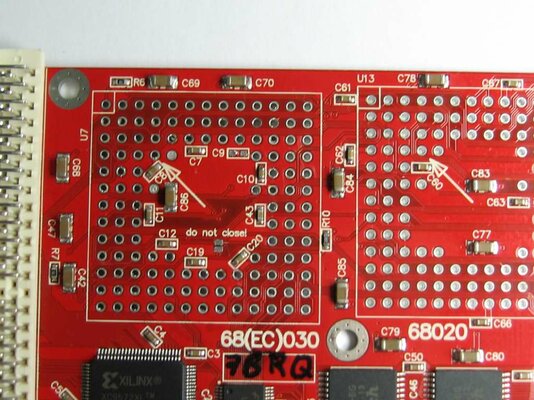
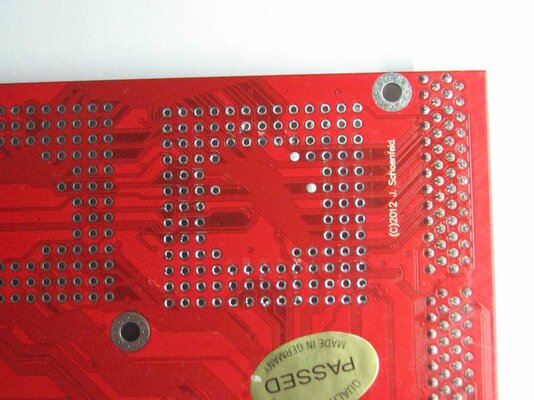
Hmm the first barrier has occurred. C86 marked capacitor, due to its height not let the socket to fit correctly on PCB.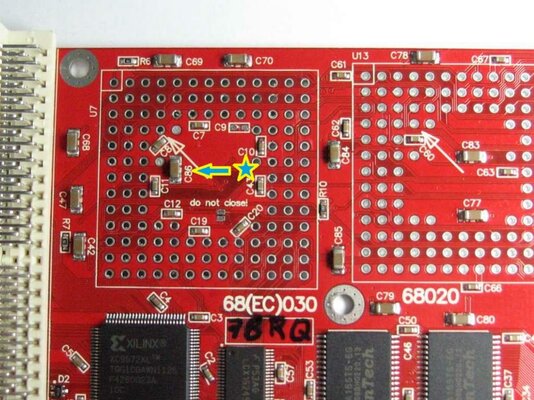
One solution was to resold the cap a little diagonal, but due to the very fine traces around something could short circuit in the future, and after card goes for :soapbox:.
So I decide to dremel the socket a bit from the bottom as to fit perfect!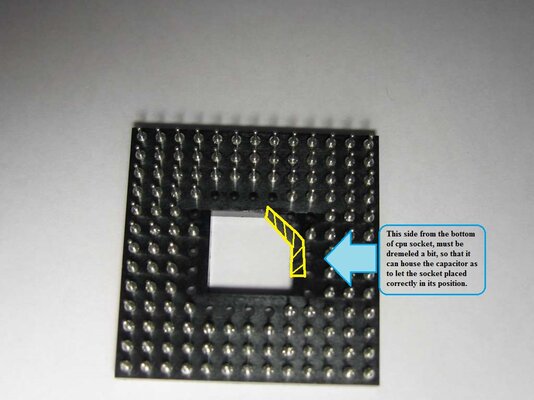
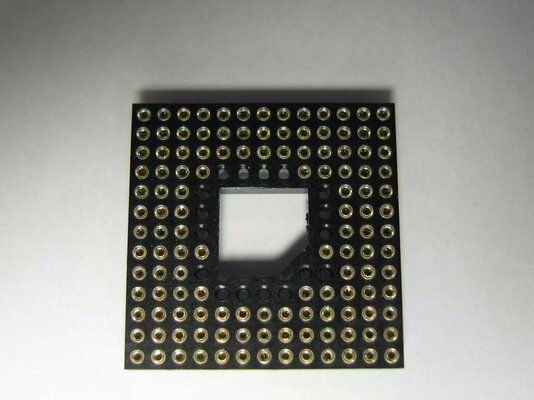
Here after fitting the socket in place, you can see the cap above in its tomb. Then was time to solder again all that pins, and clean the residues.
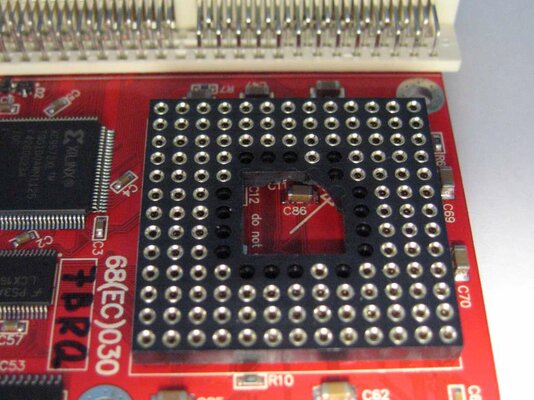
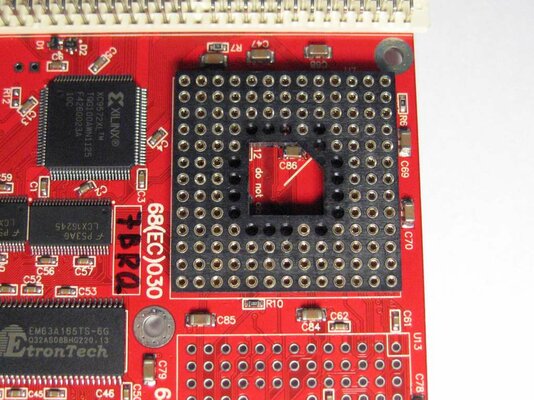
After place the new CPU on its socket and check the proper settings for this scheme.
The stock one has a jumper -0 Ohm resistor- on the R1.
I must said that the first time before change the clock settings, I work the accelerator as is in stock condition (with the new CPU in place), just to see if all its OK and stable. After many games, and full AIB benchmark, decide to try to complete the upgrade. Until now all work perfect, and with lower heat from CPU vs stock plastic one. Yes during the benchmark I could have my finger on the body of CPU without a .... ouch!
A important note here::!:
Never handle or work your delicate to static electricity card without first use a special ground bracelet, connected to a good known ground!
According now to the on board scheme R1 must desold, and R2 + R4 must be closed. In my case I had not spare 0608 type smd 0 Ohm resistor, and sold kynar wire directly. If you follow the same, give attention the wire not take in contact with the rest of PCB on left - right or middle, except the two original proper solder points.
After that I make the same things as to check the operation of my little accelerator card. All work perfect and faster than before. No isn't psychologically, is a reality!
The no so reliable "SYSINFO" give a clock of 42.7MHz, 9164 Dhrystones, 9.56 Mips, and HDD speed (CF 4Gb in my case) once standard 2,184,000 and once 3,276,000 bytes per second.
Also with as in previous state map-rom enable, now it take 11 second from power-on to load in full Classic WB3.1 ADV. Hmm,:huh: this is something I haven't mention with previous CPU.
Also something strange. Before, when I tried a info-benchmark program I saw the "DCache Burst" option to be disabled, and couldn't change this!
Now with the new CPU this option is by default enable. Of course I can change its state to "off", but this return back to previous "on" state during the power up.
Eventually it was worth all this?:huh: For me yes because I pulled all the power which can offer me this accelerator card, and the most important... without overclocking!
40 MHz CPU and 80MHz of 128Mb 32bit fast ram. Not bad at all.
Finally I would like to attach the 2 full AIBB benchmarks before and after the upgrade, just to see by yourself the difference. To be this possible must run the program into "Review Mode", and load the 2 files (modules) below.
Hope to enjoy it.
Three weeks ago during of the recap of a A1200 for a friend, he told me that he intend to buy a ACA1220 card, mainly for use with WB3.1 and whdload. Also he asked me about my setup. I respond that I use a blizzard 1220/4 with add-on memory full upgraded to 8 Mb. Then surprised propose me to sell him my card, and with the addition of some more funds to buy any newest 030 card I would like.
So it happened.
After some research
When 1 week later card arrived here, the first thing who impressed me was the compact size, the 2 in 1 PCB design -depending on the intended use as ACA1220 or as ACA1232-, and the quality of construction.
My A1200 mobo was 1D1 revision fully recapped, without any "timing fixes" from me or someone else in the past.
Recapped was also the PSU, the original one from a A600.
Accelerator ran from the first time -without any issues- in Classic WB3.1 ADV, with the whdload games through the amazing “igame” front end.
Another point I would like to focus about this card, is cause although have installed the 030 @ 33 MHz CPU, have a very fast ram which for me
Now the interest part of the story.
Another detail that I noticed when I got in my hands this card, was a silk-screened chart on PCB with jumper settings for cpu and memory clock speed. Showed that could be supported a 030 @ 40MΗz with memory clock @ 80MΗz, and this w/o overclocking
I decide to write
Jens owner of Individual Computers, responded immediately that this card can be upgraded with an 030 @ 40 or even @ 50 MHz ( it easier to find), without any firmware update except to change the on board clock jumpers.
Of course someone to do all that w/o risk, must have skills on electronics, the proper tools (electronic desolder vacuum and hot air station), a new socket and a CPU MC68030RC40 or 50.
Yes all this hassle because Jens for some reason place directly the cpu on PCB w/o a socket. Maybe the final cost or maybe something else, really I don’t know why decided so....
Also he mention me that in all cases after that, you LOST THE ORIGINAL 1 YEAR GUARANTY FROM MANUFACTURER, if anything is happening now or in the future.
Jens replied also in a second part of my question, if I could use a 030 @ 50Mhz in this accelerator?
Yes -he said- but for that I need 1 to 3 days extra work for a new firmware, time that this moment can not afford. Beside that -he said- I must to add some more wait states on cpu, and finally whether it is worthwhile as regards the additional gain speed.
After all that I decide to try this, as in the past with a GVP accelerator card with an XC040@33Mhz, which upgraded with a newest MC series @ 040 Mhz.
That time guided by the hope and some rumors:wooha: that GVP once had released such a version!
But today things were quite different, and besides I had the bless of manufacturer also!!!
Or so I would think..Kipper2k -Brian- member here, was my supplier of a new old stock never used MC030RC50B CPU, plus a new socket for it.
After 10 days I receive his parcel. I must admit that he made amazing packaging.
Thank you Brian.Ok, lets see some pictures about the whole thing!
Goods received.
Old plastic CPU desolded from PCB, and gone away for ever.8)
Hmm the first barrier has occurred. C86 marked capacitor, due to its height not let the socket to fit correctly on PCB.
One solution was to resold the cap a little diagonal, but due to the very fine traces around something could short circuit in the future, and after card goes for :soapbox:.
So I decide to dremel the socket a bit from the bottom as to fit perfect!
Here after fitting the socket in place, you can see the cap above in its tomb.
Then was time to solder again all that pins, and clean the residues. After place the new CPU on its socket and check the proper settings for this scheme.
The stock one has a jumper -0 Ohm resistor- on the R1.
I must said that the first time before change the clock settings, I work the accelerator as is in stock condition (with the new CPU in place), just to see if all its OK and stable. After many games, and full AIB benchmark, decide to try to complete the upgrade. Until now all work perfect, and with lower heat from CPU vs stock plastic one. Yes during the benchmark I could have my finger on the body of CPU without a .... ouch!
A important note here::!:
Never handle or work your delicate to static electricity card without first use a special ground bracelet, connected to a good known ground!
According now to the on board scheme R1 must desold, and R2 + R4 must be closed. In my case I had not spare 0608 type smd 0 Ohm resistor, and sold kynar wire directly. If you follow the same, give attention the wire not take in contact with the rest of PCB on left - right or middle, except the two original proper solder points.
After that I make the same things as to check the operation of my little
accelerator card. All work perfect and faster than before. No isn't psychologically, is a reality!The no so reliable "SYSINFO" give a clock of 42.7MHz, 9164 Dhrystones, 9.56 Mips, and HDD speed (CF 4Gb in my case) once standard 2,184,000 and once 3,276,000 bytes per second.
Also with as in previous state map-rom enable, now it take 11 second from power-on to load in full Classic WB3.1 ADV. Hmm,:huh: this is something I haven't mention with previous CPU.
Also something strange. Before, when I tried a info-benchmark program I saw the "DCache Burst" option to be disabled, and couldn't change this!
Now with the new CPU this option is by default enable. Of course I can change its state to "off", but this return back to previous "on" state during the power up.
Eventually it was worth all this?:huh: For me yes because I pulled all the power which can offer me this accelerator card, and the most important... without overclocking!
40 MHz CPU and 80MHz of 128Mb 32bit fast ram. Not bad at all.
Finally I would like to attach the 2 full AIBB benchmarks before and after the upgrade, just to see by yourself the difference. To be this possible must run the program into "Review Mode", and load the 2 files (modules) below.
Hope to enjoy it.
Attachments
Last edited:


