
ACA500 black screen

  • Thread starter Thread starter Teevee2
  • Start date Start date
  • Replies Replies 19
  • Views Views 2159

Teevee2

New member
Joined
Feb 5, 2018
Posts
60
Country
Canada
Region
Toronto ontario
Hi all,

I recently purchased an ACA500 on here but I didn’t realize until the last minute I had a rev 5 NTSC Amiga 500. I would get the power light and a black screen.

I changed out my motherboard to a rev6A PAL and I’m still getting a black screen.

Would anyone have any idea why this is happening? I know the motherboard works because I can boot up other software and it runs like normal

Sent from my iPhone using Tapatalk
 
Last edited:
Check the edge connector for corrosion etc / clean the contacts?
(Use cotton buds and IPA for the edge connector on the rev6A board, and an old toothbrush for the ACA500 slot connector.
GOOD quality white rubber works well for cleaning the edge connector too, some bad quality ones will leave some oily gunk residue though so exercise caution.)


Could also do a voltage check with the ACA connected to verify the PSU can still deliver.
Is the board a full PAL rev6A? (PAL oscillator, 8372A Agnus set to PAL timings, no funny upside-down PCB near the trapdoor)
Supposedly NTSC+ACA is an issue only for rev5, but given the scarcity of rev6A NTSCs some scenarios might not have been exhaustively tested.

The ACA is known to work, eh? :-)
 
I get this form time to time with my ACA 500 / Amiga 500, I think mine is a 6A. The edge connector is always the culprit. Jiggle it. Just a little bit. No wait that's a song I think. But it's good advice. Between that and the pencil eraser method described above, I always get it back in shape.
 
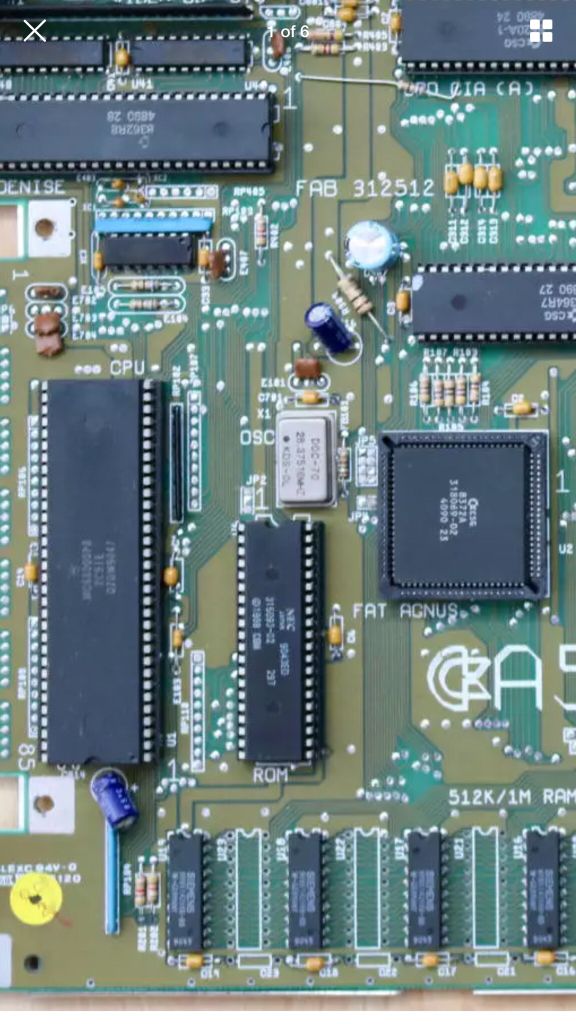
Here is a pic from the board. It should be a full PAL motherboard it was purchased from Germany.
b31a6582f09f15d956f26fda35329c67.jpg


I will definitely give the side slot a clean with an eraser.

I get the power light coming on just no boot.
Cheezmonkey, you’ve had this problem before? If that’s the case then there is hope lol!!

When it comes to the PSU, what’s the best way to test? I’m using the PSU from the rev5 board


Sent from my iPhone using Tapatalk
 
ACA500 black screen

remove jumper

When I first plugged it in the jumper was sitting on 1 pin only. I assume to remove jumper but not lose the jumping block.

What sort of alcohol should I be using to clean the connectors on the motherboard? I will have try the eraser first

Judging by the pic I posted can anyone verify if this is indeed an PAL motherboard?


Sent from my iPhone using Tapatalk
 
Last edited:
From the picture I can see that both the Agnus chip and the oscillator are PAL versions

Cleaning the edge connector on both the motherboard and the ACA500 is Always a good plan.
Use IPA 99% for cleaning.
 
From the picture I can see that both the Agnus chip and the oscillator are PAL versions

Cleaning the edge connector on both the motherboard and the ACA500 is Always a good plan.
Use IPA 99% for cleaning.

Thanks for the confirmation :)

I’ve seen 70% and 90% available here. Are these ok to use?


Sent from my iPhone using Tapatalk
 
ACA500 black screen

Unfortunately cleaning the contacts didn’t work. Being a rev6a motherboard the red led stays dim when I power on with the card installed. I’m basically getting the same with the card being installed on the rev5 NTSC..

I did get one guru meditation with the FFE7 start but didn’t get a chance to read the rest.


Sent from my iPhone using Tapatalk
 
Last edited:
What are you outputting the display to? I know it sounds irrelevant but when I was testing different displays and connecting methods, I encountered several situations where the aca500 bios screen was garbled or not visible at all. I guess it uses an unusual screen mode. F6 or F7 should make it boot (and switch to a screen mode which is more common) -it probably won't help you but is worth noting!
 
What are you outputting the display to? I know it sounds irrelevant but when I was testing different displays and connecting methods, I encountered several situations where the aca500 bios screen was garbled or not visible at all. I guess it uses an unusual screen mode. F6 or F7 should make it boot (and switch to a screen mode which is more common) -it probably won't help you but is worth noting!

The display is output to an LED tv via a scan doubler/HDMI converter. When the computer is powered on the power light stays dim so I don’t think it even boots just hangs, and when the converter is powered I see the boot screen of the converter. I have an ECS Denise chip installed too not that it makes any difference.


Sent from my iPhone using Tapatalk
 
OK - I've no experience with scan doublers, though I am thinking of getting one. In general though, if I'm troubleshooting a no-boot situation, I tend to remove as many things as possible and then add them back in one at a time until I find the culprit. It may be that this is not helpful, as everything else works unless the ACA is connected. I don't really have any other suggestions myself, I'm sure there are far better qualified folks than I here!

I can't remember whether you'd said the ACA is known to be good? If it's untested, may I make the super helpful suggestion of pulling out one of your spare 500's (which, of course, you have piles of, as we all do :) and see whether it does definitely work?
 
I have found that the ACA can be quite picky with regards to the power supply. With my original Amiga PSU my ACA500plus will not boot just like yours, but with another modern PSU it boots 90% of the time. When it won't boot it is always when I boot from cold so if then turn the power off and on again, it always boots the 2nd time around. With the original PSU, I have never been able to make it boot, although the PSU seems to work fine with systems without the ACA500plus.
 
ACA500 black screen

I have found that the ACA can be quite picky with regards to the power supply. With my original Amiga PSU my ACA500plus will not boot just like yours, but with another modern PSU it boots 90% of the time. When it won't boot it is always when I boot from cold so if then turn the power off and on again, it always boots the 2nd time around. With the original PSU, I have never been able to make it boot, although the PSU seems to work fine with systems without the ACA500plus.

I tried 2 different power supplies.

I thought the maybe turning off and on again would help but same situation.

How much power does the external floppy drive take? I’ve tried bare computer nothing connected and with extras plugged in and still the same.

What did you use to repair/upgrade the PSU?

OK - I've no experience with scan doublers, though I am thinking of getting one. In general though, if I'm troubleshooting a no-boot situation, I tend to remove as many things as possible and then add them back in one at a time until I find the culprit. It may be that this is not helpful, as everything else works unless the ACA is connected. I don't really have any other suggestions myself, I'm sure there are far better qualified folks than I here!

I can't remember whether you'd said the ACA is known to be good? If it's untested, may I make the super helpful suggestion of pulling out one of your spare 500's (which of course, you have piles of, as we all do ? and see whether it does definitely work?

The scan doubler has its own 5V power supply, it only uses 5 pins on the RGB port for signal. I’ve tried running with accessories and without. I’ve had everything unplugged and just the tv connected but no go still.

I’ve tried on a couple amigas. Both rev6 one NTSC and one PAL. Previously tried on NTSC rev 5 but that one wasn’t going to work anyway due to compatibility issues.


Sent from my iPhone using Tapatalk
 
Last edited:
ACA500 black screen

I’ve tested on 2 different A500s. Actually 3 but one was a rev 5 the other 2 were rev 6A’s

Here is the power supply from 1 of the amigas.
6f0c14c935059eae9ea3257aeb5e19a6.jpg


They both have the same power supplies with the same ratings


Sent from my iPhone using Tapatalk
 
Last edited:
Back
Top Bottom