Amiga 2000 Cherry Keyboard Broken Cable.

  • Thread starter Thread starter jason_v_r
  • Start date Start date
  • Replies Replies 5
  • Views Views 2034

jason_v_r

New member
Joined
Sep 7, 2014
Posts
14
Country
UK (Wales)
Region
Caerphilly
Hi all,

i've got an old cherry keyboard for my Amiga 2000, the cable that came with it was missing the 6 pin DIN connector :Doh:
i'm after the pinouts from the keyboard block connector inside the keyboard itself to the 6 pin DIN Connector.
the keyboard has a philips IC (KYPCIV) and not a mitsubushi IC. but i don't think this will make a difference to the cable.

i'm absolutely stumped by this and i hope someone has a simular keyboard and can provide me cable trace from the block connector to 6 pin DIN connector.


cheers
Jason
 
I think I've got one. Will try to open it up and take a picture of the innards tomorrow (too tired now).

p.s. I guess you will want a correspondence between whatever internal connector and the exteranl DIN one. Will do my best to have that too, but may take a day or two.
 
Last edited:
I think I've got one. Will try to open it up and take a picture of the innards tomorrow (too tired now).

p.s. I guess you will want a correspondence between whatever internal connector and the exteranl DIN one. Will do my best to have that too, but may take a day or two.

Hi Amigean,

Thanks for replying, i hope to hear from you soon.

cheers

Jason_v_r
 
You probably meant 5-pin DIN (as all big-case Amiga keyboards are) :)

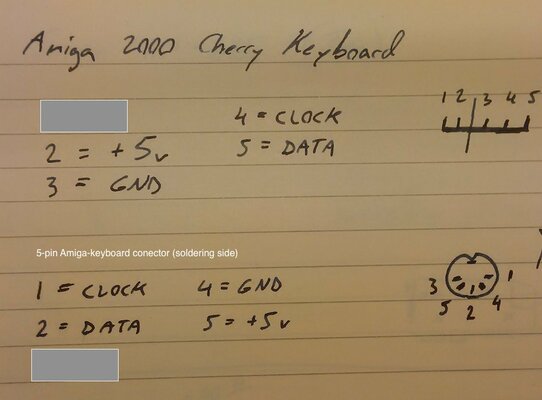
I faced this same problem some time ago: I had bought an A2000 Cherry keyboard without a case and needed to build my own cable. Attached is a photo from my notes about the cable. The two greyed out pins are not connected.

The top part is the connector on the keyboard. The line between pins 2 and 3 is the slot where there is no pin.

The DIN connector is seen from the soldering side. So you'll need a 4-wired cable and then connect the pins by the drawing (ie. pin 2 of the keyboard connector goes to pin 5 in the DIN connector etc).

I believe this was the final and correct schematic which I used to build my (working) cable (which is not at my reach to open and check at the moment). Still; better to check first and I take no responsibility if you blow something.

20161211_131732.jpg
 
Hi mindwalker,

thanks for replying, i will give this a try as soon as possible.

much appriciated

Jason
 
Ok, some news about the keyboard :D

aplogies for not updating the thread sooner, but family life and christmas has been keeping me away from fixing and testing the keyboard.

Anyhow It Works!!! after some inital mucking about with the cabling and double checking the work i'd originally carried out (which burnt out a resistor on the mainboard) all is now well and the old girl is being upgraded with a gotek and a little scsi technology.

Back to the keyboard then. i got the cable setup wrong from Mindwalkers info (my bad). so i went back to the keyboard circuit board and researched the controller chip and traced the tracks from the connector to the controller chip. 4 tracks were traced and i was able to identify the clock, data and power tracks on the back of the keyboard circuit board. i then soldered the cables to the correct pins on the internal connector and now i have a fully operational keyboard.

i cannot express my thanks enough to everyone who helped out with this problem, it has been a painful but rewarding nightmare. i've taken pictures and i will post them as soon as i'm able to do so.

Jason
 
Back
Top Bottom