lict
New member
Occasionally over the past few years, I have gotten by old Amiga 3000 out of storage and tried to use it. Several years ago, it worked fine. However, in the last few years, it started having problems with booting. Sometimes it would boot, sometimes it wouldn't. The problem got progressively worse over time and eventually it stopped booting altogether.
Finally, about 3 months ago, I decided to try to fix the problem and started to research what could be wrong.
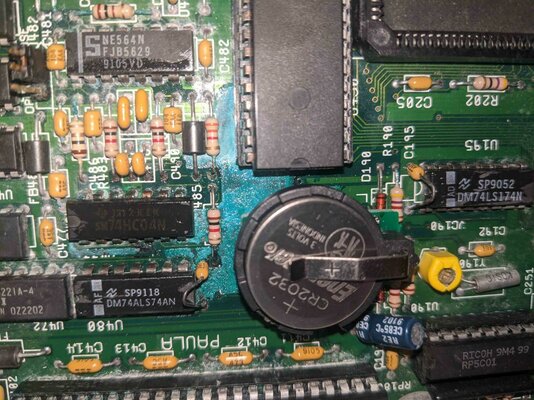
I quickly discovered about the infamous leaky battery problems with the Amiga 3000. Sure enough, when I took it apart, I found that the battery had leaked and damaged the area around the batter for about an inch in every direction as well as corrosion in other nearby parts. So, I
- removed the old battery
- washed the affected area in vinegar
- rinsed the affected area in filtered water
- thoroughly dried everything
- installed a CR2032 battery kit from AmigaKit
I then tried to boot and it still failed. The screen went through several colors and it sounded as if there was disk activity, but it would not boot. So, went back to researching the problem and found that there was no continuity from the + battery post to the nearby R192 resistor. So, on the back of the motherboard, I soldered a thin wire from the battery post pad to the R192 pad and checked that there was now continuity. Tried to boot again and again no success, however, the behavior did change. Now, the following happens:
- the power and hard disk lights come on immediately and stay on (i.e., the hard disk light does not flicker like it used to)
- the screen briefly flickers red and then turns to a light gray
- it sounds like the hard drives are being briefly accessed
- then the disk access sounds die off and nothing else happens.
- the screen stays light gray and the power and hard disk lights stay on.
I am interested in any help I can get in figuring out what is still wrong.
Finally, about 3 months ago, I decided to try to fix the problem and started to research what could be wrong.
I quickly discovered about the infamous leaky battery problems with the Amiga 3000. Sure enough, when I took it apart, I found that the battery had leaked and damaged the area around the batter for about an inch in every direction as well as corrosion in other nearby parts. So, I
- removed the old battery
- washed the affected area in vinegar
- rinsed the affected area in filtered water
- thoroughly dried everything
- installed a CR2032 battery kit from AmigaKit
I then tried to boot and it still failed. The screen went through several colors and it sounded as if there was disk activity, but it would not boot. So, went back to researching the problem and found that there was no continuity from the + battery post to the nearby R192 resistor. So, on the back of the motherboard, I soldered a thin wire from the battery post pad to the R192 pad and checked that there was now continuity. Tried to boot again and again no success, however, the behavior did change. Now, the following happens:
- the power and hard disk lights come on immediately and stay on (i.e., the hard disk light does not flicker like it used to)
- the screen briefly flickers red and then turns to a light gray
- it sounds like the hard drives are being briefly accessed
- then the disk access sounds die off and nothing else happens.
- the screen stays light gray and the power and hard disk lights stay on.
I am interested in any help I can get in figuring out what is still wrong.