
Another A2000 repair thread :) And, motherboard revisions.

  • Thread starter Thread starter WhyreByter
  • Start date Start date
  • Replies Replies 36
  • Views Views 7690
Yellow screen normally means a bad FAST RAM expansion instead a CPU error.

Since this is a A2000 error, I can bet a few money on the PSU or the missing tick signal.

There's no RAM other than what's on the motherboard, and switching J300 doesn't make a difference.

For better or worse, it's now no longer intermittant: it's always yellow. :)

I'll check the power supply tomorrow; gotta do other stuff tonight. Is it anything other than metering the voltages under load?

Unfortunately for this 2000, I got an incredible deal on a truly amazing condition 3000... So, it'd better shape up soon, or it may spend a good long while non-working. :|

--Robert

Cheers!
Robert

---------- Post added 12th August 2012 at 00:06 ---------- Previous post was 11th August 2012 at 23:08 ----------

Aaaand: booo...

Checked the power supply under load. Everything read within +/- 0.1v of nominal. Need to break out the scope for the TICK line, but if the J300 is working right, that shouldn't matter, right?

Suggestions? RAM is all soldered on; not liking the idea of desoldering all of them. :)

Thanks!
Rober
 
Repair update...

Repair update...

Long story short:

The 4.1/4.2 board has/had a bad PLCC socket (replaced), as well as very dirty contacts on pins 1-4 of the CPU. In addition, the CPU itself has very dirty pins. Cleaning of both contacts and pins yields a working board, but I'm not entirely happy with the condition of the socket, so I'll probably wind up replacing it soon, and possibly the CPU as well, and keep this one as a backup.

The 4.4 board continues to frustrate, but I know what the current issue is: the CPU's HLT line stays low, keeping the CPU halted. I've swapped Gary's with a known-good sample, and that's not the issue. I've checked input voltage at RP101, and it looks OK, though I'm still figuring out how to verify that the RP itself is OK without desoldering it. I'm physically tracing the HLT line through the board, but would love any shortcut suggestions. :)

Cheers!
Robert

---------- Post added at 18:16 ---------- Previous post was at 17:40 ----------

I've traced the HLT line everywhere, but get stuck going backwards through U107. Looks like it taps into pin 10, which is an output of an inverter, which is fed by pin 11.

Looks like pin 11 of U107 feeds/is fed by pin 11 of U108, which is the CLK line of a D flip-flop.

Or, at least that's how it looks tracing the board manually. The scans of the schematics I can find right now are... fuzzy. :)

If any of you wizards have any suggestions, I'm open.

Thanks!
Robert
 
Grab the clean schematics version from Aminet. Large size and extra crispy.

IIRC, the A2000 uses a 555 or equivalent to drive the reset line.
 
@rkauer - Been searching/browaing aminet for the schematics, but no luck. You wouldn't happen to have a link, would you?

Replaced the CPU socket on the intermittent one, waiting for a chance to power it up...

Thanks!
Robert
 
So the other one that works is good to go now? Works every time? Does it boot from HD? I thought it had some bad traces near battery?
 
So the other one that works is good to go now? Works every time? Does it boot from HD? I thought it had some bad traces near battery?

After an Agnus and CPU socket replacement, and cleanup it boots off the floppy 100%. Haven't put the SCSI card back in to boot off the HDD, that's for tonight.

The traces weren't actually bad. A little battery juice had weakened the green board coating, and when cleaned with lemon juice/vinegar turned it a dark green/black, but the traces were perfectly fine underneath (thankfully).

Replaced the CPU socket on the other board, but it still has the same result. :( Starting to get frustrated with it, esp. since it's such a pain to test it (in/out of the shield, in/out of the case, etc.). Wish there was a quick fix for it, but looks like i'm going to have to take a bunch of test readings off the good board, and compare to the bad to narrow down the trouble areas.
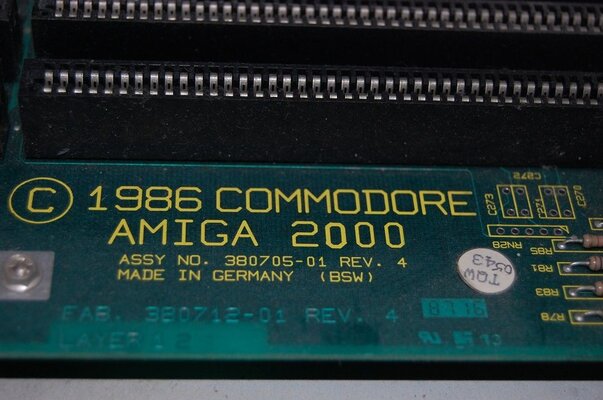
Still looking for better schematics. Found some very clear ones, but they use completely different component designators, so, while they're useful, I'd love to find a better set.

Cheers!
Robert
 
After an Agnus and CPU socket replacement, and cleanup it boots off the floppy 100%. Haven't put the SCSI card back in to boot off the HDD, that's for tonight.

Sadly, after putting the SCSI card back in, it goes into an endless grey screen cycle/reboot. Pull the card back out, and it boots 100%. I've reseated the socketed chips on the card, to no avail.

At this point, unless someone has some quick suggestions, I think I'm going to have to set this one aside for a bit. I've got my nice 3K waiting for me to give it some attention. I'll come back to it and either pick up troubleshooting, or just trade it away. :(

Thanks!
Robert
 
Where did you get the 3000? I love mine, I got one in a lot where I got those 2000's from.
 
After an Agnus and CPU socket replacement, and cleanup it boots off the floppy 100%. Haven't put the SCSI card back in to boot off the HDD, that's for tonight.

Sadly, after putting the SCSI card back in, it goes into an endless grey screen cycle/reboot. Pull the card back out, and it boots 100%. I've reseated the socketed chips on the card, to no avail.

At this point, unless someone has some quick suggestions, I think I'm going to have to set this one aside for a bit. I've got my nice 3K waiting for me to give it some attention. I'll come back to it and either pick up troubleshooting, or just trade it away. :(

Thanks!
Robert

That SCSI card may be bad. Try another one. I also have a2620 card that was in there that doesn't work either, got some battery leakage on it! A2000 must of been on its side or something.
 
Yeah, I'll keep my eye out for a known good card, and pick this back up later...

On to playing with the 3k now...
 
Took a closer look at the SCSI card. Its got some battery corrosion on it, and when I pulled the z80, two of the pins were bent under. I gave it a going over, cleaning it up and fixing the pins, but still no go.

It just cycles dark, med, light grey, then resets and starts over. Pull the card, and it starts fine.

I'm going to call it quits on that card, and get another one. :D

Cheers!
Robert
 
Get a A2091, GVP Series II or Supra Wordsync. These all work great with the A2000.
 
Yes, I have a A2091 and a GVP Series II in my A2000s, both are really wonderful SCSI cards, the GVP a little bit faster and can carry up to 8 MB Fastram...
 
Revision 4.4 was the one with the "fixes" for problems in earlier revisions.
Rev 3.8 (pre-production)
- Rev 3.9 (pre-production)
- Rev 4.0 (Rev 3.9+final FCC fixes/changes, never released due to an error)
- Rev 4.1 (1st production version, 1987)
- Rev 4.2 (undo excessive FCC-releated tweaks)
- Rev 4.3 (fixes for CSG Gary, a phased in replacment for Toshiba Gary)
- Rev 4.4 (Tick-line fixes, as some production PSU sources changed)
- Rev 4.5 (Adjustment due to buffer-part vendor tollerance variations seen with accelerators/DMA)

- Rev 5.0 (very rare, estimated 5 boards in existence, never put in production)
 
Revision 4.4 was the one with the "fixes" for problems in earlier revisions.
Rev 3.8 (pre-production)
- Rev 3.9 (pre-production)
- Rev 4.0 (Rev 3.9+final FCC fixes/changes, never released due to an error)
- Rev 4.1 (1st production version, 1987)
- Rev 4.2 (undo excessive FCC-releated tweaks)
- Rev 4.3 (fixes for CSG Gary, a phased in replacment for Toshiba Gary)
- Rev 4.4 (Tick-line fixes, as some production PSU sources changed)
- Rev 4.5 (Adjustment due to buffer-part vendor tollerance variations seen with accelerators/DMA)

- Rev 5.0 (very rare, estimated 5 boards in existence, never put in production)
The 5.0 never went in production because of FCC changes.
That is because they went straight to 6.0, 6.1, 6.2 and then 6.5
6.5 is pretty rare for us, because that is the full ECS version, the 5.0 is boards that Dave would have, probably Carl has one also and I suspect Trevor has one maybe, but that doesn't matter 6.2 and 6.5 are the ones you want to have.
4.5 is good also, and the early 4 versions
 

Attachments

  • DSC_0217 (2).JPG
    DSC_0217 (2).JPG
    102.2 KB · Views: 10
Back
Top Bottom