Apple II Europlus substitute keyboard build

  • Thread starter Thread starter ViperSan
  • Start date Start date
  • Replies Replies 18
  • Views Views 5453

ViperSan

New member
Joined
Sep 28, 2017
Posts
200
Country
UK
Region
Manchester
I have an Apple II Europlus which was gifted to me decades ago ..
I had never seen it function and parts are scarce ..
Having recently plucked up the nerve to tackle this computer ..
(I have worked on many 8 bit computers ..but mostly commodore...this is my first Apple)
I eventually got the main board and one of the floppy drives working..
BUT a major problem was the keyboard..
over 80% of the keys either didn't register or had damaged internal return springs...or both.
Unlike commodore keyboards Apple II KBs cant easily be serviced..
I searched for a long time and couldn't find a replacement ..only ebay vendors asking stoopid prices for individual key switches ..
..and I needed a lot..
Recently I managed to buy an Apple II clone KB on amibay ..but of course this was a gamble.
Sure enough ..it was different ..both electrically and mechanically ..
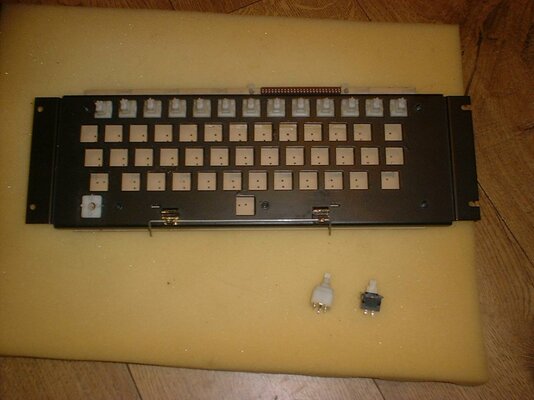
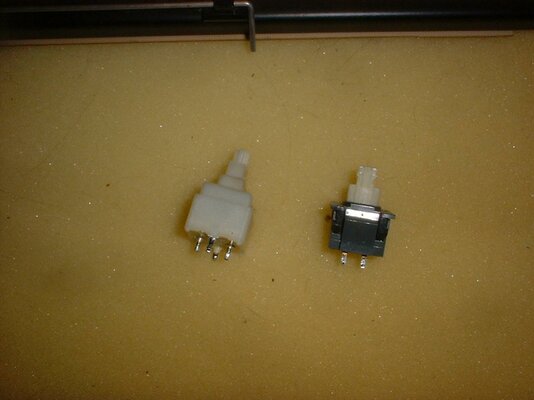
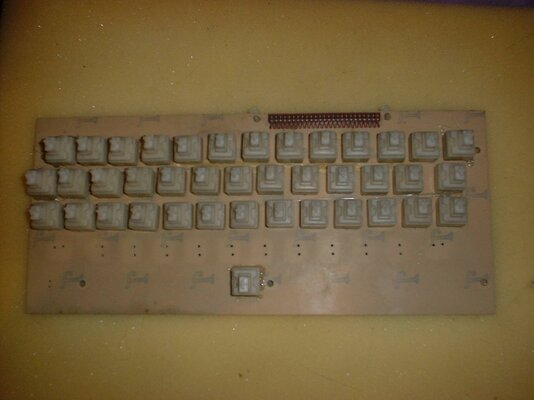
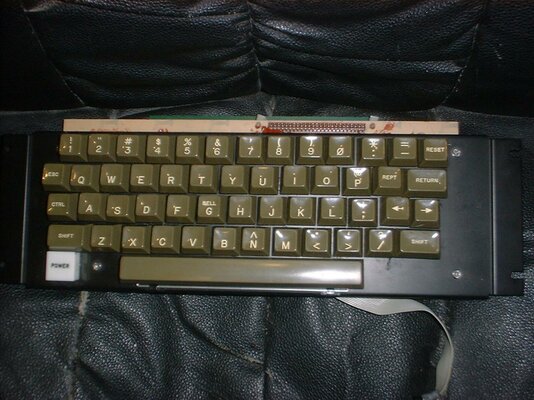
So ..My only option was to try removing ALL the key switches from the clone KB pcb ..and somehow fitting these in place of the original Europlus Key switches..
Sadly these are physically different ..use thicker wire legs ..and those pins were at right angles to the original..
PLUS ..these do not mount from the top through square holes as do the original Key switches ..
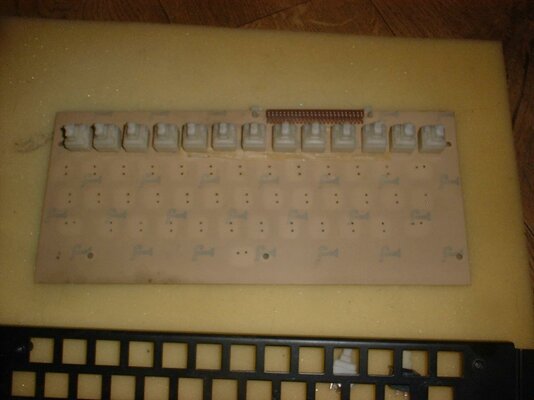
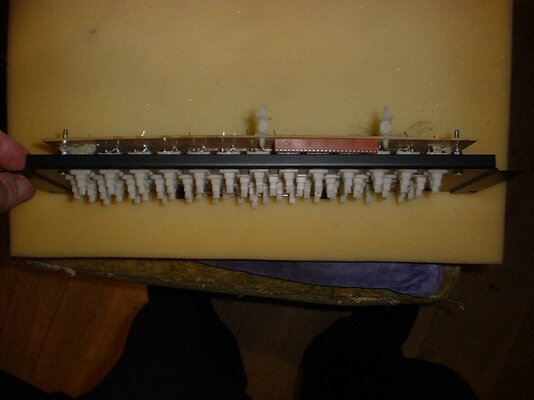
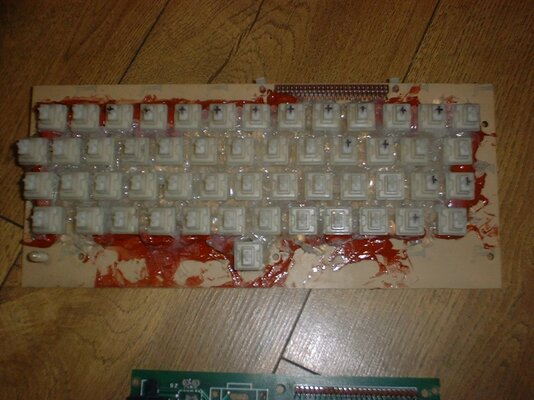
After giving it some thought ..I figured I might be able to mount the clone keys of extended wire legs ..rotated at 90 degrees ..and under the metal KB plate rather than through those holes ..
I'm attaching some photos later to show how this was achieved ..and although so far untested ..looks like it may well do the job..
rgds
VS
 
Last edited:
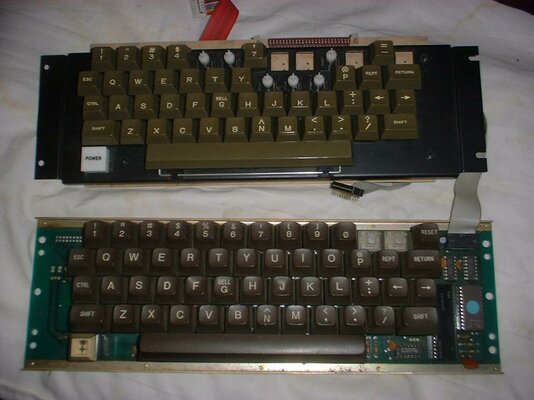
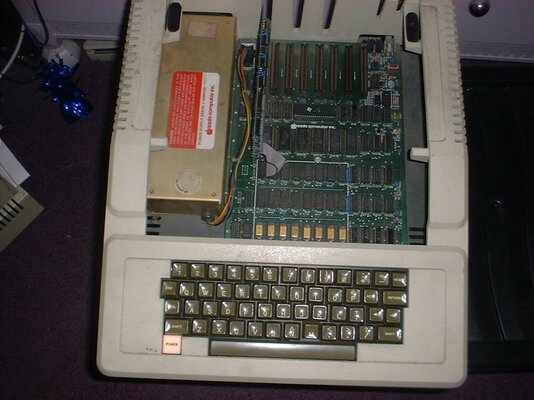
Some pics to go with the above description..
rgds
VS
 

Attachments

  • DSCF0110.jpg
    DSCF0110.jpg
    121.1 KB · Views: 6
  • DSCF0114.jpg
    DSCF0114.jpg
    107.9 KB · Views: 3
  • DSCF0115.jpg
    DSCF0115.jpg
    93.8 KB · Views: 4
  • DSCF0116.jpg
    DSCF0116.jpg
    83.1 KB · Views: 5
  • DSCF0117.jpg
    DSCF0117.jpg
    84.6 KB · Views: 4
  • DSCF0119.jpg
    DSCF0119.jpg
    89.7 KB · Views: 2
  • DSCF0122.jpg
    DSCF0122.jpg
    110.7 KB · Views: 4
Hello,
Might I be the first to say that's an excellent bit of hackery you've done there. I do hope your Apple II comes fully back to life in the near future. I relatively recently got a IIe and really enjoy fiddling with it although I have a sympathise with your issues - bits 'n bobs for these machines are too expensive.
 
Thanks Charlie..
So ..
no more work on the KB today ..
Tomorrow I may try and squirt silicon under the key switches to provide support to the wire legs..
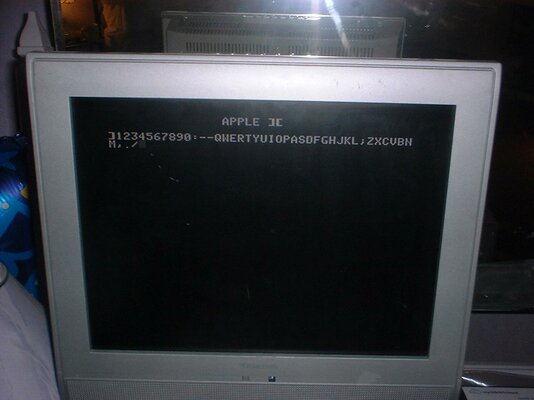
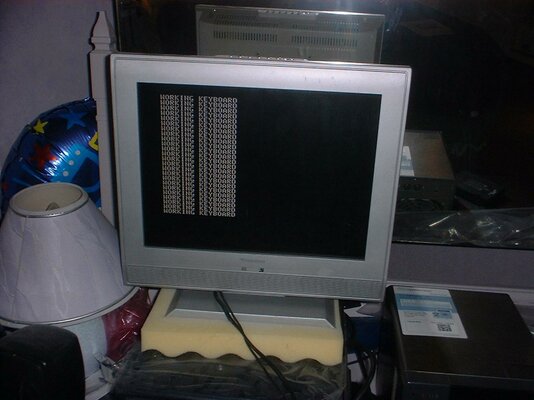
But I couldnt resist a quick test ..
did it work ?
well see for yourself ..
pix attached..
rgds
VS
 

Attachments

  • DSCF0123.jpg
    DSCF0123.jpg
    92.4 KB · Views: 3
  • DSCF0124.jpg
    DSCF0124.jpg
    156.1 KB · Views: 3
Questions for you Charlie if I may ..
I also bought a perfect 80 card along with the KB ..
and since I know nothing about Apple ..
I am assuming it goes into slot 2 ..as this is the only slot in which it appears to operate without causing continuous beeps at switch on ?
Are 80 column cards slot specific ?
Also ..there is a 2 pin connector on the card ..
does this provide composite out ..and will I have to make a suitable RCA phono adapter to connect here ?
Finally ..
I'd like to get colour out of this 8 bit eventually
I assume I would need yet another card to achieve this ?
what would I look out for ?
PAL or RGB ..
..and with RGB ..could I use a conventional RGB scart in on a TV ?
cheers
VS
 
Last edited:
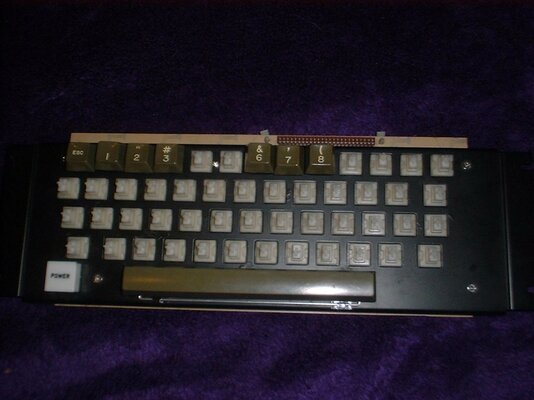
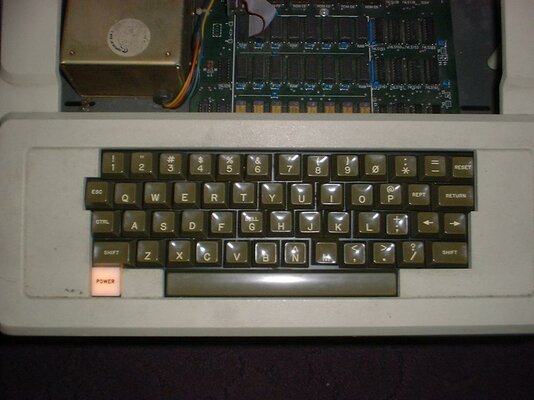
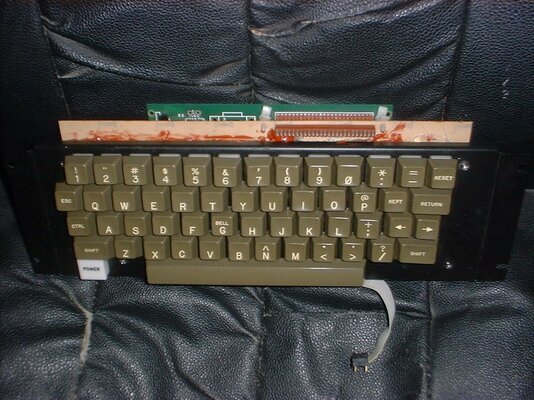
..Not the prettiest job I ever did ..
Some of the keys are uneven ..and the M key was a bit of a bodge ...but it is complete and functions well..
.I must remember to treat the keyboard gently and not press too hard is all.
I guess it will do until I get something better ..IF EVER.
lol
 

Attachments

  • DSCF0125.jpg
    DSCF0125.jpg
    145.8 KB · Views: 4
  • DSCF0126.jpg
    DSCF0126.jpg
    121.7 KB · Views: 2
  • DSCF0127.jpg
    DSCF0127.jpg
    114.4 KB · Views: 3
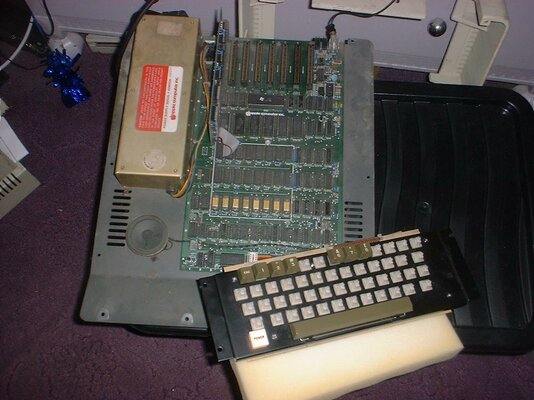
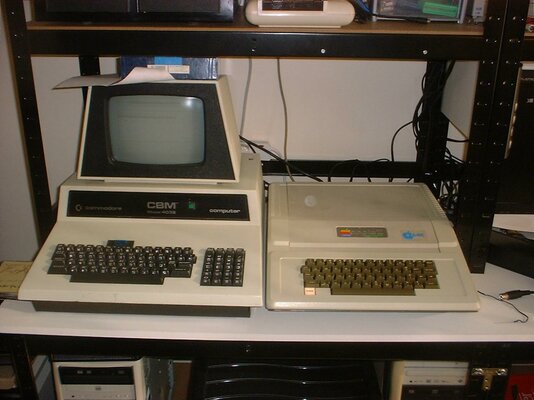
I'm scared to leave them both on their own in the same room ..
Worried in case a fight breaks out..
lol
 

Attachments

  • DSCF0128.jpg
    DSCF0128.jpg
    116 KB · Views: 5
I'm scared to leave them both on their own in the same room ..
Worried in case a fight breaks out..
lol

Lol:

Marvellous job there... now if you can introduce a Trash-80 to the mix we might just get the earliest example of Super Smash Bro's.

On the subject of your questions my knowledge is patchy at best, hopefully others will weigh in shortly but for now:

Unhelpful answer: Swap the motherboard for a NTSC IIe version. Why commit such a horror?
-If that 80col card is the one I think it is you'll likely need a motherboard with the extra slot near the front of the PSU. If it's a 'proper' older after-market II 80col card I, um, don't know. Is there a manufacturer's name / model number that might be googleable?
-The way the Apple II produces colour only works properly in NTSC. (thankfully a lot of TVs/monitors can cope) I have a very vague understanding that the Euro II was either B/W only or there was an RGB card for it. I have a feeling the Euro II has a pin-header near the composite out for an RF upgrade (so PAL and Colour possible that way) but I may be spouting nonsense.

AFAIA: pre-IIe Apples were endlessly upgradeable / hackable for such upgrades but currently outside the meagre scope of my knowledge.

Sorry that I've probably just been wholly unhelpful.
 
Thanks for replying Charlie ..
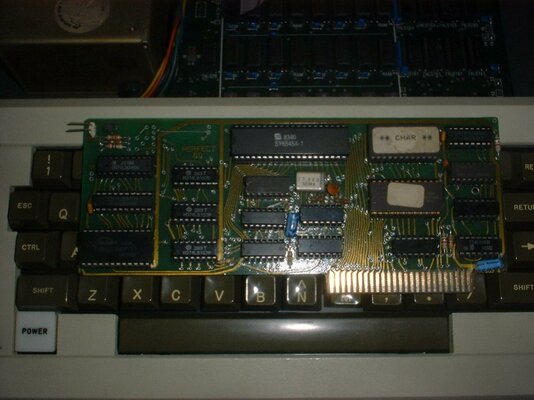
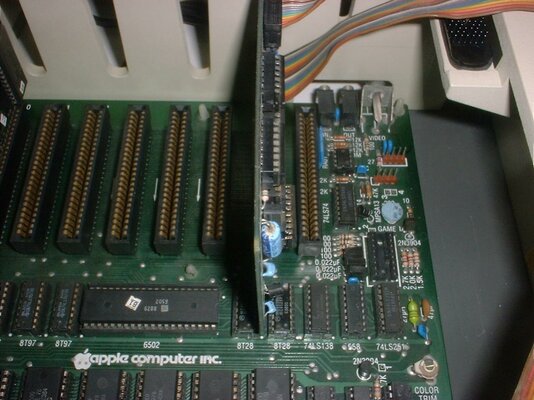
I'm attaching a couple more photos ..
one of the Perfect 80 card ..and one of the rear pins near the AV out on the Apple main board..
I'm hoping someone knows ...something that will help me out..
rgds
VS
 

Attachments

  • DSCF0129.jpg
    DSCF0129.jpg
    121.2 KB · Views: 4
  • DSCF0130.jpg
    DSCF0130.jpg
    149.6 KB · Views: 5
This may sound a bit naff ...but as I keep saying ..Apple is all new to me and I have no manuals to help.
I now have a working floppy drive which I can use to load up DOS 3.3 which I have on floppy ..
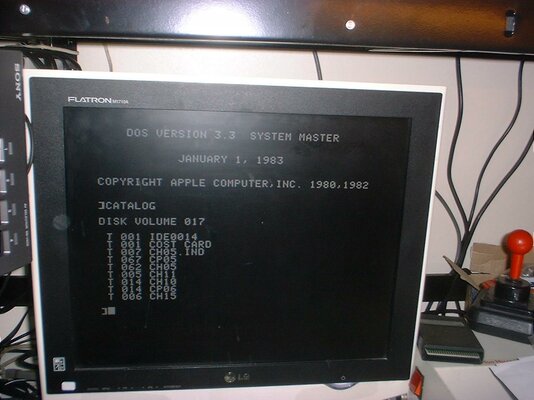
I have also some single sided single density floppy disks ..which contain ..errr something which the Apple recognises when I enter 'Catalog'
These are a series of files prefixed 'T'
The brand is Memorex ...and the labels say Cost Card Disc ..
I have no idea what computer these were made on or what the T files contain ..
They list as in the photo
I have no interest in the content...I simply want to re-use these floppies.
Can I do this ?
If so How ?
I tried INIT HELLO
..hoping this would overwrite and reformat the disc ..but all I get is an I/O ERROR ?
Can Apple DOS be used to reformat and re-use floppy discs ..
If so HOW ?
I'm really struggling with this most basic of operations ..
can anyone help me ?
rgds
VS
 

Attachments

  • DSCF0132.jpg
    DSCF0132.jpg
    119 KB · Views: 4
Hello,
I do hope someone with more knowledge than me will weigh-in at some point, but for now...

Broadly speaking the Apple II had two versions of DOS: DOS, and ProDOS. The latter a thorough update of the former. The DOS itself resides on the floppy; when an Apple II boots it scans the slots 7->0 for any cards with bootable ROMS and runs what it finds. Traditionally a Disc II card will be in slot 6 and if present the boot ROM in it initialises the disc; loads up any bootable software it finds; usually some kind of DOS; and then depending on how the disk is configured will either drop you to a (pro)DOS prompt as in your picture or will go on to run whatever software is on the disk... So we know the disk you have is a proper Apple II disk with DOS 3.3 on it. (DOS and proDOS disks are not interchangeable but both will work in the same drive with the same floppy interface card)
For interest typing pr#6 (or whatever slot number) will initialise the ROM in the card and so the, in this case, drive.

How to use DOS / proDOS..? google for the manuals may ultimately be of some help, but for now I guess the real question is:
How do I get downloadable disk images (usually .po) on to real floppies so I can use them in my real computer?
For this you will need:
-An Apple II + disk interface and drive!
-If no Super Serial Card you'll also need a PC with Mic and Ear posts and two 3.5mm audio cables to connect it with your Apple.
-The magic is a proggie called ADTPro...
...with this you can:
-Get (pro)DOS on to your Apple II if you don't have that
-Format floppy disks
-Transfer disk.po images on to real floppies for use in the Apple
-And much more: http://www.adtpro.com

If there's a down-side transferring disk images to floppy over audio is painfully slow but it's a start.

I hope that helps a bit.

PS
There's also a wee little do-hicky called an A2Pi card that along with a Rasperry Pi, Raspapple II OS, and a specific boot floppy can do wonderful things. Sadly the (horribly expensive) official card is out of manufacture and I'm currently out of the A2Pi cards I made.
If you find yourself interested I do have one functioning A2Pi card left, it's just not a pretty sight as it's the one I did most of my testing on. (There's one or two seemingly endless threads on this very forum)
 
Last edited:
Thanks Charlie ..
A2Pi sounds interesting but will have to wait until I'm convinced this Apple is viable ..
For now I simply wanted to re-format a previously used floppy ..but find I am unable to do this ?
I assume my floppy drive is ok ..as it can read and load up DOS 3.3 ..
but when I try to format a used floppy ..I get I/O error .
So either the drive(s) are both faulty on but only on write ?
..or I simply don't understand how to re-use - re-format a used floppy ?
rgds
VS
 
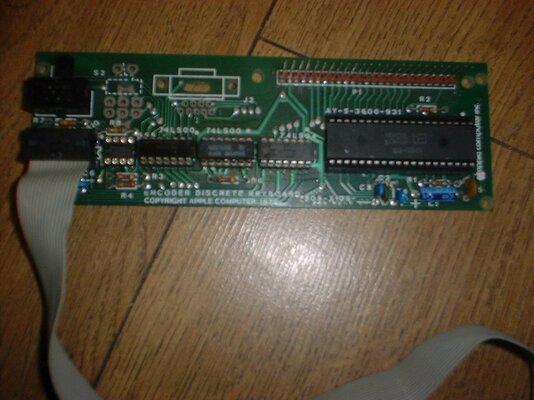
A follow up to my keyboard build ..
I have been running it for a few days now ...and there have been some oddities..
Sometimes after quickly rebooting (power down) ..the Apple starts producing on screen the last key pressed ?
Sometimes characters appear on screen after the cursor ..without any key being pressed ..phantom fingers ?
Some of the keys produced multiple occurrances of the key just pressed..
Not all keys suffered from this ..just some of them ?
There is a switch on the keyboards sub pcb ...and I didn't know what this was for so just clicked it over ..
Even more anomalies of the same type ..?
I believe this is something to do with auto repeat of the keys...if anyone knows for sure please comment.
From the limited info I found on the net ...I may well be looking at the 40 pin keyboard encoder chip faulty...but fingers crossed this is not the case ..cos it's rare.
Tracing back from the switch ..which seemed to make things worse...I came to a 555 timer ...
This chip appears to be used as a latch ...so possibly what enables single press or key repeat.
Ok ...not sure how this works ...but I removed all the chips on the sub pcb ..and fitted bases to make removal easier.
..all chips back in place ...and no change ..
OK I thought ..what if I just remove the 555 latch and leave it out ?
Well ..this appears to have fixed the problems ..so far that is.
I dont need key repeat anyway..
But I will try replacing the 555 when I have one (on order)
regards
VS
 
Last edited:
It's funny how life can throw up coincidences, my IIe started playing the same game a few days ago. "Uh-oh", I thought. "Is that the keyboard encoder up the proverbial?"
I found a very helpful fault diagnosis .pdf for the Apple II that helped a lot. I presume will be of some help with your model.

In a nut-shell it may be the encoder IC, but you may have the same issue as me - a bad C71 cap. Swapping it for a new one fixed my machine. (Little ceramic jobbie close to the notched end of my encoder IC on a IIe board)

I'm at the wrong computer ATM but I'll hopefully post that diagnostic .pdf in a bit. Best of luck.
 
Last edited:
Cheers Charlie ...
I will read it ...but it might only apply to mine in principle ..
That cap on my early sub board is not C71 I dont think ..
it is however 47pf or 47J if memory serves..
I will check this when I get home.
rgds
VS

- - - Updated - - -

I do love posting pics dont I ..
lol
Here are another 2 .
Showing the silicon injected around the wire leg mounted keys for stability ..
and one showing the KB sub board ..
the cap in question is C5 on my board I think..
..and the empty 8 pin socket is for the removed 555 chip.
rgds
VS

Oh ..btw ..I may have lost my mind ..but I recently saw an Apple IIe (enhanced I think) for sale with a single floppy ..manuals and software ..fitted with 80 column card ..
for £250 ..
..and yes ..I splashed out on it ..
should be here by weekend.
Good value ???
 

Attachments

  • DSCF0136.jpg
    DSCF0136.jpg
    145.1 KB · Views: 4
  • DSCF0137.jpg
    DSCF0137.jpg
    130.6 KB · Views: 4
Last edited:
Genuinely awesome work with that keyboard! I say that both because you got it working and for making Heath-Robinson proud.

I really must get the the computer with that guide and post it...

IIe for £250.00? If I remember correctly that's about £100.00 less than I paid for mine so I'd call that a bargain. IIe vs IIe enhanced? From my point of view I'd say the latter is better but there's not much in it. Also if it's not an enhanced the difference is a couple of ROMs and changing the 6502 for a 65c02, so not a biggie if you decide to go for it.

Speaking as a relative newbie to the Apple II (I've had mine a little less than a year) I got quite attached to it pretty quickly. Old-school 8bit design, which makes it more comprehensible compared to later 8bits, while good/expansible enough to be fun to play with. (TRS80 Model 1sand PETs are cool but not much fun in the longer term, IMO)
 
It's very easy to have grounding problems on old A2 keyboards, and they act erratically when it's not right. You may have some dodgy connections or some grounding issues still if you rebuilt a keyboard from scratch... Check from the ground connection on the motherboard (where the keyboard attaches) all the way around your keyboard and also flex the board and press down keys to make sure it doesn't break grounding...
 
Last edited:
Thanx for your input rcade ..
TBH I'm fairly happy with the lack of repeat on the keys ..
..and it was well worth stripping down ..hopefully...one last time ..
I got to correct the dodgy 'M' button ..
key switch upside down ...so angled incorrectly..
plus the addition of the injected silicon ...has made for a much more solid feel when keys are pressed ..and afforded the opportunity to line the key switches up better..
Still not perfect ..but for a 'heath robinson' build ..pretty damned good.
It was either this ..or scrap the AppleII
:D
rgds
VS
 

Attachments

  • DSCF0141.jpg
    DSCF0141.jpg
    197.1 KB · Views: 3
  • DSCF0142.jpg
    DSCF0142.jpg
    176.2 KB · Views: 10
Back
Top Bottom