Bluetooth on mediator/poseidon stack

  • Thread starter Thread starter jvdw007
  • Start date Start date
  • Replies Replies 20
  • Views Views 4041

jvdw007

Member
Joined
Jul 7, 2011
Posts
460
Country
UK
Region
Hampshire
Any idea how one would go about connecting a usb bluetooth dongle to a bluetooth mouse and keyboard.

I purchased both an apple bluetooth mouse and keyboard and have an existing usb bluetooth dongle I plugged into my subway usb card. Poseidon sees it but I have no idea how to pair the lot up. On a pc or mac it's easy as you just search for bluetooth devices...

Thanks!

In addition, anybody know what class/device in poseidon to use for wifi usb cards?
 
AFAIK only USB-LAN adapters work, not Wifi ones and I also do not think Bluetooth works, you need a normal wireless USB Keyboard/Mouse.
 
I don't think I've ever seen a comment about any Bluetooth devices being used; you might send an email to Chris Hodges about it. The way I do wireless networking is via a wired asixeth device to a wireless bridge (-40 to 60 US) that I got on special from Newegg for 30 US -- on sale.
 
Thanks guys.

I guess not having a bluetooth stack means you can't use any bluetooth devices :picard
Any recommendations for wireless usb keyboard and mice that will work?

Tried my wife's cheap 2.4ghz wireless mouse that has a tiny dongle and it works, even the scroll wheel :)

Now I guess I just need to look for wireless keyboards that run on 2.4ghz dongles then.. Thanks!
 
BlueTooth

BlueTooth

If and when you find other compatibile BlueTooth devices that work, be a friend and start a new thread on that topic; it would be nice to be able to look-up a list with those things already "tried-and-true."

The wireless Bridge Adapter I use is a ZuniDigital ZR301F; it can be USB or wall powered, works like a charm and has a list of features. It lets all my "wired" stuff be wireless.
 
If and when you find other compatibile BlueTooth devices that work, be a friend and start a new thread on that topic; it would be nice to be able to look-up a list with those things already "tried-and-true."

The wireless Bridge Adapter I use is a ZuniDigital ZR301F; it can be USB or wall powered, works like a charm and has a list of features. It lets all my "wired" stuff be wireless.

That is a great idea bdb. I have yet to find or use a working bluetooth device on the amiga, but if anybody else has tried and used a bluetooth device, I would suggest perhaps they too can start a new thread as bdb suggests :thumbsup:
 
There is absolutly no way to use any Bluetooth device on Amiga, unless we pay for an expensive Bluetooth stack license for the OS.
However, it is possible to use those serial-Bluetooth adapters for serial link with no need for a stack.
 
I'm betting the devices that work are HID and come paired with their dongle "at birth." mice, keyboards and the like, but to be sure why not contact the author.
 
Just as an update, I got a great email frmo Chris Hodges about the bluetooth thing. He did indeed say that for $US10000 per year licence, it's not possible. However a lot of the newer wireless mice and keyboards have hardware built-in bluetooth stacks that auto-pair and all that so you don't need to pair in software etc. He did also suggest trying to pair the mouse/keyboard on a pc and then plugging the dongle and keyboard/mouse into the amiga as that may work. Unfortunately the wireless apple mini keyboard and apple wireless mouse didn't work for me like that. They work fine on the pc and macbook, but still no worky on the amiga. No worries though as I've ordered the 2.4ghz dongle based ones as they do work on the amiga.
 
hi at least some usefull info mate

what set have you orderd just name will do
 
hi at least some usefull info mate

what set have you orderd just name will do

Just search the other bay for wireless 2.4gz keyboard mouse and you'll get the idea. I previously bought a cheap mouse like that for my wife's laptop as she hates trackpads and I plugged it into the amiga and it worked flawlessly, so I am 99% confident the set I bought will work too.
 
Not sure this will be helpful

Not sure this will be helpful

I have 2 Logitech wireless mice (don't know if BlueTooth or just vanilla RF) that work perfectly on my PC, Amiga and Mac. Great feel and near great weight and on the whole not expensive; can't be sure, but I'll bet their keyboards are the same.
 
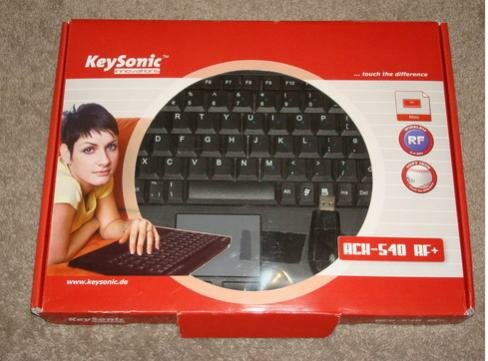
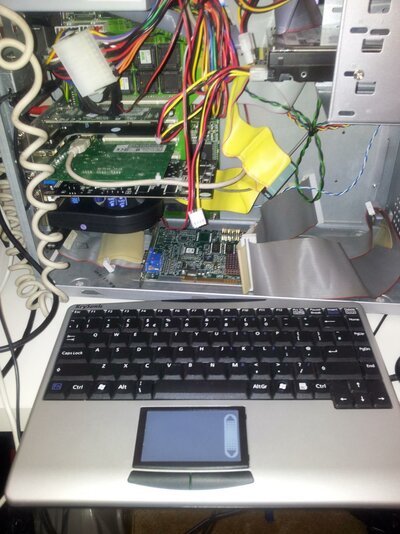
i used my wireless keyboard with a touch pad built in on the Amiga and it worked instantly with the deneb.

its a key sonic like the one in the pic. not sure of the model buts like that one.

i bought it for browsing the internet on my 42 inch tv via the apple mac , key and mouse are in one unit - no wires.

mike.
 

Attachments

  • Screen Shot 2012-07-01 at 15.22.06.jpg
    Screen Shot 2012-07-01 at 15.22.06.jpg
    30.5 KB · Views: 1

Attachments

  • key.jpg
    key.jpg
    191.8 KB · Views: 2
Last edited:
Merlinkv mentioned here some months ago that installing some tools called RTGmaster allowed him to keep Poseidon ON within WHDLOAD. Just look for his post.
However, it didn't work on my A2000.
 
2.4ghz keyboard/mouse combo came, was tested, and conquered. I am one happy chappy. :thumbsup:
 

Attachments

  • 380394327521.jpg
    380394327521.jpg
    2.5 KB · Views: 2
Back
Top Bottom