Can you help me to identify the purpose of all those cables / chips in my a500?

  • Thread starter Thread starter Flurry
  • Start date Start date
  • Replies Replies 5
  • Views Views 535

Flurry

Member
Joined
Jul 4, 2024
Posts
34
Country
Netherlands
Region
Drenthe
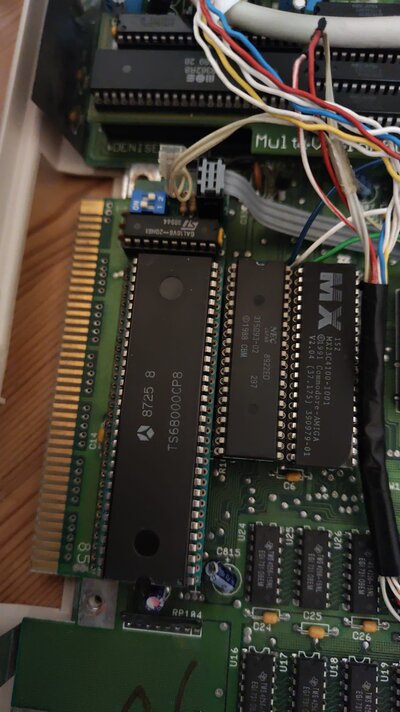
I think I know what the switches on the back of my a500 do. But I'm mostly confused by the CPU, it seems like some kind of switch. ON 1 / 2
Does it switch between different cpu's?

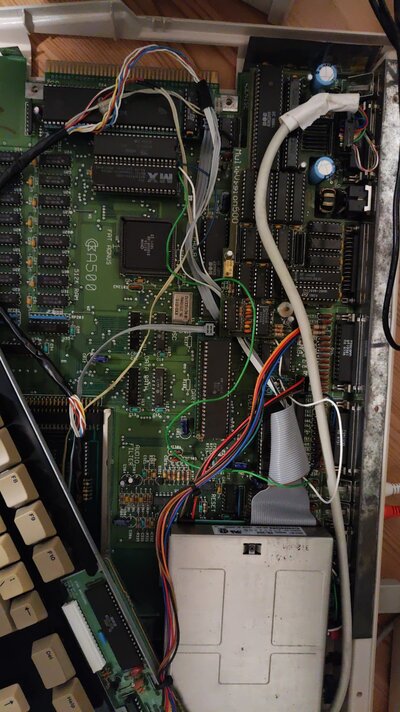
3 switches

1 – crashes -> goes to ROM switch I think kickstart switch
2 – goes to the a580 (does nothing?) could be memory
3 – responds to the floppy drive…. Seems like it switches to another floppy drive that isn’t there.

CPU – has switch on it ON 1 / 2 and multiple layers of chips?
Text on CPU: 8725 8
TS68000CP8
Text on chip behind cpu:
GAL16VB-20HB1
98944

(Switch)
ON
1 2

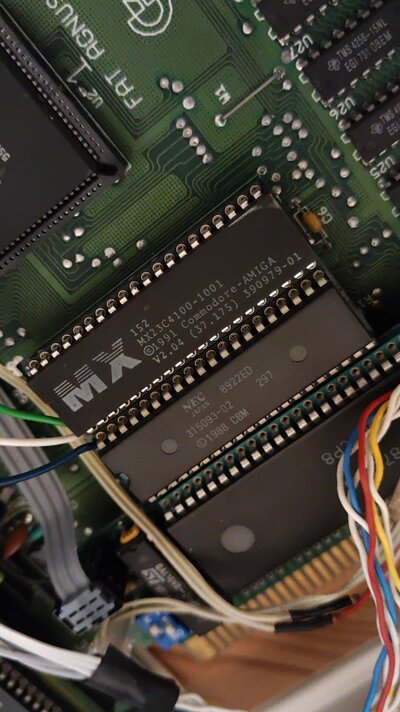
ROM: 1 = MX152
MX23C4100 – 1001
1991 commodore amiga
V2.04 (37.175) 390979-01

So Kickstart v2.04

2= NEC 8922ED
315093-02 297
1988 CBM

Kickstart v1.3?

Multivision 500
 

Attachments

  • Untitled.jpg
    Untitled.jpg
    232.3 KB · Views: 11
  • Untitled3.jpg
    Untitled3.jpg
    210.5 KB · Views: 11
This is a guess for informational purposes - so not completely sure - but these are some of the custom ROM switcher modules and other tweaks people have made on the hobbyist side of things for the A500. Not all may apply, and the pic info is kind of limiting.

You have an obvious ROM switcher in there. There is typically a means to select which ROM you want live at boot time. It looks like you have a choice between Kickstart 1.3 (1988) and 2.04 (1991).

Two popular implementations of this switcher concept are to use a hard switch (sometimes with a little logic part to be a little bit safer) to enable the chosen ROM and disable the other. Another method is a soft method to detect a ~10-second press of the Ctrl-A-A (the _reset line being held) and it selects the other while warm re-booted. Sometimes a jumper or switch controls which is the default power-on ROM on the latter method. A clip-connector to the _reset line somewhere on the motherboard is part of the implementation of this soft-switch (when in the ROM socket), although the line can also be connected to the CPU, which is a signal connection available on the board you have (for the CPU socket).

Know that the 1.3 ROM (315093-02) is 256K and the 2.04 ROM is 512K. One or more of the DIP switch options may require you select an installed ROM size. I don't see room for supporting larger 42-pin ROMs, but I'll mention it anyway: there are some which can handle custom extended Kickstart ROMs, and that involves additional connections of address lines to somewhere (GARY usually, but the CPU will also work).

Another item that may get covered by an adapter is there is a known omission of some resistor packs on older machines which affect the Rev 3/5 motherboards when they are used with EPROMs (vs a mask ROM, which C= usually sold, like you have). There is also a mistake in the the ROM socket wiring to use larger 512K ROMs and/or EPROMs on the older motherboards. The address line for a 512K part was wired wrong (a wire was needed over the top of the C= 2.04 ROM to address it) as the industry went away from one then popular part to another. Also, a pin which keeps the 27C400 EPROM in it's 16-bit Mode (but was a N/C on a mask ROM) is the other issue, and was left floating when the EPROM was used. They were all corrected in the Rev 6 and later motherboards. Some of the hobbyist switchers may have incorporated these fixes for the earlier systems.

If there's something going to the floppy cable, or more specifically, the CIA chip involved with floppy drive selection (SEL0/SEL1 lines), this may be related to redirection of DF0: to the external port for a Gotek unit. This s just a guess without any better photo information.
 
Last edited:
Here are some more pictures to clarify.
 

Attachments

  • 4.jpg
    4.jpg
    298.8 KB · Views: 10
  • 5.jpg
    5.jpg
    211.3 KB · Views: 9
  • 6.jpg
    6.jpg
    214.1 KB · Views: 14
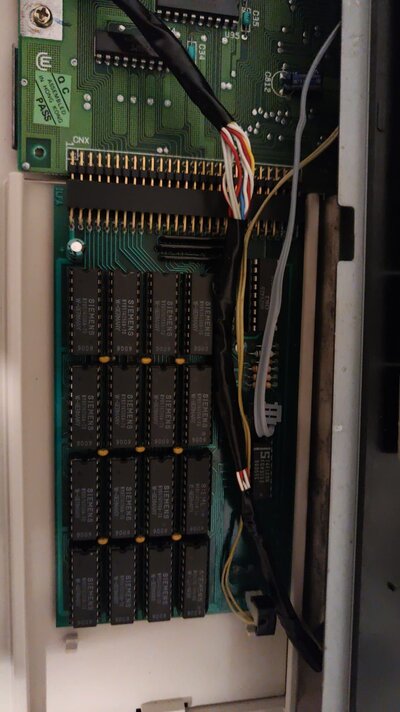
OK, you have one of the trapdoor modules that appears to have 2MB of memory chips on it (256x4 x 16). If memory serves, that will provide a combination of up to 2MB of additional memory split for different uses, and depending on the jumper/switch settings:

- It's main purpose is to add 512K to the ChipRAM pool (you have an 8372A 1MB Agnus).

- The remaining 1.5MB could end up in the $C0.000 range, or the Zorro expansion space - hence the Gary adapter with a few signal lines.

- There will likely be an option to disable the additional memory (both, or just one of the ranges).

ShowConfig (AmiNet) would help you identify the actual memory ranges each setting produces. ChipRAM starts at $0000.0000, runs up to 512K ($0007.FFFF), or 1MB ($000F.FFFF), Ranger/Slow-Fast RAM would fill in at $00C0.0000 through (up to) $00D7.FFFF (1.5MB), or they may somehow place the 1.5MB in the AutoConfig space ($0020.0000 up to $0037.FFFF) and need an AddMem to add it to the OS.

I'm not positive I see a DF0/DF1 selector. These are usually under the Even CIA chip, and it's a 3-wire toggle (SPDT).

You have a MultiVision adapter under the Denise - that's a display enhancer/deinterlacer. https://bigbookofamigahardware.com/bboah/product.aspx?id=353

Motherboard is a Rev 5 (silkscreen and the 16x 256x1 memory chips).

It's possible the ROM selector also provides a reset button, but that's speculation. I don't know the model, so the features are hard to determine. Try a Ctrl-A-A after boot and hold the keys for 10 seconds. If the ROM version / ask for Workbench Disk screen changes, that's your ROM-change solution. One of the toggles may change the default ROM at power-on.

Hope that helps. Maybe if someone is directly familiar with the ROM switcher they can help more. You may look around the site I gave you a link to for A500 RAM expansions of 2MB, and find a match to help with it's features.
 
The floppy toggle switch simply may expect a Gotek connected on a basic ribbon adapter to the rear disk port, and that performs the SEL0/SEL1 swap for DF0 move to the rear port.

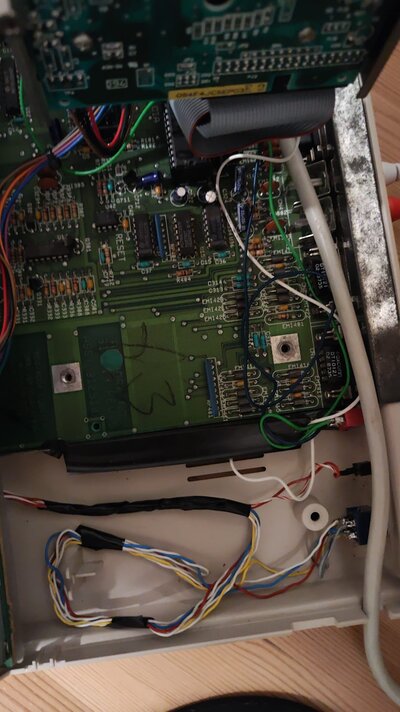
Do all testing with the computer off. Some stuff looks wired to address or control lines. Other than a reset button, it's unlikely to be good to move things around tied to memory with the OS running.
 
Back
Top Bottom