Commodore A2386 Bridgeboard problems

  • Thread starter Thread starter iRonNuke
  • Start date Start date
  • Replies Replies 12
  • Views Views 284
Status
Not open for further replies.

iRonNuke

New member
Joined
Dec 14, 2013
Posts
13
Country
Sweden
Region
Jönköping
Hi I just bought a Commodore A2386 Bridgeboard to my Amiga 4000. I have a couple of questions if you guys can answer them.

1. It's a C= A2386, but the CPU onboard is a TX486SLC, is this replaced or did C=A2386 came with this CPU? What I have read it's an 486 internal and 386 external with PIN layout as an 386. It that correct?

2. I have some problems with floppy detection. Always gets Diskette drive 0 seek failure at boot, aswell as Invalid configuration information. I think I have configurated the board (both jumpers and softare right?).

Software:
Drive A: Shared
Shared Amiga Drive: DF0:
Shared Amiga Drive Type: Dual Speed

Jumpers onboard A2386:
J501-502: 1-2
J506: Open
J512: 1-2
J601: Open

I want to use the internal Amiga floppy as PC floppy (not any floppy connected to the bridgeboard, but internal at the Amiga motherboard).

Hope you guys can answer my questions! Thanks in advance! :)
 
Last edited:
Congratulations buying the best Bridgeboard!

The CPU was upgraded! Normally, they were fitted with Intel 80386SX @16, 20 or 25 MHz!

The TI CPU is like the Cyrix 486SLC a tuned 386SX! It has some 486 instructions and an internal cache (TI 8 kB, Cyrix 2 kB) speeding up the system! There is neither a real 486 nor a real 386DX suitable for the A2386 as the external data width is 16 bit!

To use the internal Amiga floppy drive, you have to install the so called shared floppy cable connecting the Amiga floppy controller with the bridgeboard and the bridgeboard with the floppy! Without this cable, you have to connect a PC floppy drive to the floppy ort of the A2386...
 
Thanks! Is it even better than Vortex Golden Gate 2? And why if so?

Btw I found this small program http://viaduct.amigaspirit.hu/ use RTG graphics if no ISA graphics card in your Amiga :)

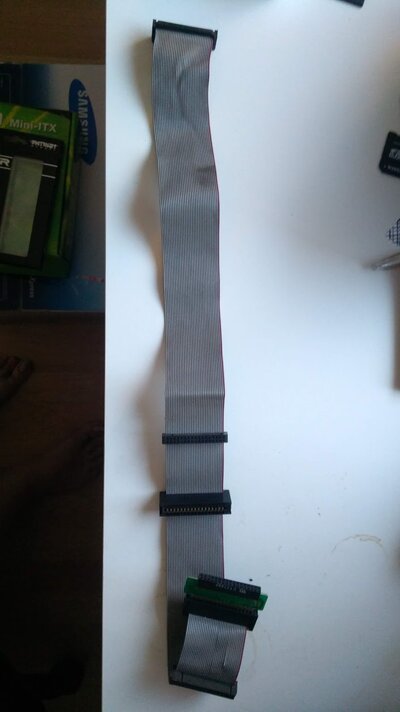
I didn't know that about shared floppy. I got this cable, can it be used?
IMG_20190607_210812.jpg
 
This is a standard floppy cable!

Why better than the Vortex?

The A2386 is faster than a Vortex equipped with the same CPU at the same speed!

The A2386 is more independent from the Amiga, the Vortex slows down, if the Amiga has a higher CPU load!

The one and only advantage of the Vortex are the 16 mb RAM...
 
Great to know! Thanks for the help! :)

I got it to work without connecting a PC floppy. I ran PC-Task with CrossDOS and ISOImage util from AmiNet. I managed to install DOS 6.22 with Norton Commander and some games.

Windows 3.1 to come! :)

What I have come to my conclusion is that Amiga 3000/4000 has too few card slot :P I want to get a graphics card and sound card for the ISA slots. I also have a CV64 and Ariadne II network card.

It won't fit all at the same time! Amiga 2000 is a little bit better in that aspect I think? I have a A2000 too, but it's quite unexpanded, just some RAM and HDD controller..
 
An A2000 is a great machine to expand with a bridgeboard including up to three ISA cards and some Amiga Zorro cards! Only the two tower models (A3000T and A4000T) are similar. Best is adding an ISA storage Controller for fast hard disk Access, too!
 
Yes apperantly. I need an accelerator card to my A2000 if I'm going to put it in. I see you got a A2630, is that any good? :) Or can you recommend any other?

Now I'm running from a RAW disk image shared from CF card from the internal IDE controller with PC-Task and it seems okey. I havn't benchmarked anything, yet.
 
A2630 is ok, but it has its RAM in the ZorroII area! GVP Gforce boards are very good, too! Best option is a Blizzard 2060...
 
I just ran System Information and got like 13ish MHz 486. Any clue why it's running so slow? I have been running a couple of benchmarks and they all are around 13-14 MHz. PCTask shows 1 MHz 486 @ my 060.

To the information is that I'm still running emulated graphics at the PC side. May that affect the performance that much?
 
I really have no experience in this type of software. But I download software like no_cache.exe, cyrix.exe etc which you can enable/disable caches. Some guides says I should turn off the L1 cache and some enable the cache, I'm confused. I tried to do both for no avail, just got lower results, 12 MHz :)

Any help here? :)
 
Better use the TI tools, not the cyrix!

And you have to turn on the cache! In Norton SI, a Vorzex Goldengate with 486SLC has ha speed rating about 15, using the cache, it has more than 32!!
 
Last edited:
To use the internal Amiga floppy drive, you have to install the so called shared floppy cable connecting the Amiga floppy controller with the bridgeboard and the bridgeboard with the floppy!

Regarding this cable, can somebody post a picture of it? Should be easy to build (I'd like to have one), but I'd like to see what the original looked like and how long it was.

Also thanks for the link to Viaduct, that was a new thing to me. Will be fun testing that out! :cool: Also the included viamakeimg tool is a nice one!
 
Status
Not open for further replies.
Back
Top Bottom