Damaged Amiga 500, please advise.

  • Thread starter Thread starter chapas
  • Start date Start date
  • Replies Replies 16
  • Views Views 345

chapas

Member
AmiBayer
Joined
Jul 26, 2012
Posts
207
Country
Portugal
Region
Lisboa
Hi there,
I have an Amiga 500 with a problem and I need some pointers to a solution.
The power supply it's OK cause it is used to power another Amigas home, when I turn it on a white image is displayed on the TV and stays that way, I never get to see the Kickstart (insert disk) image and the power led slightly blinks. Hardware problem i guess.

I was thinking in replacing all the replaceable IC's from another Amiga 500, but it's so hard to take them out that I'm afraid to ruin the pins, any advise how to remove those?

Thanks,
chapas
 
Do you have a RAM expansion installed in the trapdoor?

It may have a leaking battery, try take it out and test again.

It could also be that the chips inside the machine need a firm push on them to make sure they are correctly seated, try this before removing and re-inserting them :thumbsup:
 
Thanks for all the fast answers, really good and collaborative community here.


Thanks for the link.

Is it white straight away or does it go grey then white?

I will have to check that out when i arrive home. Will post later.
Already checked this: http://www.amigahistory.co.uk/selftest.html

Do you have a RAM expansion installed in the trapdoor?

It may have a leaking battery, try take it out and test again.

It could also be that the chips inside the machine need a firm push on them to make sure they are correctly seated, try this before removing and re-inserting them :thumbsup:

It had a RAM expansion installed w/battery, removed it and tested it on my other Amiga and it was OK, i'm keeping it out of equation for now.

Any tip/link on removing them, after the push?


Chapas
 
For regular socketed DILs and the like a small screwdriver can work well to gently easy a chip out of the socket, or at least release enough for a classic chip extractor to pull it free.
 
Last edited:
Any tip/link on removing them, after the push?

Chapas

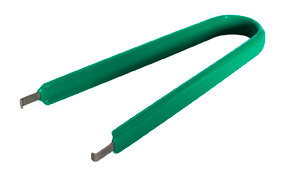
The safest way is to use a DIL extraction tool.

Yes, i have mine, but them amount of strength required it's just to much, and just can't help it on removing first on one side and bend the pins from the other, let's just hope I won't break any.

By and large, the best way to remove DIL packaged chips is with firm but gentle action. Whether you use an extraction tool or a screwdriver is down to you (I prefer the screwdriver method), but you need to apply enough force, but aim to just budge the chips slightly, gently lift them so that the legs on both sides come out.

I find that starting at one end and slowly putting the screwdriver further beneath and lifting more out until you get to the far end has been very successful for me.

By and large, practice makes perfect with this. I had a real struggle the first time I replaced a Kickstart ROM. Nowadays I'll happily pry the entire custom chipset off an A500 board and put 'em back on again. And at the very worst case, it shouldn't be too difficult to source a replacement A500 board.

Good luck!

:thumbsup:
 
Back to post some failed results,
i swapped (didn't use the DIL removal tool) every socketed IC (one at a time) to another working Amiga500 and it booted every single time. So damaged IC's are out of the equation.
I made a little video that wont show much: http://youtu.be/OuMGX566JMI
It boots but picture never get darker or brighter, it give an almost unnoticed flicker and nothing more.
Might be RAM?!?

Any more ideas, got multimeter and oscilloscope and an working Amiga on the side to compare, where should i start testing?

Thanks,
Chapas
 
Turn the A500 on, wait half a minute and put your finger over each memory chip. If one is abnormally hot, you found a culprit.
 
Turn the A500 on, wait half a minute and put your finger over each memory chip. If one is abnormally hot, you found a culprit.

Thanks for your answer,
none of the memories gets hot. The CPU and AGNUS get a bit hot (bearable hot), i guess it's normal operation.

chapas
 
Fixed!
The previous owner must been playing with the 1MB chip upgrade, jumpers JP2 and JP7A where not at their default positions, after soldering them to default the Amiga started up.

Thanks for all help and tips,
chapas
 
Fixed!
The previous owner must been playing with the 1MB chip upgrade, jumpers JP2 and JP7A where not at their default positions, after soldering them to default the Amiga started up.

Thanks for all help and tips,
chapas

I wonder why they wouldnt work in the 1MB Chip positions? Ive never had a problem the mod myself :blink:
 
Fixed!
The previous owner must been playing with the 1MB chip upgrade, jumpers JP2 and JP7A where not at their default positions, after soldering them to default the Amiga started up.

Thanks for all help and tips,
chapas

I wonder why they wouldnt work in the 1MB Chip positions? Ive never had a problem the mod myself :blink:

Possibly if there's only 512k of RAM in the machine? What happens if you do the mod, then pull out the trapdoor expansion?
 
Fixed!
The previous owner must been playing with the 1MB chip upgrade, jumpers JP2 and JP7A where not at their default positions, after soldering them to default the Amiga started up.

Thanks for all help and tips,
chapas

I wonder why they wouldnt work in the 1MB Chip positions? Ive never had a problem the mod myself :blink:

AFAIK, when you change the jumpers you are telling AGNUS to change the memory address space from 512K to 1MB. On reset the kickstart ROM has routines to clean all memory, if its not there it halts.
 
White Screen

White Screen

I am surprised that it doesn't give the green screen. Green screen mainly indicates a RAM issue.
 
Back
Top Bottom