Giving up on CF ?

  • Thread starter Thread starter kronuz
  • Start date Start date
  • Replies Replies 27
  • Views Views 749

kronuz

Member
Joined
Jul 6, 2011
Posts
811
Country
Norway
Region
Oslo
bah !
Been at it for about 6 months now. (Working WB 3.1/ 3.5/ 3.9/ CWBgaa 3.0/ 3.1/3.9...ffs and sfs.
Using Sandisk Ultra 30MB/s 4Gb/4Gb/8Gb and Kingston 133x 4Gb
-a1200
-a600

I can do it all right with ffs and get a working WB3.1 for a few hours/days, or CWB3.1 on sfs(not working at all)...of course working fine in UAE.

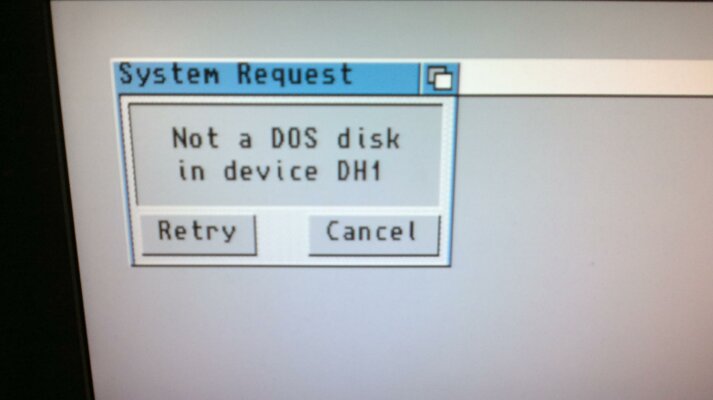
This is the closest I have ever gotten: ( as I understand that nothing less than SFS is worth zip in regards to CF? )

My blizz is dead, so I only got 2 megs of chip to play with.
...incoming 44-way cables from AK.com...gonna try an old Conner 2.5". If that works...well...I might stick with ide for a while....can feel the years beeing stripped off my life by torturing my self with this.

Pointers anyone?
Thanks for looking.
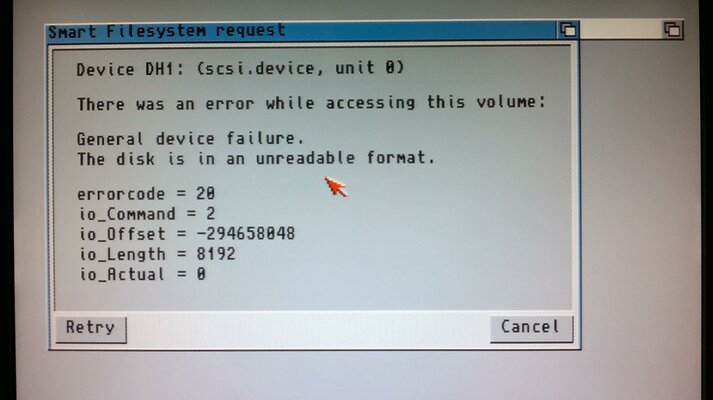
 

Attachments

  • 2012-03-28-041.jpg
    2012-03-28-041.jpg
    185.8 KB · Views: 3
  • 2012-03-28-042.jpg
    2012-03-28-042.jpg
    166 KB · Views: 5
I gave up with CF a year or so ago. its handy but a pain and I've had far too many CF's die in use or quick formatting.

IDE drives are cheap anyway
 
I give up on CF many moons ago. Unreliable piece of thing.
 
Sounds like a scsi.device issue -- I just did an install of 3.9 on SFS and when I installed BB3, it replaced the scsi.device I had. End result is that I get nearly the same errors you do.

Did you install SFS as a filesystem in HDToolbox? Also, have you tried building a boot disk with SFS tools on it and trying to access the drive?

I found that even in my broken state, I was able to get at my drive via an OS3.9 emergency boot disk.

I should note that I have two machines using CFs, one an Amiga technologies A4kT and the other an A1200. The 1200 has been running more reliably (and faster) than it did when it was running off the original HD from amigakit.
 
I have one of those SCSI readers with a PCMCIA CF adapter that I got from quarkx with the 3000T and it seemed to work well with the provided 2GB and a Kingston 4GB CF I had. The problem seemed to be constant writes. It would get corrupt over time.

I do a lot of WB tweaking so, it seemed like a bad way to go for me.

I went back to SCSI drives, but, I used the CF as a transport between my PC and Amiga to get software quickly while initially setting machines up.

It worked ok like that, I gave up on the cool idea of having it as a WB drive for everyday use.
 
Thanks guys.
"good" to hear that others have had issues with CF.

Might be that the CFadapter is not high quality, but i don't think I'll ever bother to have another go at CF if IDE works fine right away.

Found another 2.5" @ work just now...so the 600 and 1200 will be getting a drive.

I've got a 4xeide99 on the way....or at least think so. ( have not heard from elbox in weeks ). Will be fun with a little more speed and cdrom ^^ that squirrel takes up so much space:thumbsup:
 
I find the CF's useful just for setting up as a whdload rig where files don't get written to very often.

For anything meaningful, HDD all the way. My CF's always corrupt on me if try to copy large amounts of files around etc regardless of brand/cf reader.
 
I too gave up on CF many moons ago and went back to IDE HD, my Amiga and I are much happier for it:nod:
 
Last edited:
I would stick to IDE if I could in my 600 but with the ACA, it just isn't a viable option. :(

I do agree though, I much prefer a Hard Disk over an SS Disk.
 
I think its safe to say a CF card is not suitable to the beating the Amiga gives it as a base for your OS which I cant say I am surprised.
 
I have never had any problems with CF cards and I'd like to find the real reason for these problems.. (just like I wanted to find what was the real reason for Max Transfer. I don't like assumptions.)

Does the card still work 100% when used in a PC? For example does WinUAE HD image creation succeed without errors and does the card still work normally in WinUAE.

Of course it is obviously broken card if it returns errors when in PC card reader.
 
I concur. I highly doubt these cards are failing of their own accord. They are flash, true, but they do wear levelling to deal with fuse failure, and the workload a professional Canon camera inflicts is much, much worse in terms of write/erase cycles than what the SYS disk of an Amiga does, and yet CF cards are the medium of choice for photographers.

I don't suspect CF adapter failure either due to the fact that CF cards speak ATA/IDE natively, and are essentially just voltage and physical adapters rather than protocol translators.

I would suggest the same for troubleshooting -- when it fails, try using a PC to take an image of the disk. If you get actual bad sectors read, you most likely have a bad CF. Otherwise, I'd suspect the file system and/or the disk driver -- SFS is beta, after all, and scsi.device isn't exactly well known for handling exotic drives well.
 
PAh all these ppl giveing up on me, its know wonder I feel bad ;)
 
One possible reason is use of stupid wear leveling algoritm that assumes FAT format.. But this can't explain the problem if card still works in PC.
 
I suspect there's little difference between a wear levelling algo optimized for FAT vs. not, since the on disk structures have little difference and aren't fully predictable. Plus, its easier to implement a generic wear levelling algo in hardware than it is to build one specific to a file system. After all, the locations of the clusters used to make up the data stored in the files is non deterministic, depending on the OS implementation of the file system.

CFs are given a general task of safeguarding data, so writing a wear levelling algo specific to a file system is asking for trouble for a CF since you're given a fixed number of remappable flash sectors (SSDs are another matter). Remember that flash writes data in whole sectors and has to do an erase to rewrite it. Since CF cards don't have the equivalent of TRIM, they have to use writes and erasures carefully in a generic way.

Note that I'm not saying its not possible, but that its highly improbable. :D
 
on a different note if anyone can point me to some software that allows me to write important files to the outside sectors of a Harddrive let me know
 
Hey everyone, here's a post from someone on the Vintage-Computer forum about some inexpensive 5GB MicroDrives. These might be a much better solution for the CF readers that we use in our Amigas. I've ordered a couple for myself. :D

Heather

twolazy said:
Ran across this seller about a month ago, received all 4 drives that I ordered. All the drives work great! Figured others here might use CF cards as well in vintage systems, so figure I share...Price sure is right and can't beef about the added bonus of being able to use swap files! (I know you can with flash, just its slower and detrimental to the card's longevity...) =)

Sweet little drives for the price. Blow away old 3.5"/2.5" 2gb and smaller drives performance wise believe it or not, and draw only what 50ma tops! Currently playing with 2 in raid 0 setup on a 386sx on a caching isa ide controller w/ 32mb ram. ^_^

http://cgi.ebay.com/ws/eBayISAPI.dl...3618411&ssPageName=STRK:MERWX:ACTPNL:LNLK:ITM
 
Zetr0 sent me a 8gb microdrive about 2 weeks ago. Must say, works very nicely indeed. None of the hassles of maxtransfer etc, but the nice benefit of having an easy to swap drive. Felt the same as using a cf card in terms of speed tbh. :thumbsup:

Hey everyone, here's a post from someone on the Vintage-Computer forum about some inexpensive 5GB MicroDrives. These might be a much better solution for the CF readers that we use in our Amigas. I've ordered a couple for myself. :D

Heather

twolazy said:
Ran across this seller about a month ago, received all 4 drives that I ordered. All the drives work great! Figured others here might use CF cards as well in vintage systems, so figure I share...Price sure is right and can't beef about the added bonus of being able to use swap files! (I know you can with flash, just its slower and detrimental to the card's longevity...) =)

Sweet little drives for the price. Blow away old 3.5"/2.5" 2gb and smaller drives performance wise believe it or not, and draw only what 50ma tops! Currently playing with 2 in raid 0 setup on a 386sx on a caching isa ide controller w/ 32mb ram. ^_^

http://cgi.ebay.com/ws/eBayISAPI.dl...3618411&ssPageName=STRK:MERWX:ACTPNL:LNLK:ITM
 
I have never had any problems with CF cards and I'd like to find the real reason for these problems..
Same here. My A1200 has been rocking the same CF for the past 3 years and the A600 has another one now. The process to set it up was easy (thanks to WinUAE/Toni :)), the speed is top notch, the silent operation of the computer is excellent and the easiness of backing it up is just the cherry on the icing. I rarely write to it too, it makes no sense, I have an external SD card where I keep most of my data for easy transfer. So it's just written to when I install an application (rarely) or a game (even more rare).

Why so much hate?

Alternatively, you know you all COULD get a 4GB IDE SSD module for not that much... I am interested in going this route on my next Amiga, if I ever have one (someone in the household might kill me if II do get another one :D)
 
Back
Top Bottom