brinky
New member
So, got too frustrated trying to resurrect my almost-there 2000, so bought a known working one from ebay. Of course there were surprises hidden under the floppy / PSU carrier, but it still works. Went about installing a GVP HC +8, and then the re-remembering had to start. Back in the heyday we had this all figured out, how to jumper up all the big boxes for 4mb SIMMs. I know this, because all I have *are* 4mb SIMMs, (always live large!) Of course, no worky from the initial reading of the manual on how to set the jumpers, and the annoying board diagnostic red screen comes up. Fiddled with the plain RAM +8 card I have as well, and same thing there. Even putting both in the computer just doubled the annoying diagnostic display. Amazingly, the 25-y-o HD came up like a champ the whole time. Looked up online the installation manual, which doesn't even broach the subject of 4mn SIMMs (although yes, the RevII board DOES have it screened on there). I finally did get the RAM +8 card to work. The trick for me was, looking at the chart either on the board or in the manual, to realize that the jumpers are logic selectors, not physical slot selectors. I haven't checked yet, BUT, I have two 4mb SIMMS installed on the RAM +8, in the first two slots, CN12 and CN13, and then here is the tricky part: the jumpers are on j6 and j8, which means you should read the diagram as saying there is 8mb of SIMM installed on this card, and then of course j10 is jumpered to designate that the SIMMs are 4mb, not 1mb.
To explain better, and I know I figured this out 25 years ago, "It's all Coming Back to Me Now", that the cute little table printed in the manual is misleading. I looks like, and the instructions read like, you are selecting specific slots for the SIMMs via the jumpers. In the case of 1mb SIMMs that may be true, but for 4mb SIMMs I believe you can use ANY pair, as long as you set the jumpers in this way: to read as 8mb is available, and the last jumper to designate the SIMM size (4mb) is set.
Read the manual jumper table like this: memory column says how much memory is installed, ONLY, then select jumpers as per how much memory is installed, and jumper the 4mb jumper to designate SIMM size when they are used.
I am definitely going to do some testing tomorrow on whether or not it matters which pair they are in, and also if the jumpers work differently on the HC +8 (4 pairs) vs the RAM 8 (3 pairs) card.
Oh, and then the Dataflyer RAM Expansion card will get similar attention.
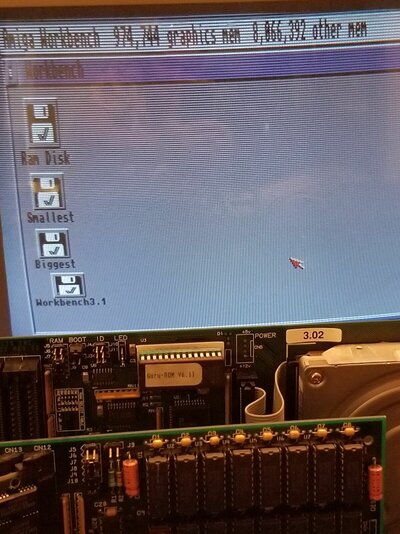
In the pic, the HC at the back has no RAM installed, and RAM8 in front has 2 4mb in first two slots installed. Hard to get a good shot with the screen showing it as well!
To explain better, and I know I figured this out 25 years ago, "It's all Coming Back to Me Now", that the cute little table printed in the manual is misleading. I looks like, and the instructions read like, you are selecting specific slots for the SIMMs via the jumpers. In the case of 1mb SIMMs that may be true, but for 4mb SIMMs I believe you can use ANY pair, as long as you set the jumpers in this way: to read as 8mb is available, and the last jumper to designate the SIMM size (4mb) is set.
Read the manual jumper table like this: memory column says how much memory is installed, ONLY, then select jumpers as per how much memory is installed, and jumper the 4mb jumper to designate SIMM size when they are used.
I am definitely going to do some testing tomorrow on whether or not it matters which pair they are in, and also if the jumpers work differently on the HC +8 (4 pairs) vs the RAM 8 (3 pairs) card.
Oh, and then the Dataflyer RAM Expansion card will get similar attention.
In the pic, the HC at the back has no RAM installed, and RAM8 in front has 2 4mb in first two slots installed. Hard to get a good shot with the screen showing it as well!