
HOW??? do i copy files on to a mac?

  • Thread starter Thread starter mjnurney
  • Start date Start date
  • Replies Replies 10
  • Views Views 2581

mjnurney

we live as we dream. Alone.
AmiBayer
Joined
Aug 27, 2010
Posts
9,473
Country
england
Region
Towcester
sooooo how do i get prince of persia (macintosh colour version) on to my macintosh si

i can copy the .sit file from the web and unpack it on my iMac with stuffit.

copy it to my PC and then floppy but the macintosh says..

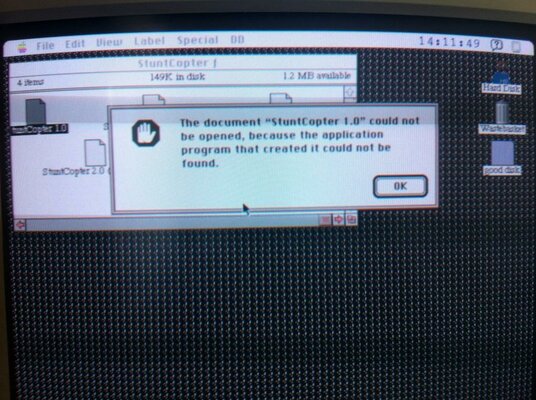
unable to find software to open this , use text view or something instead?

i have tried dozens of files and no go..

.bin
.sit

(all stuffit files)

Macintosh spec
OS 7.0
16mb ram
40mb scsi
25mhz
colour Rgb.

anyone? this is very important , I've found zork,adventure,uninvited,pirates and so on..grrrr

mike.
 

Attachments

  • what?.jpg
    what?.jpg
    133.8 KB · Views: 5
Drag the sit files onto the stuffit expander if you have that on your colour, it should work just fine that way.
 
i can't get stuffit on the macintosh because the installer (v4) comes up with the same error as above?

---------- Post added at 11:39 ---------- Previous post was at 11:37 ----------

is it because I'm using a PC to copy the files over?

i can't find my USB floppy drive for my iMac at the min
 
been a while since i used olde mac's..

but if you are copying to pc isnt it losing the attached data that gives its file type etc to os7.. a meta data type thing?

pc uses .doc extension etc.
mac has a tag attached to the file.

e.g. amiga has a .info without it the os does not know file type.
 
bazzaq is right, the extension info and everything is lost once transferred from a system that isn't Mac :P

Getting it online or have someone copy software required to a floppy from a mac would do the trick, or if the original floppies for the system has any tools for handling sit / hqx / bin
 
yes very probably , some files show data in them on the iMac

like house 128k , but the PC reports house 0K

i rather suspect the crappy PC is causing the problem, i must find my USB floppy drive of the iMac..
 
if you copy a .sit to the olde mac and then do file properties, methinks you can add the file type into it.
 
Leopard (and also Snow Leopard) does not provide the option to either make an HFS partition, or to format an volume with HFS (Mac OS standard) on the macintosh - only FAT

i can't write to an HFS volume - it's read-only, so copying from the iMac is a no no at the moment unless i find some software to do it.

---------- Post added at 13:06 ---------- Previous post was at 12:08 ----------

okay - kind of done it..

expand the files on the imac
copy to my hfs+ usb stick
open with mac drive on he pc (pc has a floppy)
copy files to mac formatted floppy with mac drive
and they appear on the macintosh..

and work :-)
 
Last edited:
When I had my Si I used a SCSI Zip drive. I formatted zip discs for the Mac, and could read them on my Amiga A4000. So I used the Amiga to transfer files that way. Worked perfectly.
 
Classic MacOS had a dual-fork filesystem. Any executable code is stored in the resource fork, which doesn't exist on MSDOS filesystems, so you can't copy Mac binary images around that way.

StuffIt files (.sit) are data fork only so they can be downloaded from the web. Your best bet is to transfer the still-compressed .sit file to the classic Mac and decompress it there.

I'm not sure how you solve the bootstrapping issue if you don't have StuffIt Expander on the Classic. Later versions of Classic MacOS shipped with it, so you might be able to find it on your original install media. If all else fails, I can maybe knock you up a Classic MacOS floppy or CD-ROM with StuffIt Expander on...

:thumbsup:
 
There is also software like HFSExplorer and Macdisk which might be of help when transferring files to old macs.
 
Back
Top Bottom