Interesting issue with upgrading Amiga OS 3.2 to a later release using 3.1 ROMs on A4000

  • Thread starter Thread starter Boing-ball
  • Start date Start date
  • Replies Replies 11
  • Views Views 1096

Boing-ball

Well-known member
AmiBayer
Joined
Nov 17, 2023
Posts
2,137
Country
United Kingdom
Region
London
Okay….

So one reason or another I got bored and updated one of my prime working Amiga A4000 Desktop with an updated overclocked Cyberstorm PPC/060 (75 MHz 060 rev 6 and 430mhz 604e PPC). As well as changing over from a Prometheus Firebird Daughterboard setup to a Mediator MKIV. This has the 3.2.2 (47.111) ROMs fitted.

Anyhoo… This broke my current 128GB SD build of Amiga OS 3.2.2.1.. When fitting the Mediator and the Cyber updated accelerator 🤷🏻‍♂️

So have now rebuilt the system with a backup of a basic AmigaOS 3.2.2.1 with Amiga physical ROMs version 3.1 (I am planning on putting on Amiga OS 4.1FE and anything last 3.1 causes issue with the installation). I did a fresh Amiga OS 3.2 install and checked that loadmodules was working correctly..

Now the issue is everytime I try and update to 3.2.1 or straight to 3.2.2 etc.. The upgrade appears to work with no errors etc.. Bit on cold boot, I am still showing Amiga OS 3.2 (2021). When I did a Amiga OS 3.2.2 from 3.2 base (Which appeared to work) then try a 3.2.2.1 hotfix, the 3.2.2.1 complains I am not at 3.2.2.

So am I right in thinking I have to have the physical 3.2 or later ROMs to get the upgrade to work? Or do I have a anomaly here?

My only thinking is to try a Blizkick onto the Cyberstorm of 3.2.2 (47.11), but for AmigaOS 4.1FE to work I will need to remember to disable the “MAPROM” option on the Cyberstorm settings everytime..

Thoughts?
 
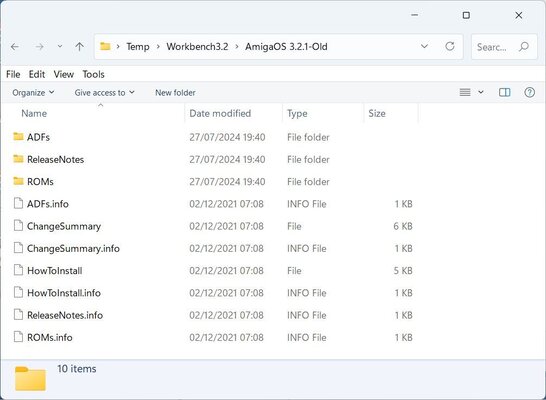
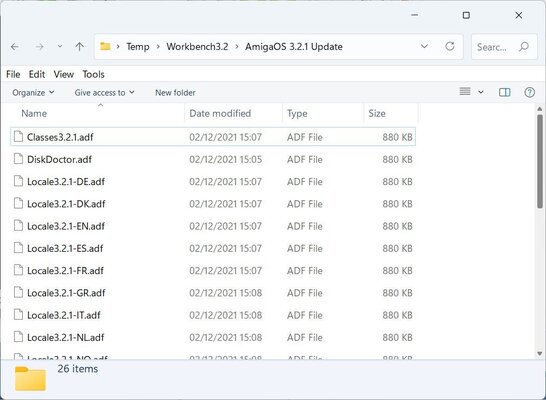
If your system is borking after installing the 3.2.1 update then go check the update contents itself. Do you have the version that are all digital adf files or do have one that contains the file 'ChangeSummary'

capture1.jpg
capture2.jpg
 
To be honest, it shouldn't make any difference if you have physical ROMs or you softkick them.

I have both versions of the 3.2.1 update. I do use the fully adf versions with my A1200's and they seem to be just fine. I wonder if the hardware config you have there is more compatible with the "ChangeSummary" version ...

I do recall a discussion thread on another forum about problems with various hardware configs when updating, maybe yours falls into this area.
 
Not sure if this is helpful (sorry, am in a virtual work meeting while typing this but not really paying attention there lol). I think you can go direct from 3.2 to 3.2.2.1 - just open the 3.2.2.1 hotfix and use the regular update flow there (not the hotfix flow) and you'll go all the way to 3.2.2.1.
 
Not sure if this is helpful (sorry, am in a virtual work meeting while typing this but not really paying attention there lol). I think you can go direct from 3.2 to 3.2.2.1 - just open the 3.2.2.1 hotfix and use the regular update flow there (not the hotfix flow) and you'll go all the way to 3.2.2.1.
Thanks. I think there is a bigger issue. Hopefully I will get this licked soon. Just tried something today with a Bootable Zip-750 installer disk I made, then I started to get Critical SCSI partition errors on my 128GB SD card 🤦🏻‍♂️ Now the card won’t start up and the system locks up when I try to start up… Life of Amiga ownership…
 
Update time…

Thanks to Miggymad with his Assitance over on PM 👍🏻

It appears I have some annoying issues with my new setup. This looked to be around the SCSI termination. I have simplified the build and so far so good with a AmigaOS3.9 with BB 1-4 setup using the Cyberstorm SCSI and SCsI2SD V6 rev F. Although what is weird is the fact that I struggled to get an actual video output with my MK2 AGA Indivision and RATTE adapter until I updated to BB3&4 prior to 2018. 🤷🏻‍♂️
Ended up using a Amitrak RGB to Composite output and even then my screen output was screwy with my LG TV/Monitor 🤬🤦🏻‍♂️
On a AmigaOS3.2 upgrade then it goes through but fails to load WB. I’m guessing this down to the S-S getting changed and not having ThorsMMU setup anymore…..

The challenge continues……

Just putting this up, just in-case anyone else has this issue….

I have put up a Wanted thread for a MK3 Indivision just incase this is a MK2 problem as well….
 
Wow, that's strange. I set up ClassicWB 3.9 via the following:
  1. Install barebones OS 3.9
  2. Update with BB1+2
  3. Install ClassicWB 3.9
  4. Update with BB3+4
  5. Update with OS3.2
  6. Update with 3.2.2.1 updates/hotfix
Note that I was running direct into an Amiga monitor so did not have any output issues, but also, don't have a RATTE adapter installed at this time which might be worth you investigating as a culprit for the video output issues?

I did have to do the CPU installer for my 060, so maybe that could be the missing step here, idk, but worth a shot? In any case, unless you're installing CWB, this is probably not apples to apples, but figured I'd chime in. I got my hard drive set up in UAE before moving over to hardware, and everything "worked" once that was done.

Also, once you do get things rolling, I'd love to see some speed benchmarks of your SCSI2SD on the accelerator SCSI :)
 
Wow, that's strange. I set up ClassicWB 3.9 via the following:
  1. Install barebones OS 3.9
  2. Update with BB1+2
  3. Install ClassicWB 3.9
  4. Update with BB3+4
  5. Update with OS3.2
  6. Update with 3.2.2.1 updates/hotfix
Note that I was running direct into an Amiga monitor so did not have any output issues, but also, don't have a RATTE adapter installed at this time which might be worth you investigating as a culprit for the video output issues?

I did have to do the CPU installer for my 060, so maybe that could be the missing step here, idk, but worth a shot? In any case, unless you're installing CWB, this is probably not apples to apples, but figured I'd chime in. I got my hard drive set up in UAE before moving over to hardware, and everything "worked" once that was done.

Also, once you do get things rolling, I'd love to see some speed benchmarks of your SCSI2SD on the accelerator SCSI :)
Thanks for the instructions 👍🏻

What is interesting, if I plug in the SD card (with the 3.2 upgrade) onto another A4000D with Cyberstorm mk1 and Cybervision 64/3D setup with the 3.22 ROMs (47.111). It boots fine 🤷🏻‍♂️ on my cyberppc with 3.1 ROMs using loadmodules. It ain’t starting up properly. Yet will work fine with AmigaOS3.9 bb1-4. This is indeed a headscratcher. I suspecting some shannigans on my setup somewhere.
 
@Boing-ball

Check to see if any rom chips are not seated in their sockets properly to begin with.

Perhaps it would also be more beneficial for you to remove as many cards as possible, leaving only the bare essentials. Then start to reintroduce them one at a time between booting from either the now known working SD card or a new full AmigaOS 3.2.2 install on a new one created with WinUAE.

That should hopefully give you some indication as to where the conflict may be situated.
 
@Boing-ball Any thoughts on starting with a bare OS3.2.2.1 install and adding components you want from there? I feel like my CWB 3.9 with BB1-4 and OS3.2.2.1 over top runs pretty slow compared to a basic OS3.2.2.1 starting point. This may help rule out any software/config issues as well.
 
@Boing-ball Any thoughts on starting with a bare OS3.2.2.1 install and adding components you want from there? I feel like my CWB 3.9 with BB1-4 and OS3.2.2.1 over top runs pretty slow compared to a basic OS3.2.2.1 starting point. This may help rule out any software/config issues as well.
Yeah. Already tried that. Same results. Either try and Blizkick 3.2.2 or going to try replacing the KS3.1 ROMs with the actual 3.2.2 versions. My next test after this will be Amiga OS 4.1FE install. I know last time with 3.1.4 ROMs I had a lot of issues getting that installed. Stay tuned… 👍🏻
 
Back
Top Bottom