Issue with SFS

genny_flick

Well-known member
AmiBayer
Joined
May 13, 2011
Posts
1,398
Country
Italy
Region
Bari, Apulia
After finding a reliable hard drive, I want to use Smart File System. It works but this icon remains on the workbench screen as you can see on the image and the INFO command gives this result.
1708113627625374672429906368675.jpg
 
After finding a reliable hard drive, I want to use Smart File System. It works but this icon remains on the workbench screen as you can see on the image and the INFO command gives this result.

View attachment 2478098
Can I ask why SFS? It’s no longer developed for nor supported now… If you don’t want to use FastFilesystem, then I definitely recommend PFS3. Toni Willen is still supporting this. A newer version is being worked o. With a Beta for version 20.0 can be downloaded. Current is 19.2 off Aminet..
 
In the past I have used PFS but had a bad experience, I will try again, thanks.
 
No further development on SFS is a wrong argument.
SFS is fine as is and doesn't need anything more.
It has been reliable for me for 20+ years while i only got problems with FFS before that.
I don't use PFS because it wasn't free at the time and i don't need it now.
Only once one SFS partition got damaged and i got warning messages. It has been solved by just copying data on another partition, reformating and copying again and it has been fine ever since.

About that FDH1 problem, you should explain how you got to this.
What disk is this? How did you build the partition? Do you have an updated scsi.device? Did you quick format it properly?

These days, i do not prepare new drives on a real hardware but first on WinUAE (Amikit) to make sure i have everything working fine before putting it in real hardware. So i use the HDToolbox from this distro. Only using big SSD now if that matters, and i make sure to setup correct drive geometry for each drive.
 
Thanks for the reply. Kickstart is version 3.2, workbench is version 3.9. I tried both with and without updating scsi.device. Initially the hard drive had FFS with 2 fully functional partitions obtained using HDToolBox and fully formatted. They installed on RDB SFS v1.277 and fully formatted FDH1 (formerly working partitions). It works very well but the icon remains and the info command gives the disk unreadable but it works. I tried removing sfs from RDB and reusing FFS and the strange icon disappears. After a fresh install of SFS and a full format of the partitions, it never changed, the icon is still here. I have had SFS for over 10 years in my other A4000 and this problem is new to me. As you say, it never has corrupted or corrupted files or partitions. The only difference is the kickstart rom, one A4000 has v3.1, the others have v3.2.2.
 
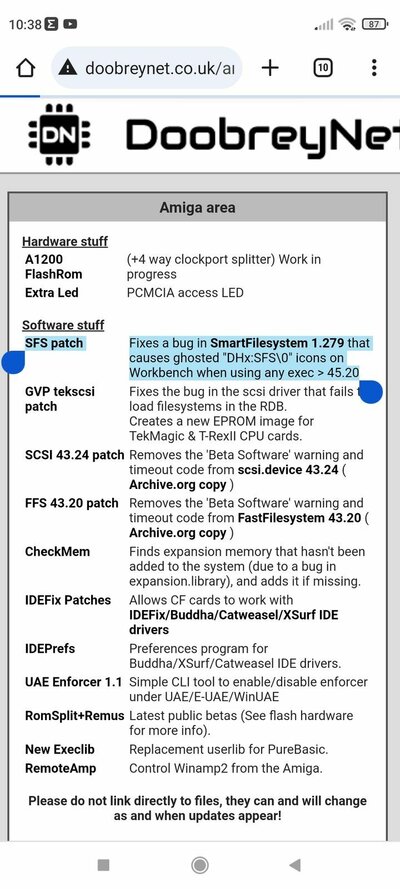
Thanks to an AmiBay user, it seems that the problem has been solved, as you can see in this image.

I'll try this afternoon.
 

Attachments

  • Screenshot_2024-02-19-10-38-51-829_com.android.chrome.jpg
    Screenshot_2024-02-19-10-38-51-829_com.android.chrome.jpg
    180.4 KB · Views: 19
Kickstart is version 3.2, workbench is version 3.9

Why have you mixed ROM 3.2 with AOS3.9?
ROM 3.2 is intended to be used with AOS3.2+, when AOS3.9 has been developed the latest ROM version was 3.1 and it is the base for patches included in the AOS3.9.
 
I don't have os3.2. Is it so necessary or can it be done without using only OS3.9? From what I understand, once OS3.2 is installed, isn't it worth installing OS3.9?
 
My point was, 3.2 ROM has been developed for OS3.2, not for OS3.9.
If you use OS3.9, stay with ROM3.1.
In 3.2 ROM, you have some much newer libraries and device drivers, which may not be compatible with what comes with OS3.9.

ROM and OS versions were almost always supplied together.
KS1.2 - WB1.2
KS1.3 - WB1.3
KS2.0 - WB2.x
KS3.0 - WB3.0
KS3.1 - WB3.1
KS3.1.4 - WB3.1.4
KS3.2 - WB3.2

WB3.5 / WB3.9 never got dedicated KS, and used 3.1 ROM as starting point.

The bottom line: I do not say you have to buy and use OS3.2 after installing 3.2 ROM, you can use any other OS version you like to, but be prepared for some strange side effects.
 
No further development on SFS is a wrong argument.
SFS is fine as is and doesn't need anything more.
It has been reliable for me for 20+ years while i only got problems with FFS before that.
I don't use PFS because it wasn't free at the time and i don't need it now.
Only once one SFS partition got damaged and i got warning messages. It has been solved by just copying data on another partition, reformating and copying again and it has been fine ever since.

About that FDH1 problem, you should explain how you got to this.
What disk is this? How did you build the partition? Do you have an updated scsi.device? Did you quick format it properly?

These days, i do not prepare new drives on a real hardware but first on WinUAE (Amikit) to make sure i have everything working fine before putting it in real hardware. So i use the HDToolbox from this distro. Only using big SSD now if that matters, and i make sure to setup correct drive geometry for each drive.
Not really. I have to disagree. It has been now proven that the latter 3.2 ROM may have been the issue here. As I have stated the SFS filesystem is no longer developed. Things move on. Having the rebuttal that this is the wrong argument. Is not the way. PFS3 and FFS are still being developed, Supported and improved upon. As I have stated in my original post. PFS3 is still supported by Toni Willen with the latest released version being 19.2. After a number of years, someone found an issue where if you went past the 512KB block size, PFS3 wouldn’t utilise it. Luckily as there is still support. A new BETA of version 20.0 has been released. All because it is still supported 👍🏻
 
I don't have os3.2. Is it so necessary or can it be done without using only OS3.9? From what I understand, once OS3.2 is installed, isn't it worth installing OS3.9?
I’ve done it this way. Physical 3.2.2 ROMS. Installed 3.9 + bb1-4. Then upgraded to 3.2 - 3.2.2.1. Works for me 👍🏻
 
Back
Top Bottom