It's time... To mod a PSION Series 7

  • Thread starter Thread starter Charlie
  • Start date Start date
  • Replies Replies 28
  • Views Views 14387
Small update:

It's my intention to use an Aikon programmable USB keyboard controller for my project. Fully made Aikon's have been sold out for years - not a biggie, the plans for a home-brew version are readily available and simple enough to construct. But it would be nice to use an equivalent off the shelf part, and making a fully DIY version does need an ISP programmer - not an expensive bit of kit but I bet very few people have one in their parts drawer.
Therefore the plan was to use a MattairTech MT-DB-U4 with a preinstalled CDC Serial Driver. You can find them on the other bay for next to nothing...
...You can then use AVRDUDE to programme this device with the Aikon firmware via USB. No fabrication, no special hardware needed. It all works too. The fly in the ointment is while everything works just fine the Aikon Windows software used to set up the keymap is hard-coded to only recognise the custom Aikon boot-loader, not the standard CDC one that this device uses.

DAMN AND BLAST IT! I can't program it. :-(

Ho-hum, I have an ISP programer on order, and I do expect this device to work as an Aikon substitute, but I had hoped for a dead easy solution that others would find helpful...
...still, assuming this device will indeed work in this role, it's still good to know you don't have to build one from scratch.
 
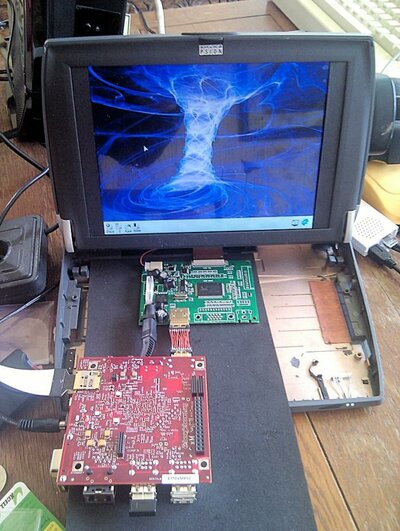
Right, time for some progress:
PSION1.jpg
-Bits 'n Bobs-

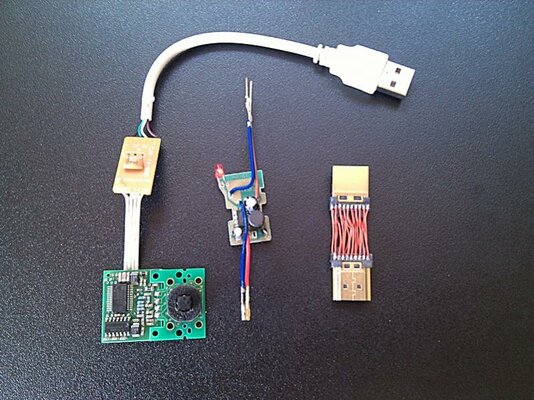
A few essential bits 'n bobs to connect stuff. From left to right we have:
A Trackpoint board connected to a proper PS2 to USB converter. Currently there's a USB connector attached for testing but the final version will be directly wired in.
Next is the remains of a car lighter to USB converter. That's 12v to 5v sorted for the Beagleboard-xM, it gives a surprisingly stable 5.02v and 1.5A - much better than I was expecting from a cheap bit of electronic tat.
Then there's my mini HDMI to HDMI connector. A bit slow and fiddly to make but it works fine. This is only the proof of concept, I'm likely going to need to make a Mk2 once I've finalised how everything will go in the PSION shell.
I'm still waiting on my programmer to turn the AtMega32 board I have in to an Aikon programmable keyoard controller...


Disassembly shots:
PSION2.jpgPSION3.jpg
-Fully working Psion.., For now-

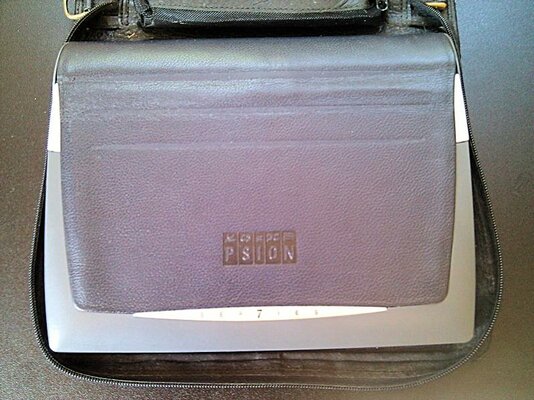
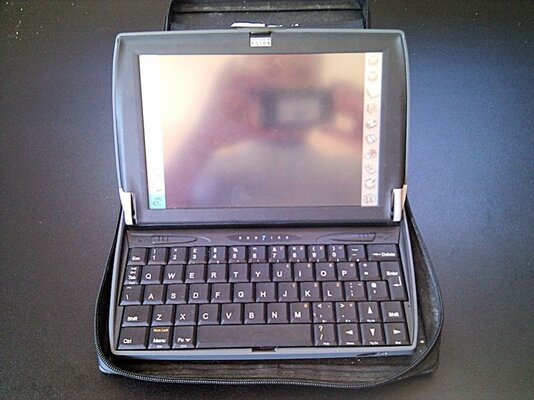
So here's my Series 7 with Netbook personality module prior to surgery. A shame to have to chop it up but as I don't have a dead one and nobody's taken me up on my new lamps for old offer...
I shall make this a bit tediously detailed as sites with the info are rapidly disappearing - indeed a 'how to take the screen apart' guide can't be found anywhere, but here.


And so we begin:
PSION4.jpg
-A Screw Loose-

The first job is to open the case and get any upgrades out to access things further. First the Series 7 (or Netbook) label needs pulling out. I find the easiest way is to get a thumbnail under an edge, then release all the way round, pulling gently as you go so the label doesn't get damaged. Under that is a screw that needs removing.
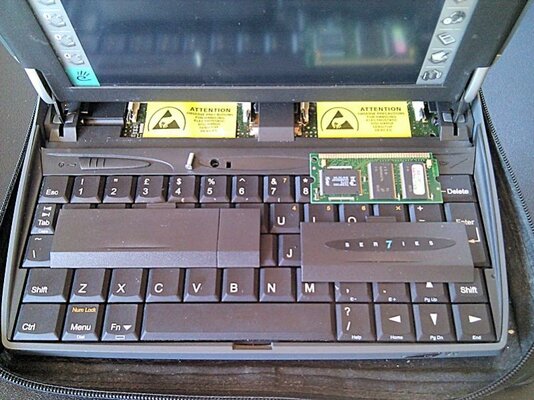
Next adjust the screen to it's upright rather than the usual leaning back at a relaxed angle. This will allow you to slide the two covers forward to reveal any upgrade modules. In my case a Netbook personality module. Remove any such upgrades buy releasing the latches on either end - they fit very much like laptop memory modules. Use the button on the right to pop out stylus.


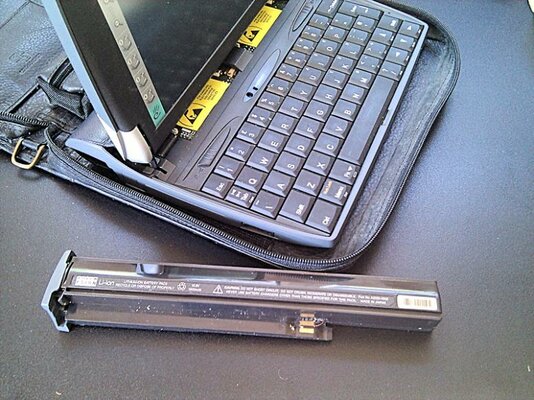
Compact Flash and Battery(s):
PSION5.jpgPSION6.jpg
-More stuff to remove-

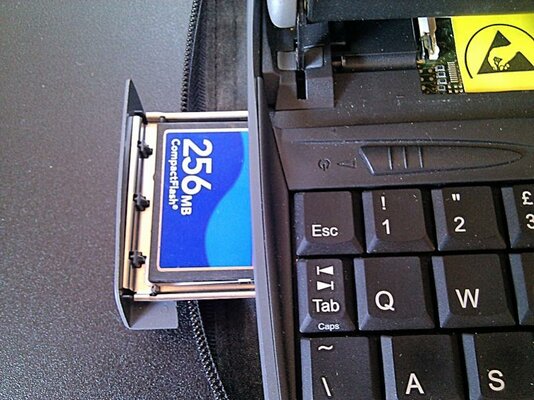
The 7/Netbook 'HDD' comes in the form of a CF card you drop in to a groovy little tray - shame I'm going to need the room inside so I won't be keeping this feature. Pop out the CF card, then turn the machine over and remove the lithium cell from it's trapdoor.
The cover for the main battery is integrated with the battery itself. It will slide back a little way making for a convenient handle. The whole lot should then slide out of the left side of the machine. You may need to pull quite hard - especially if, like mine, time has caused the glue that holds the leather covering to migrate on to the battery. A bit of waggling may help.

More anon...
 
Last edited:
...Anon


Mr Floppy:
PSION7.jpgPSION8.jpg
-Remove the Pins, Out with the Plastic-

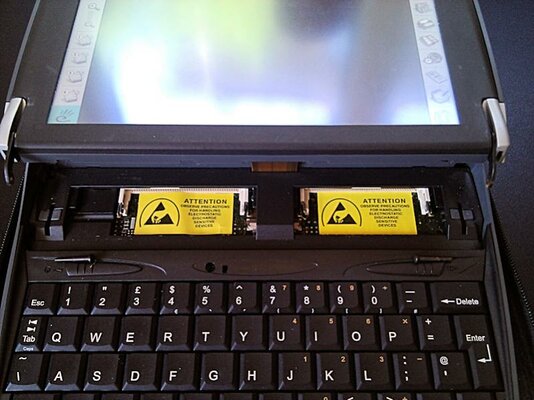
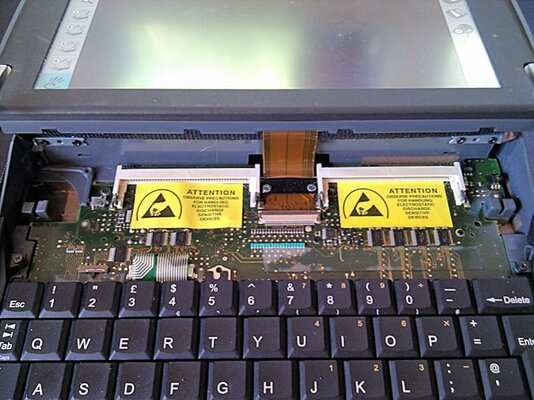
At the outside edges of the now empty upgrade slots are two pins that hold the front mounts of the screen hinge. Just pull the pins and the screen will flop back. The rear hinges can be left in place.
Having done that the plastic tray can be pulled upward and forward - There are clips and it can be quite stiff so some force can be needed but don't go at it like a gorilla or you'll snap something.
The ribbon cable for the screen is held down with a bar and a couple of screws, remove this, and plugs direct in to the motherboard - the plug has a little plastic bar to flip up to release the cable. Don't pull and be gentle with the bar - if you snap it you've trashed the motherboard.


Away with the keyboard:
PSION9.jpg
-The Keyboard Departs-

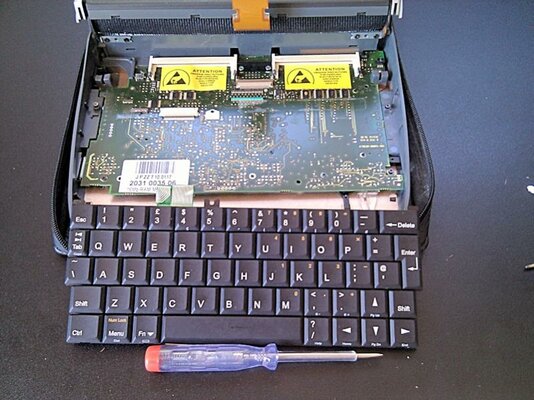
At this point gently but firmly pull the keyboard ribbon cable toward the screen and it will pop out - this one's held in with friction. The keyboard should then just lift out from the back, the front being slotted under the front lip.
Two pieces of plastic either side of where the keyboard fits can then be unscrewed to fully reveal the motherboard.


Out with the motherboard:
PSION10.jpgPSION11.jpg
-Out it Comes-

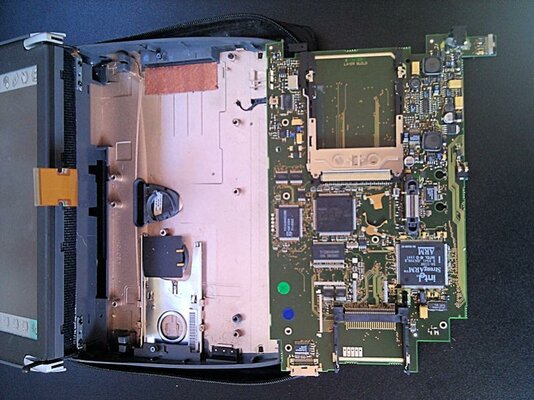
The motherboard pretty well fills the whole base of the machine. It's dead-easy to remove, just unscrew every remaining screw you can see and it will lift up and forward - with a little jiggling. As can be seen all the good stuff is on the underside. The Series 7 / Netbook is basically a portable RiscPC, so close in fact that there once was a project to port RiscOS to this machine. Sadly it stalled because the data sheet for one or two of propitiatory IC's remained unavailable (in spite of much begging) so making a port impossible.
*Sigh* I wouldn't be engaged in this project if RiscOS ran natively on this machine.


Are you paying attention?

PSION12.jpg
-Out with the Screen-

Finally we get to some genuinely new information, I couldn't find this on the 'net so I had to work it out for myself. Possibly it will be useful to someone else?
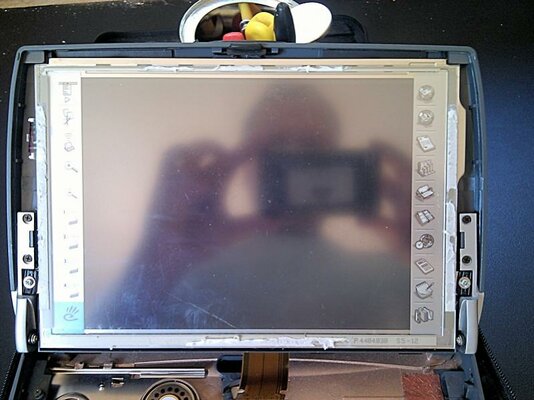
The picture above shows the screen once the bezel has been removed. By far the best 'tool' to use is one of those loyalty card thingummies, about the side of a credit card but without the lumpy bits. Do NOT use anything other than this kind of soft, stiff plastic - at best you'll leave lots of nasty scratches, at worst you'll snap the bezel and scratch the screen.
In a nut-shell the bezel clips in to the shell, if memory serves two at the top, two either side, and four at the bottom. The ones at the bottom are the trickiest and prone to snapping, we'll do those last. The really nasty thing Psion did was also to glue the bezel to the screen - Damn them!

So:
Pick a side and inset your loyalty card between the bezel and the shell, then gently slide it up and down gently levering up the bezel as you go to disengage the clips. Then without removing said card run round the top corner then the opposite side to pop those clips too - Leave the bottom ones alone!
You now want to repeat the exact same procedure again but this time you're now aiming the edge of the card between the screen and bezel. Push the card in just far enough that a corner appears in the screen area, then slide it round the three sides you did before to free the glue holding the bezel to the screen - Damn them!
Take as many goes as you like, there's no hurry, some grunt will be required but as before gorillas are not required for this action.

Did you leave the bottom clips alone?
Oh dear. You snapped them off, eh? Assuming you heeded the above advice go find a flat head screwdriver small enough to fit in the slots on the underside of the screen shell. Insert the card between the now flapping bezel and screen GENTLY freeing any glue along the bottom edge. Once you have made it all the way to the edge what you're aiming for is to combine three actions in one:
-Lift the free edge of the screen
-Support the clip you're trying to pop with the card from the inside
-Pop the clip with the end of the screwdriver
Do that with each clip in turn and the bezel will come away without any damage. You can see the remains of the glue in the photo above.

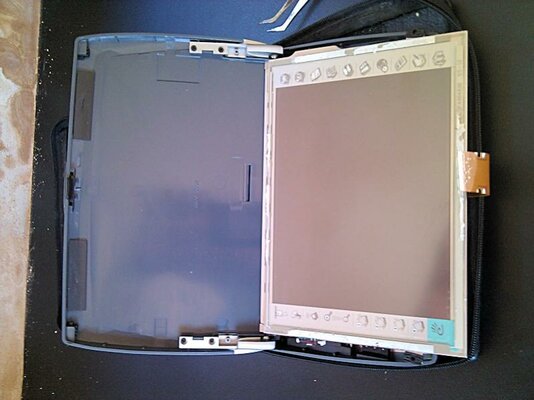
Bottom left and right of the screen, just above the hinge mechanism, are two screws. Remove these and pop out the rubber grommets you find underneath. The top of the screen is held under a couple of rubber clips so once the lower grommets are out the screen will lift out from it's lower edge.


Two more disassembly shots:
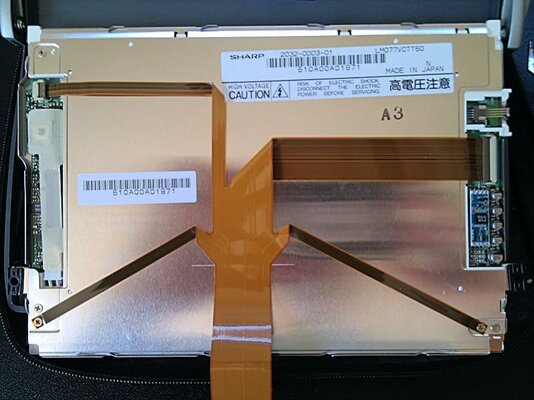
PSION13.jpgPSION14.jpg
-Out with the Old Screen-

Ooo, Han's just been thawed.
'Who are you?'
'Someone who loves you.'
'Oo, ho, ho, ho, ha, ha, har...' Back later.
 
Last edited:
Beautiful work!
Kind of you, now let the butchery begin:

New Screen:
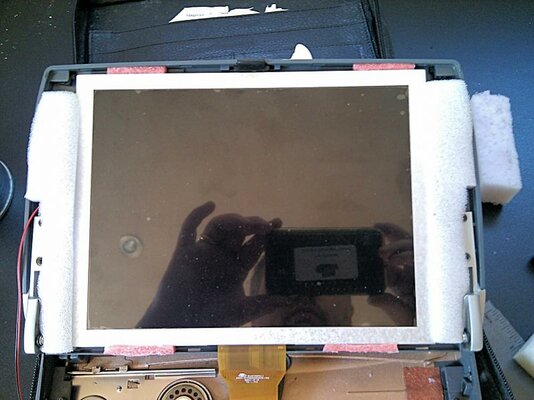
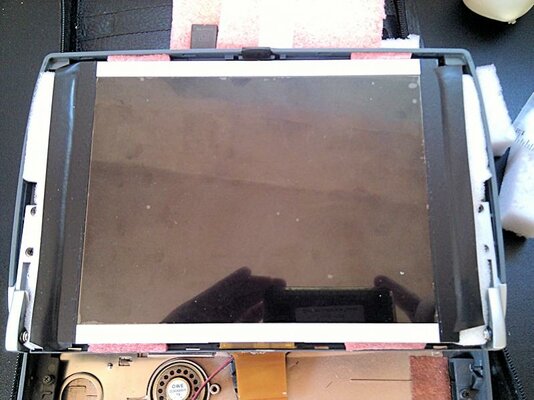
PSION15.jpgPSION16.jpg
-Foaming at the Mouth-


So here's the new screen in place. The viewable area is an almost exact match for the original - more luck than judgement. It's otherwise physically a little smaller than the original, so how to mount it?
I had briefly toyed with putting the AV adapter board behind it to free up a much room in the main shell as possible but this screen (and the old one occupies the full depth). At least that meant I could reply on the original rubber backing without need for mods, but what about the spare space? The touch panel won't detach easily from the old screen so the original mounts were of no use, that also meant I'd have to do something with the exposed edges which carry the buttons either side of the original screen.
Well, with all the foam packaging from the bits 'n bobs I've bought I resurrected a 'system' I've used before for mounting non-standard screens: Cut bits of packaging foam slightly over-size to hold the screen in place, and once the fit and position is good (many re-tries with the bezel in place) use black electrical tape to cover the foam and attach it to the screen. The tape is used to pre-squeeze the foam for a perfect fit and make it a little harder. The photos above show the initial fitting but I neglected to take one of the final result before the bezel went on - oops.
You'll also note the small bits of stiffer (pink) foam to locate the screen's vertical position. Gravity makes this important, and also these needed to be small and positioned carefully to allow the clips in the bezel to work properly. It's a horrible bodge but it's served me well on more than one occasion and allows a little shock-adsorption for the screen.
I also needed to cut a new slot in the frame to allow for the new screen's ribbon cable and power leads as they were in a different place...
...plastic protected with more tape prior to Dremmeling, the hole then carefully sanded to make sure no sharp edges will cut the ribbon.


Bezel in place:​
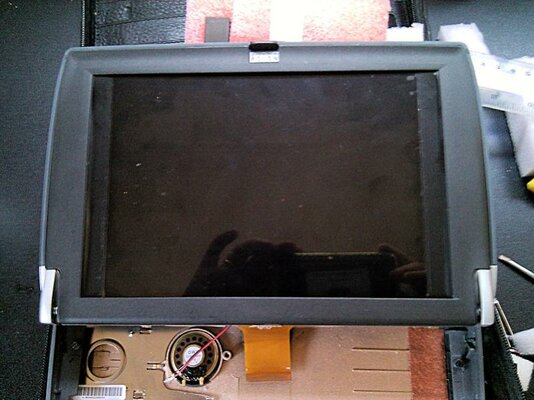
PSION17.jpg
-Getting there-

Not too shabby I feel. The two black bars either side are where the back tape comes to the edge of the screen, and where the original would have had those extra buttons. Between this piccie and the next ones I covered those bars with heavy back card - happily a perfect match for the plastic surround in both colour and texture. For the final fix I suspect I'm going to have to repeat Psion's 'glue the screen to the bezel' bodge to loose the gaps round the edges.


Up 'n running:
PSION18.jpg
-Ma Brainz is Out-

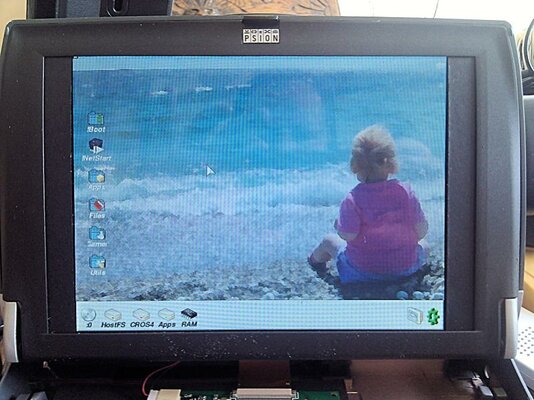
There's still a great deal to do but above is a shot of the dang thing running. That's RiscOS 5 running at 1024x768x16m with my own icon set. It will seemingly do up to 1920x1440 but at 1280x1024 the icons are a bit small. The RPi's boot screen is much nicer than the Beagle's... Hmm, I wonder.

Much to explain in this photo:
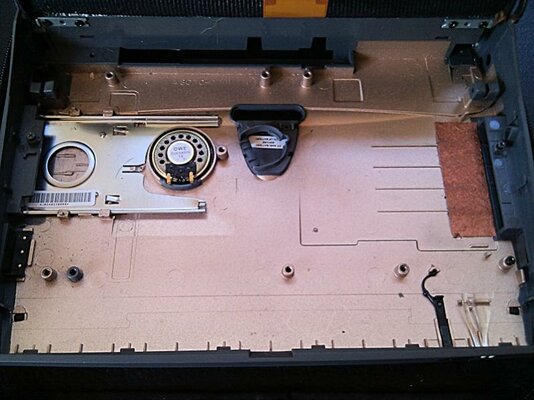
I pretty well Dremmeled out all the lumps, bumps, and old motherboard mounting posts to leave as much room as possible. The original plan was to leave the case alone to allow the stock parts to go back if I wanted, not now!
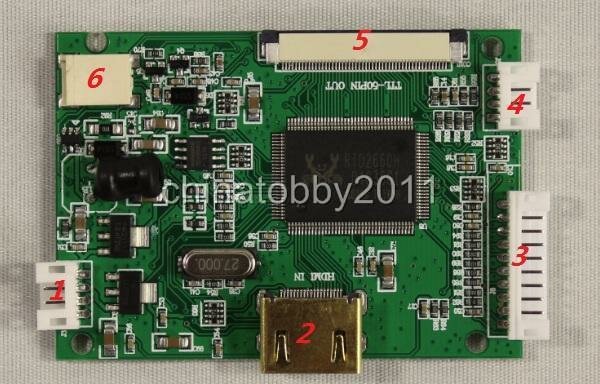
The video board will only go in one place given the position of the screen's ribbon cable which is not a good use of space. I guess a bit of searching might turn up a screen with it's cable to the side or a smaller video board but part of the 'fun' is making what you've got work. Bottom line? I can't get both this board and the Beagle to fit in the case! My RPi will fit, being smaller, but darn and blast it I want to be Beagle powered. (Oh, and the Beagle version of Aemulator is free while the EPi version isn't)
The eagle-eyed will have already seen the solution - all the connectors have been de-soldered from the right side of the video board, they will all go but for the HDMI connector for the semi-final fix. The Beagle will likewise have all but it's HDMI and audio ports removed, and possibly mounted upside down. (This was going to happen anyway so relevant ports on the Beagle could be remounted on cables for attachment to the shell of the Psion) The boards can then overlap to some extent and everything will fit - HURRAH!

:blased:Fingers Crossed:blased:


A vision of the future, past?
PSION19.jpg
-Cake and Eat It-

This is a shot of my Psion running Classic RiscOS 4.2 (my RiscOS distro for classic machines and emulators) under !ArcEmu on RiscOS 5.2. Don't be put off by the dottiness, it looks perfect in real life. An effect of running 800x600 on a higher resolution TFT being shot by the rubbish camera in my phone.
So I'll soon have a 1Ghz RiscOS laptop running a 32bit version of the OS using Aemulator for 26bit compatibility and !Stronguard to take care of games support... Oh and the above when I want to be really retro.
:D

PS (for now)

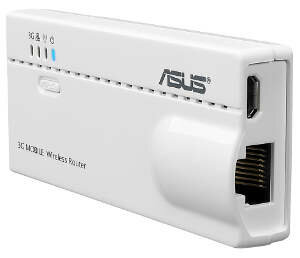
asus-wl-330n3g-adapter.jpg
-Asus wl330n-

What's a laptop without WiFi support?
Well that's tricky with RiscOS as for all it's wonderful aspects it doesn't do wireless networking. Not a biggie, just configure the OS's Ethernet port to connect to something like the wl330n - a fully featured router about the size of a credit card. It can then handle wireless connections itself and can be configured via a browser from within the OS...
...the 'plan' was to go one further and gut said wl330n and mount the parts within my Psion (I must think of a better name) rather than have it attached externally. But that's not going to work - RisOS boots so fast it's up and running long before the rooter has thought about what shoes to wear or even rolled out of bed. The router has to have a head start, so will need external mounting and power for now.

Speaking of power I hit a snag while dismantling the Psion. I assumed (like most ancient laptops) that the power circuit would be on a separate board. I could nab that for interfacing with the battery, powering the video board, and maybe the Beagle. Nope - it's all built in to the Psion's system board, blast! Worse still the battery provides 10.8v not the 12v I assumed as that's what Psion's power adapter is reputed to provide. (must actually check that)
:picard and :Doh:​

So:
Will the video board screen run off the juice provided by the battery and power adapter?
Will my little 12v - 5v converter board still provide 5v to the Beagle if fed 10.8v?

And:
How in blue-blazes does one interface an external power supply with both the electronics and battery in a portable device in such a way that when plugged-in it powers the machine and charges the battery, and when not plugged-in the battery will do the job?

I don't suppose it's as 'simple' as wiring them all in parallel and hoping for the best? (maybe a few diodes?) Can anyone tell me?
 
Last edited:
mall update:​
The 'fun' thing with projects like this is often the devil is in the detail:

Q: If I use the Beagle-xM there isn't enough room in the Psion's shell for that and the TFT's controller board.
A: Not a biggie, both boards will need their connectors removing so I can just overlap them - cutting a big chunk off the controller board is also doable. (Using a RPi would be easier but less 'fun'. Butchering an Android tablet would be dead easy but no RiscOS)

Q: I thought the 7/Netbook used a 12v battery and wall-wart which would fit nicely with the TFT's 12v controller board. One conversion therefore needed for the Beagle's 5v supply.
A: No, both are 10.5v - a really unhelpful choice by Psion, blast them!

Q: I had assumed, being an older device and therefore it would be a separate PCB, I could re-use the original power board for battery management and wall-wart power. That would solve the above issues even with a 10v supply the Psion does use a 12v rail in places. Um, no - it's all integrated in to the original motherboard.

Q: How to make a portable power board for my project that will run off the wall-wart, charge a Li battery safely (not simple - under/over charge protection, charge windows, over current/volt protection, auto-shutdown before the battery is fully emptied) and switch to battery power when needed, all from a base of 10.5v supplying 5v and 12v..?
A: Much reading, testing, and fabrication to do!

A: I shall be ditching the current TFT controller board in favour of a smaller one that takes a 5v supply. Of course such boards are quite hard to get hold of, but I'm making enquiries...


722419632_o.jpg
-VS-TY50-V2-

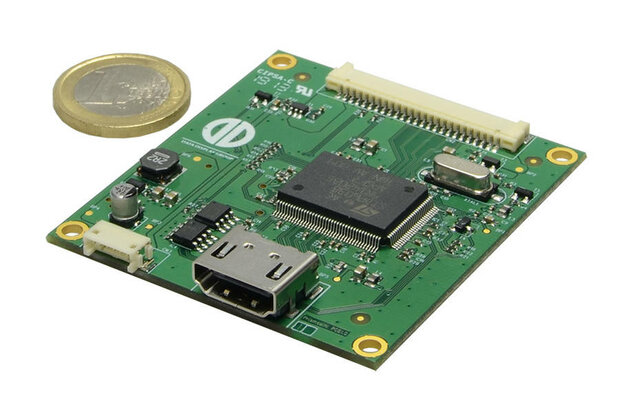
Which will do the job and the Chinese manufacturer has so far been very helpful, or...


8ef3d51d98.jpg
-PrismaMINI-

Which would be perfect (even smaller) but is only available as engineering samples - I'll have to see if my enquiery will fall on deaf ears or not.

Lots to do.
 
Last edited:
It's (again) been an age since I've been about - I really must look for a job that allows me time to do stuff other than, um, work.

Anyway a quick update on my 'make a RiscOS laptop because I can' project. There's been a few hurdles which I'll go in to with more detail when I'm not stuck with typing on a tablet.
-Beagle board fully depopulated of all unnecessary components
-Power circuit sorted (what a b#gger, especially when you don't really have a clue)
-Custom keyboard controller and 'mouse' sorted
-Custom port headers and drive bay done
-Video board and TFT working well
-Psion 7 case mostly ready to take components
-Custom RiscOS install sorted to handle any generation of RiscOS software ;-)

Still got to sort an audio circuit so I'll have internal speaker that disconnects when headphones are plugged in. Also the Series 7 battery only had 1500mAh when new, it won't power the machine for more than half an hour! Battery rebuild/upgrade in process...
...I bet there's still a load of things I haven't thought about before it's done.

A couple of piccies:
Apologies for the 'as-is' photos, some things aren't too easy on a tablet...

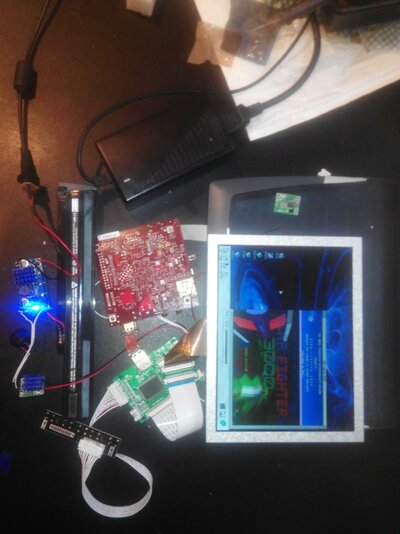
IMG_20141008_164620.jpg
-Up 'n Running-

Working trial setup (mostly) sitting on top of my modded Series 7 shell, ready to be installed properly. Assuming the photo wasn't rotated 90deg the 12-ish volt power pack is wired to the charging module (blue light says still charging). This is connected (via a couple of diodes to ensure one-way current) to both the battery and the system's power module. From power module to Beagle and Video Board. The TFT takes it's power from the Video Board... which is in turn connected to the Beagle via a custom HDMI connector (a new one will be needed once all components are in the case).
The set up means it will run from the power brick (while charging), charge when switched off, and will run off batteries of course. Oh, and I can plug / unplug the power adapter while it's running. :-)
When the Beagle is on full load with screen on max brightness it draws close to 3A!!! That's why both my charge and power boards have heat sinks - they get a bit warm!


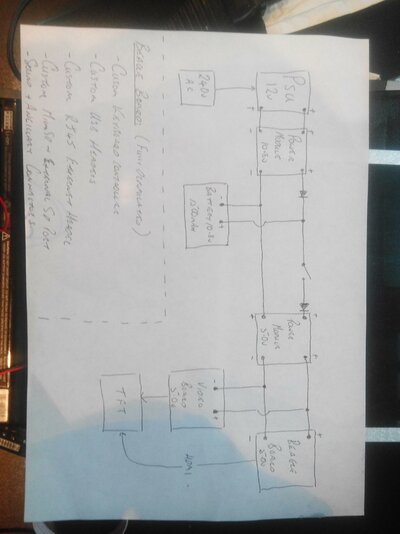
IMG_20141008_170035.jpg
-Power Circuit-

Again photo quite unedited - pretend it's not rotated through 90deg. This is the 'schematic' for my power set up. I've yet to decide if I really need the right hand diode, but then I've got plenty to spare!
Having never made a portable computer before I was quite clueless with regard to wiring one up, having seen my 'schematic' some may say I still am! Please feel free to point out errors. It took me ages to dope this out - after much on line reading (in the hope I'd find a DIY schematic I could just copy) I just made it up... Then a few false starts finding sufficiently rated components; the whole thing draws a bit more power than I hoped - mostly the TFT's back light which the Psion didn't have.
You need:
-A power brick rated roughly 2-3v higher than your battery's voltage with enough amperage to more than supply everything on full load.
-A proper Lithium battery charging module that can be adjusted to your battery's voltage & current needs - Li batteries go bang if you over charge them, over current them, and are easily b#ggred if you flatten them too much. The Psion's battery has built-in protection so I didn't need a full-on charging module...
...just as well because the way I have my system wired I needed a module that could handle the whole system on load, not just the battery, and I could only find 'basic' modules to do this.
-A battery that produces at least 2-3v more than the system components require and enough storage to last more than a few minutes. Happily the Psion one will do for now.
-A power module that can handle whatever voltage / current the charge circuit / battery combo are throwing out and convert that to a nice steady 5v for the system.

As a very rough guide every circuit that converts input voltage to output voltage will need a 2-3v minimum differential to keep working. That's why a 5v system starts with a 12v PSU to allow for the 10.8v battery, and in this case a 10.8v battery so there's plenty of room for voltage drop as the battery discharges to the point where the power circuit can't output 5v any more.

More piccies to come... some time. :-D

PS
Apologies for late replies on PM's - I will get there eventually, honest! :oops:
 
Last edited:
Charlie,
Did you ever get this project finished? I am currently attempting something similar, and was wondering if you would mind sharing the matrix for the keyboard wiring if you know it at all. I am probably going to use a teensy to convert the keypresses to USB for my pi.

Thanks
Rik
 
Another Netbook user here Charlie. Any chance you could tell us how you got on with your conversion?
-Neil F
 
Back
Top Bottom