My A4000T fixed after 10 years

  • Thread starter Thread starter ancalimon
  • Start date Start date
  • Replies Replies 19
  • Views Views 5082

ancalimon

Member
Joined
Dec 18, 2009
Posts
250
Country
Turkey
Region
Istanbul
Well sort of. :) I no longer have the 3640 to use it and I'm going to send my CyberstormPPC to Stachu this week (probably just the flashrom after not being turned on for 10 years..)

A friend is going to lend me his 3630 so that I can use my A4000T meanwhile.

Here are some photos of the mainboard:

2014-09-03%2018.30.18.jpg


2014-09-03%2018.33.15.jpg


2014-09-03%2018.34.34.jpg


The backplate of the Audio Video module is lost at the moment.

Also the vertical drive bay is lost but I don't think I'll every be able to find a replacement so I'll find another way to mount drives there.

2014-09-03%2018.30.53.jpg
 
great stuff!
drop a few pics of the casing as well when finished too!
:)
 
The vertical drive bay is not lost, you can still mount drives there. For example I dont use it at all, because it collide with my CSPPC coolers.

The audio-video back-plate can be easily made from empty back-plate, just make few holes with drill machine and using smooth file you can reach the similar shape slowly and surely.
 
I plugged in some cards for preparation.

What do you think about the order of the cards?

1: Zorram (I guess it will be useful at the moment since I'll be using 3630 for a while)
2: Empty
3: XSurf100
4: Toccata
5: Empty
6: Emtpy

2014-09-03%2023.41.33.jpg


These are the cards I have: CyberstormPPC, CVisionPPC, Toccata, VLabMotion, Peggy+, Zorram256, XSurf100

I'm going to use the following cards

CStormPPC, CVisionPPC, Toccata, XSurf100 (and its usb module when it comes out), Prisma Megamix (when it comes out), and maybe Zorram256 if it's useful for OS4.1 but I guess it's a better to simply use a swap file on a small 4gb scsi3 harddrive. (or a partion inside one of the harddrives. I have a 120gb ide harddrive and 500gb sata harddrive both ready to be connected on the CStormPPC once I prep them properly)
 
Last edited:
You can mix them how do you like, base on their sizes, better cooling, optimal connector output. Do you think you need two hardisks and 620 GB space? I think that 120 GB is absolutely enough. Do you have Acard interfaces for them?
 
You can mix them how do you like, base on their sizes, better cooling, optimal connector output. Do you think you need two hardisks and 620 GB space? I think that 120 GB is absolutely enough. Do you have Acard interfaces for them?

Yes both for the IDE and SATA harddrive. The IDE harddrive is very old and causes problems from time to time. That's why I want to have the 500gb one.
 
The vertical drive bay is not lost, you can still mount drives there. For example I dont use it at all, because it collide with my CSPPC coolers.

The audio-video back-plate can be easily made from empty back-plate, just make few holes with drill machine and using smooth file you can reach the similar shape slowly and surely.

Unfortunately I have only one of these:

2014-07-10%2001.46.58.jpg


I'll need two more of them which were lost with that huge bay.
 
Yes both for the IDE and SATA harddrive. The IDE harddrive is very old and causes problems from time to time. That's why I want to have the 500gb one.
If your IDE causes problems, dont use it, you may loose data. I still think 500 GB disk drive is too big for Amiga kind of data, honestly all Amiga games can be fit within 25 GB or something.

I'll need two more of them which were lost with that huge bay.
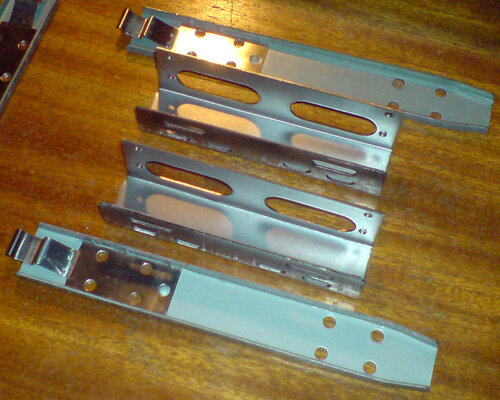
I think yours is floppy holder without the front plastic. For the disks I got three pairs of these:

A4kT_disk_holder1.jpg

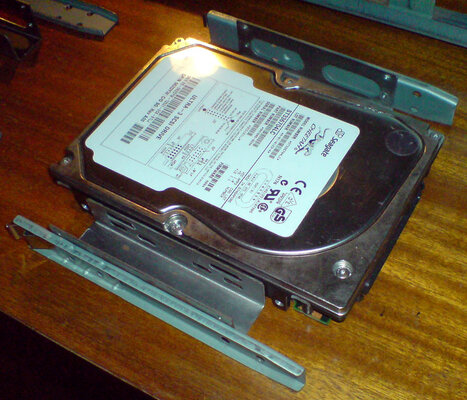
Then disk is mounted like this:

A4kT_disk_holder2.jpg

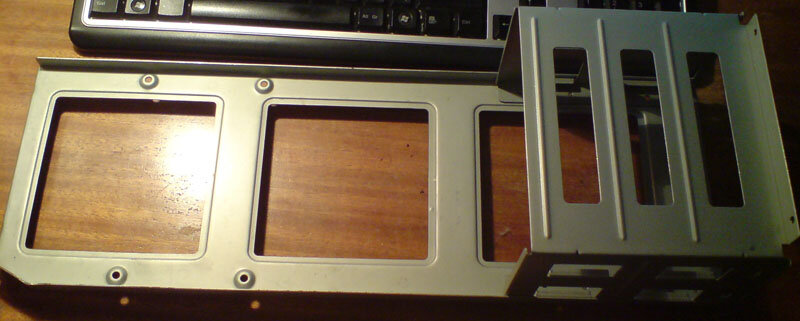
Here is photo of the internal metal plate which I dont use because it colides with CSPPC and CVPPC. But I miss two vertical 5.25" places then.

A4kT_internal_metal_plate.jpg

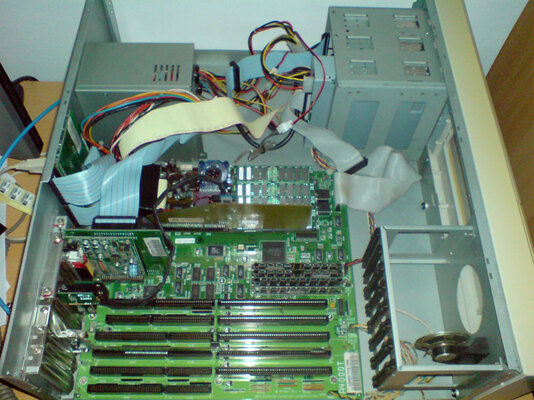
Without the internal metal plate there is a lot of space inside.

A4kT_opened.jpg
 
Yes both for the IDE and SATA harddrive. The IDE harddrive is very old and causes problems from time to time. That's why I want to have the 500gb one.
If your IDE causes problems, dont use it, you may loose data. I still think 500 GB disk drive is too big for Amiga kind of data, honestly all Amiga games can be fit within 25 GB or something.

I'll need two more of them which were lost with that huge bay.
I think yours is floppy holder without the front plastic. For the disks I got three pairs of these:

View attachment 75450

Then disk is mounted like this:

View attachment 75451

Here is photo of the internal metal plate which I dont use because it colides with CSPPC and CVPPC. But I miss two vertical 5.25" places then.

View attachment 75452

Without the internal metal plate there is a lot of space inside.

View attachment 75453

About using a 500gb hdd with Amiga. I guess I can always fill it up with Tosec and some mp3s :P

It's the harddrive holder. The floppy holder is occupied by the floppy. :)

That huge internal metal plate is the part (3rd picture you posted) that was lost. I took it out because mine too was colliding with something (probably CVisionPPC)

I have the floppy drive holder on the top, and the cdrom holder under it. The only harddrive holder I have is under the cdrom.

2014-09-04%2023.52.18.jpg
 
Last edited:
OK. Maybe Escom changed some of the equipment during the production time. My A4000T seems to be some of the first wave, because original battery was the same like in A4000 Destops (that little leaking barrel). Anyway A4000T was always my dream and I fully understand you want your machine to be complete and in original shape as much as possible.
 
Last edited:
1) The space bar is out of business. Checked the membrane and it's the same as those used inside A500s. (A619B)

https://www.amibay.com/attachment.php?attachmentid=62926&d=1394984758

Would using one of those "electric pencils" to draw on the broken line fix it? I can see a very small crack on the membrane near spacebar.

(edit: I licked a normal pencil and drew on the crack. It's fixed at the moment.)

I'll ask for A500 membranes tomorrow just in case.


2) Also for some reason Caps Lock was not working. I changed the led from one very old A1200 keyboard (from a revision 1b A1200) and it's very dim. Will try another led.


3) For some reason, my harddrives that are working on my A1200 FastATA MK4 are not working on the A4000T ide. (hdtooolbox does not see them) Only one small harddrive works.
 
Last edited:
When I plug my big harddrives to internal IDE port (can't use the scsi port since I don't have any suitable drives or converters) they are not detected. I created a bootable disk that updates scsi.device and using that disk, I can boot from my 500gb sata harddrive "once". After reset, I have to load the floppy again. Don't know why this happens.
 
Hello,

if you are sure that the SATA>ATA converter is compatible with the Amiga 4000 IDE port, you need to have the first boot partition (the boot partition of your harddrive with the highest priority) under the first 4gb of space of your hardrive and not exceed the 2gb of space and not go over the 4 gb of the harddrive. Then, the filesystem of this partition need to be compatible with the cpu that you use to start the Amiga. If you have planned to use MAC emulators on real hard drive (not hardfile), you need to add a partition, under the first 4gb and not bigger of 2gb.
About SCSI, your system need to be right regulated, with the two termination at the two end (inside and outside the tower).

Regards
Stefano
 
Hello,

if you are sure that the SATA>ATA converter is compatible with the Amiga 4000 IDE port, you need to have the first boot partition (the boot partition of your harddrive with the highest priority) under the first 4gb of space of your hardrive and not exceed the 2gb of space and not go over the 4 gb of the harddrive. Then, the filesystem of this partition need to be compatible with the cpu that you use to start the Amiga. If you have planned to use MAC emulators on real hard drive (not hardfile), you need to add a partition, under the first 4gb and not bigger of 2gb.
About SCSI, your system need to be right regulated, with the two termination at the two end (inside and outside the tower).

Regards
Stefano

I tried 120gb, 160gb, 300gb IDE drives and the 500gb sata drive. All of them work with my A1200 (although it has FastATA1200 and I never tried without it But A1200 would probably detect the harddrives and the first 4gb part even without patched scsi.device)

Boot partions is inside the 4gb and it's 1gb in size. Using pfs3aio non directscsi version.

Anyway without loading patched scsi.device using loadmodule (from floppy), HdToolbox won't even detect any of these harddrives. It's funny because I remember using the 120gb hdd in 1998 when I plugged it from my A1200 to A4000T (only seeing the partitions below the first 4gb). Then I got myself an Acard adapter and started using it on the CyberstormPPC.

I'm not sure about the termination of SCSI part probably because I never used more than one device on a scsi cable before. (previously I had the SCSI CDRW connected to A4000T scsi port and the 120gbide connected to CyberstormPPC scsi port) I found the SCSI cable and plugged one end to the disk module and plugged another one to my scsi cdrw. Termination is set to on on the cd drive and it's working. Tried connecting an harddrive >before< the terminated cdrw (I'm not sure if it's working) but it's not detected by hdtoolbox. The hdd is set to termination off.

The A4000T 10 years ago consisted of these:

CyberstormPPC 060@50 & 604e@233
128mb ram on CStormPPC
CVisionPPC
Delfina Lite
VLab Motion
Peggy+
DD disk drive
3.2gb IDE hdd on IDE port
120gb IDE hdd on CStormPPC
SCSI cdrw on A4000T SCSI port.

Today it consists of these:

3630 cpu card
Toccata
ZorRAM 256
XSurf100
hd floppy drive
500gb sata on IDE port
SCSI cdrw on A4000T SCSI port.
There is no onboard RAM at the moment since I just ordered 4x4mb of ram from Ebay.

Maybe the reason it's not seeing large harddrives is because of non existing onboard ram together with 3630 or maybe the 3630 itself?

 
Last edited:
You can mix them how do you like, base on their sizes, better cooling, optimal connector output.

It turns out that I can not mix them how I like.

I tried several configurations and this is the one which worked:

First slot empty at the moment
Second slot: ZorRAM256 Zorro3
Third Slot: XSurf100 Zorro3 Mode
Fourth Slot: VLab Motion
Fifth Slot: Toccata

10705020_10154558457240167_355483240_n.jpg


EDIT: (Actually it could be the opposite of this because I plugged the Zorro3 cards on the upper slots thinking they are the first slots. It turns out that the bottom slot is the first slot (because it's address space is lower?)

I guess the first card have to be Zorro3 cards because as soon I plug a Zorro3 card between two Zorro2 cards, it either won't see the cards or (with some other configuration) I get a defective message upon first powerup.
 
Last edited:
Stachu fixed my CyberstormPPC yesterday. :D Many thanks to him!

Also many thanks to tabuhuso for fixing my A4000T!

Now he is waiting for new ppc cpus to arrive. He is going to upgrade the 604e@233 to 400Mhz (I guess it will be the first :) ) and the rev5 060 to Freescale :)
 
Last edited:
Hello,

just a stupid thing about your IDE drives. Have you tried to attach two device (as master /slave) in this way: your 500gb harddrive + a small size IDE harddrive with a bootable partition?
Then you can start to find a solution to install correctly your big IDE drive. On the site of amiga.com there is the last patch for the scsi.device, to make possible to use big size Harddrives.
If you use PFS2/3 as filesystem, try the scsi direct version, that is more versatile.

Regards
Stefano
 
Last edited:
Hello,

just a stupid thing about your IDE drives. Have you tried to attach two device (as master /slave) in this way: your 500gb harddrive + a small size IDE harddrive with a bootable partition?
Then you can start to find a solution to install correctly your big IDE drive. On the site of amiga.com there is the last patch for the scsi.device, to make possible to use big size Harddrives.
If you use PFS2/3 as filesystem, try the scsi direct version, that is more versatile.

Regards
Stefano

I tried plugging another 160gb ide harddrive as slave and you know what? Suddenly they are being detected and Amiga can boot from the sata harddrive (after a reset because on first powerup, I'm greeted by the kickstart screen). I'm not sure what the problem was before. I'll try to boot from my other harddrives as well.
 
Back
Top Bottom