My Amiga 4000 is dying, help needed.

  • Thread starter Thread starter telonio
  • Start date Start date
  • Replies Replies 18
  • Views Views 518

telonio

Member
Banned
Joined
Oct 6, 2014
Posts
273
Country
Greece
Region
Athens
Ok I think my Amiga 4000 is about to die. I don't want to say farewell to my second beloved Amiga, so here are the faults and I want your help please.

My A4000 has 2mb ram, hard drive Seagate 1275mb and 3.1 roms. The only added thing is a Individual scandoubler and a dvd rom drive.

First of all a pin in the motherboard IDE connector was broken. Well I replaced it and the IDE hard drive worked fine. That's the only good thing in the story.


From the first time I bought the A4000 (about 10 years now) and still after the broken pin, it has this issue. When I press the power button for the first time in the day, the 4000 powers up but it shows this error message (see below).

vsowna.jpg


After 10 to 15 tries of resetting and power on/off then finally it boots normally from the IDE hard drive. Now after the first succeeded boot (probably when the 4000 warms up), no matter how many times I power off and on the 4000, the error message is not showing and the hard drive boots normally. I made a test with a 4gb CF IDE card and it shows the same issue. Could this be the board capacitors or something that I can fix?


I also have a problem with the games in the 4GB CF card. While every program like dopus and dpaint work ok, no game is running. Now I know that many old games were not compatible with the AGA Amiga models, but I tried games that run from disk in 4000. From the CF no game is running and I get these messages:

Cannot allocate ShadowMem.

Cannot allocate ExpMem.

DOS-Error #205 (object not found) on reading "Disk.1".


In every AGA game I get the message DOS-Error #103.


Here is a photo from the 2gb ram.


10ng8d5.jpg


and here some photos from the configuration

2dhbuyw.jpg


34tegoz.jpg


2qu2nfb.jpg


A few days ago the psu was dead for no obvious reason. I tried several times the on and off switch but it was not working. Just a clicky sound and the fan was just moving a little. So I disconnect the power cord and left the psu without current for a day. The other day the psu surprisingly worked perfect. Actually it still works without any problems at all. But I'm afraid that this might happen again. Should I replace the two big capacitors and the fuse or is it just pointless?


Alas Gods I hope it doesn't get any worse!

Any help will be much appreciated.
 
Last edited:
I also have a problem with the games in the 4GB CF card. While every program like dopus and dpaint work ok, no game is running. Now I know that many old games were not compatible with the AGA Amiga models, but I tried games that run from disk in 4000. From the CF no game is running and I get these messages:

Cannot allocate ShadowMem.

Cannot allocate ExpMem.

DOS-Error #205 (object not found) on reading "Disk.1".
This is what happens when you try to run whdload games when you do not have enough ram. The only answer is to add ram to the system, a bare minimum of 2mb fast but I would suggest 4mb at least.
 
Looks like your attachments dont work.

I would have thought trying to run an Amiga with only 2mb RAM would be like going to a blind dentist.....very painful! Without seeing what your attachments are, you definitely need more ram!
 
Thanks all.

Images fixed.

I am going to upgrade the ram up to 4gb. But the error message 10 times and more in the startup, could it be the low ram?
 
The error messages do look memory related except one, the file not found message could be low RAM, missing file or a illegal assign somewhere. Expand the RAM and try it, I should go for at "least" 16mb, preferably more depending what your using it for.
 
Can the A4000 handle 16mb? It has the 3.1 ROM 40.068 and just the daughterboard. Usually I am using is the deluxe paint V and run some old demos.

Today no matter how many tries of resetting, power on/off I get the error message
"Software Failure. Press left mouse button to continue. Error: 8000 0004 Task: 00002718

If I disconnect the hard drive (or the cf card) the system boots normally without errors. It shows the screen with the "insert disk" message and boots perfect from the disk drive.

I let it run the insert disk message for about 30 minutes. Then I powered off the system and connected the cf adapter. When I turned on the system, the cf booted with no errors. Now no matter how many times I reset the 4000, the cf boots just fine. So I believe something wrong goes when the motherboard is still cold right?
 
2mb of memory is just not enough unless you just want to use it with floppy disks. Booting from hard drive will use extra memory for disk buffers and such, the 2mb you have is only the built on ChipRam of the A4000. You really need a FastMem expansion for it, that will get rid of the memory errors and speed things up considerably. Either look on here for one for sale or consider one of these. It does sound like a A1200 would suit you better, they are cheaper to expand and just as versatile.
 
I agree with everybody else that 2mb (not gb!) is simply not enough for an A4000. All A4000s can be expanded to 16mb of ram very easily (you just have to find 4 x 4mb standard EDO-type sticks, which go for peanuts these days). But I think there are likely more issues with your machine. Here's what I suspect:

1. PSU: If the machine refused to turn on at all, then you really need to repair this (or get a new one) before fixing anything else. This is a crucial component - everything else rests on this and if it malfunctions it can cause irreversible damage elsewhere. Changing the capacitors usually fixes them.

2. Damaged ram: I was having similar issues in my A4000 and it boiled down to a broken RAM stick. Try removing them one by one checking each time if the problem goes away. If you will be upgrading, you might as well throw all the current sticks away, they're not worth anything these days anyway. Alternatively it may be that your ram sticks are fine, but that there is damage in the memory area of the motherboard due to a previous battery leak. This is certainly a possibility, but it can often be repaired too.

3. Motherboard capacitors. It is a good idea to change all the motherboard caps. There are people on this board that will do it for you, and AmigaKit does it too.
 
Ok I think my Amiga 4000 is about to die. I don't want to say farewell to my second beloved Amiga, so here are the faults and I want your help please.

My A4000 has 2mb ram, hard drive Seagate 1275mb and 3.1 roms. The only added thing is a Individual scandoubler and a dvd rom drive.

First of all a pin in the motherboard IDE connector was broken. Well I replaced it and the IDE hard drive worked fine. That's the only good thing in the story.


From the first time I bought the A4000 (about 10 years now) and still after the broken pin, it has this issue. When I press the power button for the first time in the day, the 4000 powers up but it shows this error message (see below).


After 10 to 15 tries of resetting and power on/off then finally it boots normally from the IDE hard drive. Now after the first succeeded boot (probably when the 4000 warms up), no matter how many times I power off and on the 4000, the error message is not showing and the hard drive boots normally. I made a test with a 4gb CF IDE card and it shows the same issue. Could this be the board capacitors or something that I can fix?


I also have a problem with the games in the 4GB CF card. While every program like dopus and dpaint work ok, no game is running. Now I know that many old games were not compatible with the AGA Amiga models, but I tried games that run from disk in 4000. From the CF no game is running and I get these messages:

Cannot allocate ShadowMem.

Cannot allocate ExpMem.

DOS-Error #205 (object not found) on reading "Disk.1".


In every AGA game I get the message DOS-Error #103.


Here is a photo from the 2gb ram.


10ng8d5.jpg


and here some photos from the configuration


A few days ago the psu was dead for no obvious reason. I tried several times the on and off switch but it was not working. Just a clicky sound and the fan was just moving a little. So I disconnect the power cord and left the psu without current for a day. The other day the psu surprisingly worked perfect. Actually it still works without any problems at all. But I'm afraid that this might happen again. Should I replace the two big capacitors and the fuse or is it just pointless?


Alas Gods I hope it doesn't get any worse!

Any help will be much appreciated.

Am I missing something here....your photos shows more than 2Mb ram on the board? (at the very least it has 6Mb, up to 18mb...as shown in the photo)

If I understand that correctly, your software errors may be related to the system not picking up the entire ram installed?

If you pull out the lower 4 memory simms, do the problems still occur?
 
Last edited:
Thank you all I really appreciate your help. :thumbsup:

Obviously there is something wrong with the memory of the system. I removed the lower simm and I got the same problem. I removed all the simms and replaced them with two old simms. The 4000 booted normally just once with 2mb ram. After a power off and on, the same problem. I tried alone each one of the simms that Amiga had before. Only one works ok and the system starts with 1mb ram.

Well I'm not quite sure if there is a simm issue. Because 8 simms tested (logically because they are too old and used, some might not working). But yesterday the system was working with 2mb (showed this in the sysinfo). :huh:

So I must find some reliable simms to test and I'll let you know.

What is the ram limit for os 3.1? 16mb or 32mb?
 
What is the ram limit for os 3.1? 16mb or 32mb?
The mainboard can hold 16mb of fast ram, you can add something like 4gb I think though using accelerators and other ram cards.
 
Sorry if I'm stating the obvious, but as it hasn't already been mentioned, I'll just mention it...

You have 5 slots on the A4000 motherboard and the TOP one is for the Chip RAM only - this must be populated. If you are only showing 2mb and no Fast RAM is appearing, then you may well have problems with the slots or bad tracks leading to them (as I had...).

Hope this helps the investigation... :)
 
Acid and RichyV thanks for the help!

I hope the tracks are not damaged. I think that the tracks are not repairable because it is 3 layer motherboard, am I right?

Also I noticed that the jumper J213 is set to 2MB and the J214 set to VBB by the previous owner of 4000. :???:
 
Acid and RichyV thanks for the help!

I hope the tracks are not damaged. I think that the tracks are not repairable because it is 3 layer motherboard, am I right?

Also I noticed that the jumper J213 is set to 2MB and the J214 set to VBB by the previous owner of 4000. :???:

Hi,

they are the correct settings - 8MB of Chip RAM (the alternative settings on those jumpers) was never implemented - 2MB is the maximum.

Think there was a jumper elsewhere (852?) that selects between 1MB SIMMS and 2/4 MB ones - that could be set incorrectly..?
 
Last edited:
You are correct, there is a jumper J852 almost below daughterboard and near ram slots. It is set to 1Mx32 simm size.
 
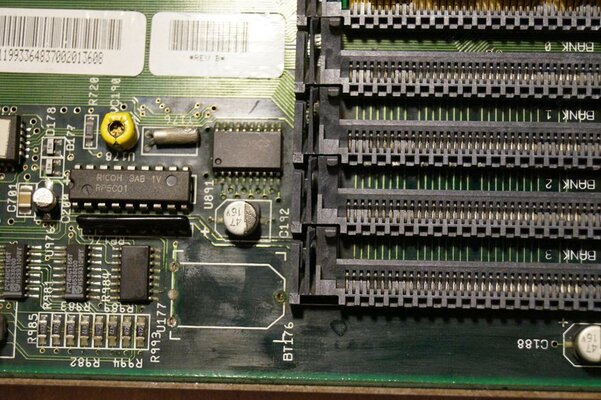
Has the board got any green fuzz on any of the chips around where the battery was....or any black looking traces in the same area?
 
U891 chip pins are little green. But not too much green as it looks in the photograph. I can upload a highest resolution of 5456x3632 if you wish. Original battery was removed by me 10 years ago. It was never leaked unless there was a previous leaked battery a very long time ago. Though Y176 seems corroded.

DSC01717.JPG
 
Doesn't look too good, does it? Nearly all of the connections in that area look corroded, and not shiny at all. Even the capacitor on the right looks like that too!

And what's the deal with that 'barrel' shaped component - it looks like it's been covered in something highly corrosive to me... :(
 
Last edited:
Back
Top Bottom