

I have a non-Amiga related question here but one I cannot seem to find an answer anywhere, not even in Gameboy specific forums.
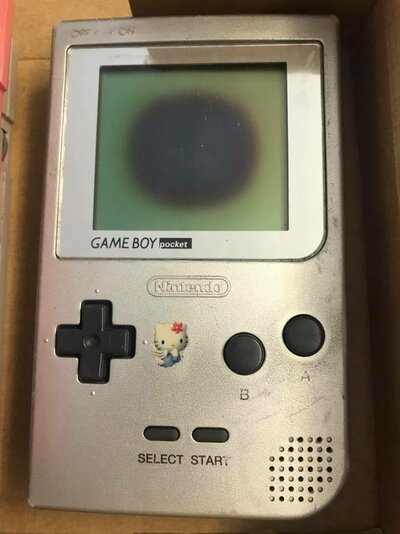
Prologue: Basically a big issue with a lot of Gameboy Pocket's these days is that many tend to develop large dark circles/ovals on the LCD's which progressively get worse over time. This seems to mostly affect Gameboy Pocket's and the much rarer Gameboy Light. This is the like the Varta battery leak on the A500+ in terms of Gameboy Pocket killers and many Pocket's end up in the bin or as spare parts because of this.
I am told that it is caused by humidity in the air and that storing them with a sachet of Silica Gel (Do Not Eat) prevents them from getting to that state. Not all are the same, I've got loads of GBP's which are all kept in the same conditions and some delveloped this issue and some (till now - I better get some Silica Gel (Do Not Eat) asap) did not.
Anyway, I found a way to repair them which basically involves VERY CAREFULLY removing the front Polarizing Filter using a blade and then removing what looks like a dry gel adhesive substance which is sandwiched between the Polarizer Filter and the glass LCD. In 99% of case it is this (that gel adhesive) which is damaged and causes the dark circle/oval. I then go ahead and clean up the screen properly and replace the polarizer filter.
**NOTE: Anyone attempting this, the ribbon cable is attached to TWO parts of the LCD and it is VERY DELICATE. Any sort of stress on that cable WILL result in horizontal/vertical lines and/or a DEAD LCD and its almost IMPOSSIBLE to repair.**
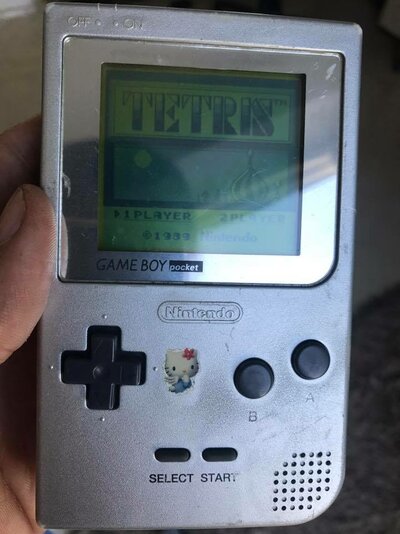
Now to the issue: After doing this process and ending up with a very much usable Gameboy Pocket the LCD has turned from Black & White to Green (like the original Gameboy). This is because that gel like adhesive substance that was sandwiched between the lcd glass and the front polarizer must have acted as some sort of color filter. Problem is that I have no idea what it is, what to look for and what to replace it with.
What really helps is installing a backlight, they are cheap enough but that involves more work (I have done one already), the Gameboy is no longer original and degrades battery life on a massive scale.
Prologue: Basically a big issue with a lot of Gameboy Pocket's these days is that many tend to develop large dark circles/ovals on the LCD's which progressively get worse over time. This seems to mostly affect Gameboy Pocket's and the much rarer Gameboy Light. This is the like the Varta battery leak on the A500+ in terms of Gameboy Pocket killers and many Pocket's end up in the bin or as spare parts because of this.
I am told that it is caused by humidity in the air and that storing them with a sachet of Silica Gel (Do Not Eat) prevents them from getting to that state. Not all are the same, I've got loads of GBP's which are all kept in the same conditions and some delveloped this issue and some (till now - I better get some Silica Gel (Do Not Eat) asap) did not.
Anyway, I found a way to repair them which basically involves VERY CAREFULLY removing the front Polarizing Filter using a blade and then removing what looks like a dry gel adhesive substance which is sandwiched between the Polarizer Filter and the glass LCD. In 99% of case it is this (that gel adhesive) which is damaged and causes the dark circle/oval. I then go ahead and clean up the screen properly and replace the polarizer filter.
**NOTE: Anyone attempting this, the ribbon cable is attached to TWO parts of the LCD and it is VERY DELICATE. Any sort of stress on that cable WILL result in horizontal/vertical lines and/or a DEAD LCD and its almost IMPOSSIBLE to repair.**
Now to the issue: After doing this process and ending up with a very much usable Gameboy Pocket the LCD has turned from Black & White to Green (like the original Gameboy). This is because that gel like adhesive substance that was sandwiched between the lcd glass and the front polarizer must have acted as some sort of color filter. Problem is that I have no idea what it is, what to look for and what to replace it with.
What really helps is installing a backlight, they are cheap enough but that involves more work (I have done one already), the Gameboy is no longer original and degrades battery life on a massive scale.

 I am sure the same problem could be found on many other old LCD screens and I hate seeing stuff being discarded when it could be fixed.
