
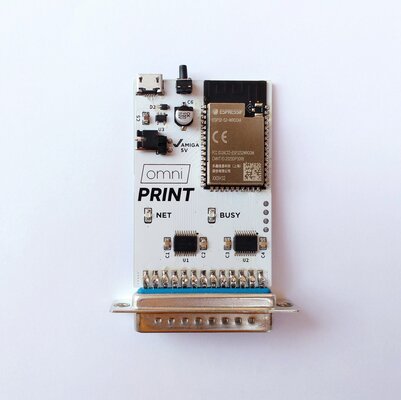
It's a small module that plugs into the parallel port and acts as a wireless bridge to forward data to a network printer, if you have a modern printer that supports raw printing (usually on port 9100) you can use this to print from your Amiga. You still need a driver on the Amiga side but a lot of modern printers should work with the PostScript driver
For example I'm using it with a CUPS server and its virtual PDF printer which supports PostScript, I can print from my Amiga and it generates a PDF file on my laptop. Not really necessary in 2024 but still pretty cool
I primarily made it for the Amiga but it should also work on other PCs with a parallel port since the pinout and protocol are standard
This was inspired by this project I found on Github: https://github.com/Manawyrm/ESP32_VirtualPrinter
I didn't use their code and I designed the PCB myself but I still want to give credit to the original author
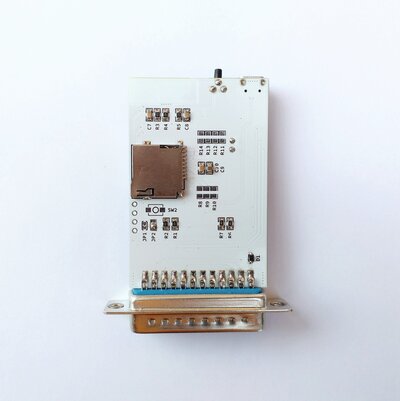
The original version uses one of the very common ESP32 boards + an adapter for the parallel port and lots of wires, but like the author mentions connecting the ESP32 directly to 5V signals is not a very good idea since the chip is not technically 5V tolerant. It might work for a quick prototype but I wanted something permanent so I made a custom board with proper level shifters, this solves the voltage issue, it's more compact, and even includes a MicroSD card slot on the back side
If you insert a MicroSD you can copy files from the Amiga to the card, like a very basic monodirectional SDBox (if you never heard of it see: https://github.com/jbilander/sdbox)
You don't need any special driver, you can just copy a file directly to the parallel device ( par: )
For example if you run from the shell:
You can then find "somefile" on the MicroSD
Note that you can't transfer files in the other direction, from the card to the Amiga, it's technically possible but it would require a custom driver on the Amiga, I may work on this in the future
The module must be powered from the MicroUSB port because the parallel port is not normally designed to provide power, however on Amigas pin 14 is usually connected to 5V through a 47 ohms resistor so if you have a modded motherboard with that resistor bypassed you can power it directly from the Amiga by closing the "Amiga 5V" jumper on the board
I designed the board like this specifically because on my A500 I bypassed the resistor and I wanted to have the option to use the module without connecting an extra USB cable
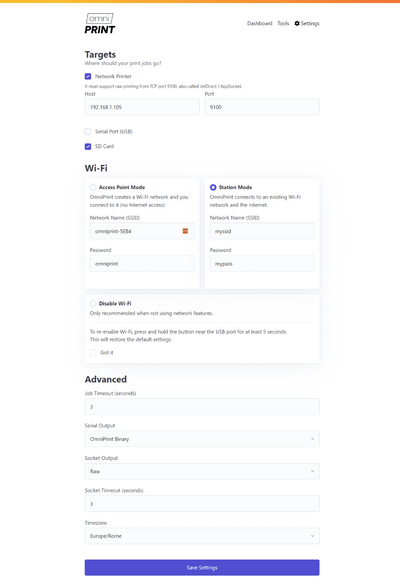
Settings for the WiFi, printer and other options can be changed from the web interface or by connecting the module to a PC and using a terminal
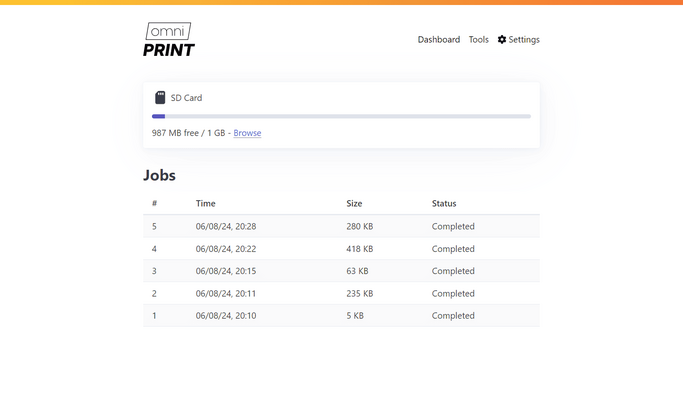
When the module is turned on for the first time it creates a Wifi hotspot, you can connect to it and go to 192.168.1.1 to access the settings page and configure your SSID and password, after rebooting the module will connect to your network
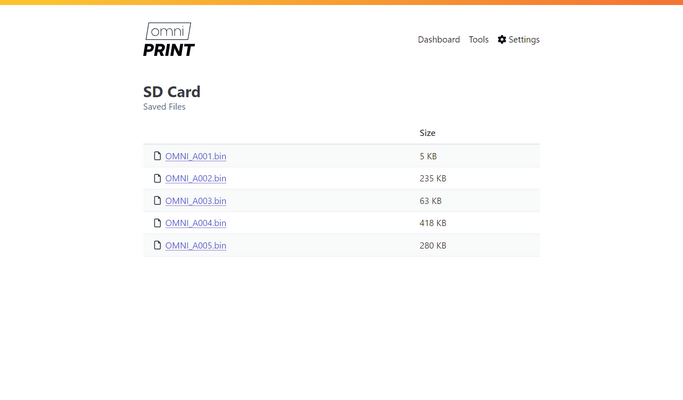
You can also download files saved on the MicroSD card directly from the browser so you don't have to move it to a PC every time
Price: 55€ + shipping (Paypal FF)
For example I'm using it with a CUPS server and its virtual PDF printer which supports PostScript, I can print from my Amiga and it generates a PDF file on my laptop. Not really necessary in 2024 but still pretty cool
I primarily made it for the Amiga but it should also work on other PCs with a parallel port since the pinout and protocol are standard
This was inspired by this project I found on Github: https://github.com/Manawyrm/ESP32_VirtualPrinter
I didn't use their code and I designed the PCB myself but I still want to give credit to the original author
The original version uses one of the very common ESP32 boards + an adapter for the parallel port and lots of wires, but like the author mentions connecting the ESP32 directly to 5V signals is not a very good idea since the chip is not technically 5V tolerant. It might work for a quick prototype but I wanted something permanent so I made a custom board with proper level shifters, this solves the voltage issue, it's more compact, and even includes a MicroSD card slot on the back side
If you insert a MicroSD you can copy files from the Amiga to the card, like a very basic monodirectional SDBox (if you never heard of it see: https://github.com/jbilander/sdbox)
You don't need any special driver, you can just copy a file directly to the parallel device ( par: )
For example if you run from the shell:
Code:
copy somefile par:You can then find "somefile" on the MicroSD
Note that you can't transfer files in the other direction, from the card to the Amiga, it's technically possible but it would require a custom driver on the Amiga, I may work on this in the future
The module must be powered from the MicroUSB port because the parallel port is not normally designed to provide power, however on Amigas pin 14 is usually connected to 5V through a 47 ohms resistor so if you have a modded motherboard with that resistor bypassed you can power it directly from the Amiga by closing the "Amiga 5V" jumper on the board
I designed the board like this specifically because on my A500 I bypassed the resistor and I wanted to have the option to use the module without connecting an extra USB cable
Settings for the WiFi, printer and other options can be changed from the web interface or by connecting the module to a PC and using a terminal
When the module is turned on for the first time it creates a Wifi hotspot, you can connect to it and go to 192.168.1.1 to access the settings page and configure your SSID and password, after rebooting the module will connect to your network
You can also download files saved on the MicroSD card directly from the browser so you don't have to move it to a PC every time
Price: 55€ + shipping (Paypal FF)
Attachments
Last edited:


