Problem with Ide-to-sd adapter on CD32

  • Thread starter Thread starter Nek3d
  • Start date Start date
  • Replies Replies 2
  • Views Views 42

Nek3d

Active member
AmiBayer
Joined
Dec 30, 2024
Posts
243
Country
Greece
Region
Attiki
Hi, I just installed a TF330 on my cd32 with Kipper2k riser and a IDE to sd adapter.
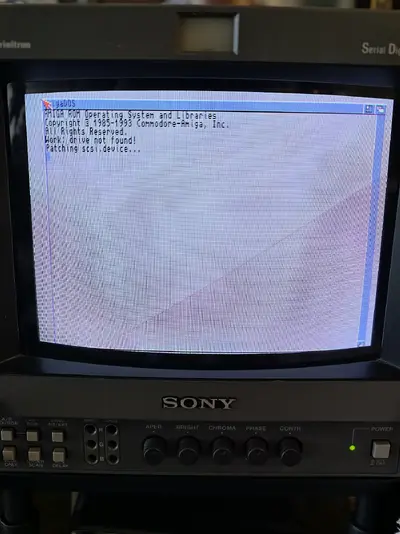
I tried my tested sd with AGS 2.7 AGA (works on my a1200) but got to this screen and then the machine reset to a black screen.

When I removed the SD card, the cd32 boots normally and runs CDs just like before. So the TF330 is working perfectly. I also tried another SD with AOS 3.2 and got the same screen!
Please note that I haven't used this IDE-to-SD adapter on another amiga, but I have used one exactly the same on my a1200 and it works.
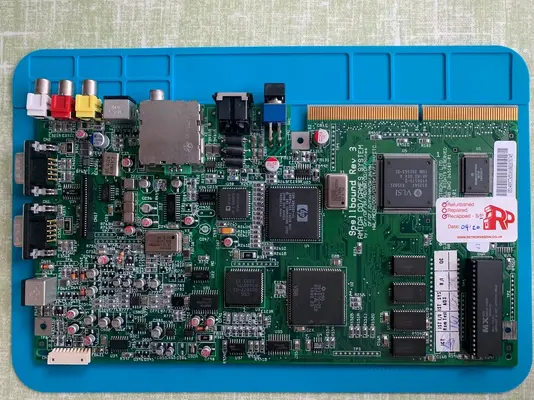
(I also attached my cd32 board which is recapped)

Any help would be appreciated!
 

Attachments

  • IMG_20260201_143739.webp
    IMG_20260201_143739.webp
    593.6 KB · Views: 1
  • my cd32-board.webp
    my cd32-board.webp
    451.8 KB · Views: 1
I got this reply from AI:
The message you’re seeing:
"Work: drive not found! Patching scsi.device..." then black screen / reboot
…is a classic symptom of AGS using the wrong scsi.device version for the TF330.
 
Hi yes it is a scsi version problem that I found with AGS and the CD32, here is my solution that I posted on another forum:

------------------------------------------------------------------------------------------------------------

To run AGS on CD32 with TF360 then add the C:cpuspeed to the SSeq and then do a soft reboot and it should overclock

Also to run AGS with CD32 ( also applies to ( TF330 )depending on if you use 3.1 or 3.2 rom,
then add the commands below to the SSeq right at the top of the file
and then comment out any reference and commands associated to Sepatch lower down in the SSeq

C:LoadModule Devs:scsi.device ( use with 3.1 rom but use a newer scsci.device ver 47xx like the one in OS3.2 into Devs folder )
C:SetPatch QUIET ( only needed with 3.2 rom )

Note*
Also do this for the A600 with 68k AGS

Note 2*

Using AGS 3 just get hold of scsi.device 47xx from OS3.2 and put it in the Devs folder and edit the Startup seq exactly as I do below and it will work

---------------------------------------------

; Loads a patched scsi.device with large partition support if Work: not found.

Assign VOLS >RAM:VOLUMES

Search >NIL: RAM:VOLUMES "Work [Mounted]" QUIET

LoadModule DEVS:scsi.device

;If WARN

; Echo "Work: drive not found!"

; Echo "Adding patched scsi.device..."

; Wait 2


; If Exists DEVS:scsi.device

; LoadModule DEVS:scsi.device

; Else

; Echo "Please select your Amiga from the menu."

; BMX scsi_hw_select

; Wait 2
 
Last edited:
Back
Top Bottom