
Hi,
Here are my (mis)adventures in Amiga-land. Long ramblings, sorry about that.
Why this section? I probably run into trouble sooner and later so I will ask questions.
During the corona-lockdown I was working on my C64 and a thought occurred: I had an plain vanilla Amiga 500 back in the day, why not get an another one and see if it really was so good I remember?! And then upgrade it, like I have done with other machines. I don't have much desk space so I started to search for more compact A600. They are not that common in my region (loads of 500's though), I then managed to find one in Germany. DE keyboard is almost like Finnish/swedish, so that will do. It came untested and with absolutely nothing else - just the computer itself.
My original plan was to gut the machine and install a RPi + USB/HDMI/Ethernet-ports+Keyrah + SD-card reader etc. and run Pimiga. And I did buy all the stuff to do it but when I received the machine I didn't have nerve to go forward with the plan. It was just too nice. If the machine had a totally corroded mb then yes but this just looked to good in and out for such a project. I decided to go some other route on this one.
Being somewhat (sadly) experienced in C64 woes I didn't rush into doing anything. Lots of surfing and getting myself up to date on what is going on with Amigas and what is nowadays available. Well, I see lots have happened and there is already many generations of sw, parts and upgrades made within last decades - some already obsolete. So, then I spent couple of years on and off thinking of this project, getting stuff and reading forums trying to figure out what I want and what might be smart. Meanwhile I played around in various Pimiga -versions, Amiga Forever, Retropie etc.
So finally, few days ago I decided to start the actual project. At this point I still didn't even know if the machine starts or boots. I blowed all the pubes and other furry stuff out and looked closely at the motherboard with a loupe. The mb is in general quite pretty. Didn't see any obvious leaks but some component legs looked a bit oxidized. Cleaned them the best I could. It seems I am the first one who opened this machine as the seals were still intact and the shields looked untouched. So, no recap made yet.
Then I made an inventory of what I have bought over these two or so years. It seems I have forgotten pretty much what I had and I am missing something and have double of something else. Typical. And I have no idea yet if all that I have even fits inside the A600 at the same time.
So, here goes, note these were bought over time so there is stuff that is useless if something else is used etc.:
- Amiga 600 base model without any upgrades, German kbd
- Amiga 600 capacitor kit (I need to practice my SMD soldering with a broken iMac MB first)
- 1MB chip RAM expansion with RTC (eX601n)
- 1MB chip RAM expansion w/o RTC (didn't remember I already had the previous card)
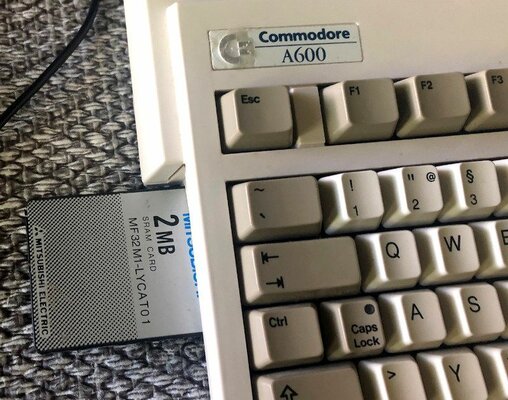
- 2MB PCMCIA SRAM expansion (fast RAM, Toshiba), probably useless after PiStorm -installation?
- RGB2HDMI + Pi Zero 2W
- PiStorm 600 + Pi 3A (or Zero 2W if space is a problem) + disk drive power splitter cable (EMU68 thingie looks interesting)
- I am hoping I could just use the PiStorm as hw-emulator and still use the cf-cards as harddrives, maybe even boot from the cf-card?
- KS Switcher (seemed like a good idea to put a boot ROM and DiagROM in there for good and switch if needed - or something...( wonder if it fits with the PiStorm?)
- Amiga DiagROM 1.2.1
- Amiga Test Kit -diskette (this is infact my one and only diskette at the moment, need to get few more!)
- 3.1 ROM + WB 3.1 on cf
- 3.2.1 ROM + WB 3.2.1 cf + installation CD (I no longer remember why I bought this one, but lets see)
- SD-card adapter + AM-Sider v2 (this was a misclick in the webstore, I was supposed to buy a cf-card adapter instead)
- modern Amiga 50W PSU
- USB mouse, Amiga tank style (have plenty of others is that doesn't work)
So, yesterday I realized I am missing 3 things, at minumum:
1. USB-adapter for the mouse
2. CF-adapter (fixing the mistake I made when ordering one above)
3. Amiga-SCART -cable (to start experimenting before I get the RGB2HDMI put together and installed)
So, I ordered those and additionally a CF-PCMCIA -adapter so I can hopefully transfer files between Win/Linux -machines and the Amiga relatively easily.
Today I decided to try if the machine works and boots. More about that later.
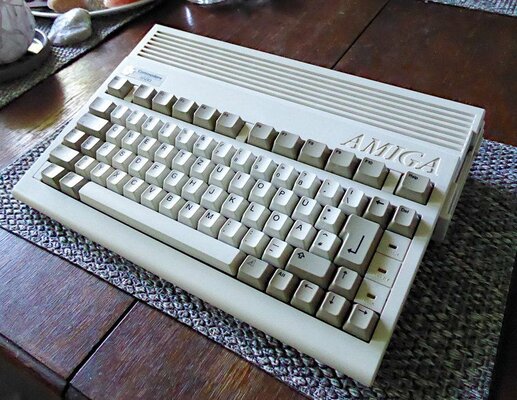
Prettyprettypretty:
Here are my (mis)adventures in Amiga-land. Long ramblings, sorry about that.
Why this section? I probably run into trouble sooner and later so I will ask questions.
During the corona-lockdown I was working on my C64 and a thought occurred: I had an plain vanilla Amiga 500 back in the day, why not get an another one and see if it really was so good I remember?! And then upgrade it, like I have done with other machines. I don't have much desk space so I started to search for more compact A600. They are not that common in my region (loads of 500's though), I then managed to find one in Germany. DE keyboard is almost like Finnish/swedish, so that will do. It came untested and with absolutely nothing else - just the computer itself.
My original plan was to gut the machine and install a RPi + USB/HDMI/Ethernet-ports+Keyrah + SD-card reader etc. and run Pimiga. And I did buy all the stuff to do it but when I received the machine I didn't have nerve to go forward with the plan. It was just too nice. If the machine had a totally corroded mb then yes but this just looked to good in and out for such a project. I decided to go some other route on this one.
Being somewhat (sadly) experienced in C64 woes I didn't rush into doing anything. Lots of surfing and getting myself up to date on what is going on with Amigas and what is nowadays available. Well, I see lots have happened and there is already many generations of sw, parts and upgrades made within last decades - some already obsolete. So, then I spent couple of years on and off thinking of this project, getting stuff and reading forums trying to figure out what I want and what might be smart. Meanwhile I played around in various Pimiga -versions, Amiga Forever, Retropie etc.
So finally, few days ago I decided to start the actual project. At this point I still didn't even know if the machine starts or boots. I blowed all the pubes and other furry stuff out and looked closely at the motherboard with a loupe. The mb is in general quite pretty. Didn't see any obvious leaks but some component legs looked a bit oxidized. Cleaned them the best I could. It seems I am the first one who opened this machine as the seals were still intact and the shields looked untouched. So, no recap made yet.
Then I made an inventory of what I have bought over these two or so years. It seems I have forgotten pretty much what I had and I am missing something and have double of something else. Typical. And I have no idea yet if all that I have even fits inside the A600 at the same time.
So, here goes, note these were bought over time so there is stuff that is useless if something else is used etc.:
- Amiga 600 base model without any upgrades, German kbd
- Amiga 600 capacitor kit (I need to practice my SMD soldering with a broken iMac MB first)
- 1MB chip RAM expansion with RTC (eX601n)
- 1MB chip RAM expansion w/o RTC (didn't remember I already had the previous card)
- 2MB PCMCIA SRAM expansion (fast RAM, Toshiba), probably useless after PiStorm -installation?
- RGB2HDMI + Pi Zero 2W
- PiStorm 600 + Pi 3A (or Zero 2W if space is a problem) + disk drive power splitter cable (EMU68 thingie looks interesting)
- I am hoping I could just use the PiStorm as hw-emulator and still use the cf-cards as harddrives, maybe even boot from the cf-card?
- KS Switcher (seemed like a good idea to put a boot ROM and DiagROM in there for good and switch if needed - or something...( wonder if it fits with the PiStorm?)
- Amiga DiagROM 1.2.1
- Amiga Test Kit -diskette (this is infact my one and only diskette at the moment, need to get few more!)
- 3.1 ROM + WB 3.1 on cf
- 3.2.1 ROM + WB 3.2.1 cf + installation CD (I no longer remember why I bought this one, but lets see)
- SD-card adapter + AM-Sider v2 (this was a misclick in the webstore, I was supposed to buy a cf-card adapter instead)
- modern Amiga 50W PSU
- USB mouse, Amiga tank style (have plenty of others is that doesn't work)
So, yesterday I realized I am missing 3 things, at minumum:
1. USB-adapter for the mouse
2. CF-adapter (fixing the mistake I made when ordering one above)
3. Amiga-SCART -cable (to start experimenting before I get the RGB2HDMI put together and installed)
So, I ordered those and additionally a CF-PCMCIA -adapter so I can hopefully transfer files between Win/Linux -machines and the Amiga relatively easily.
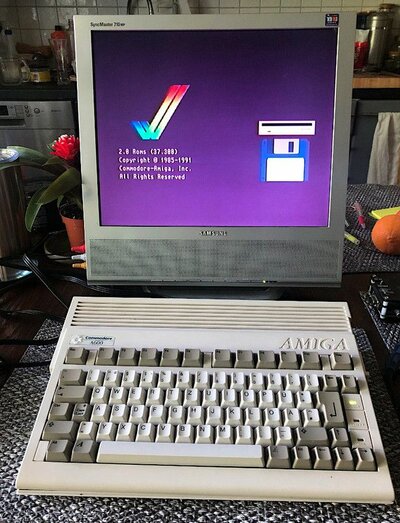
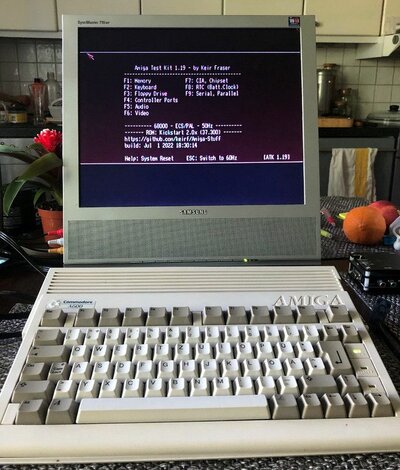
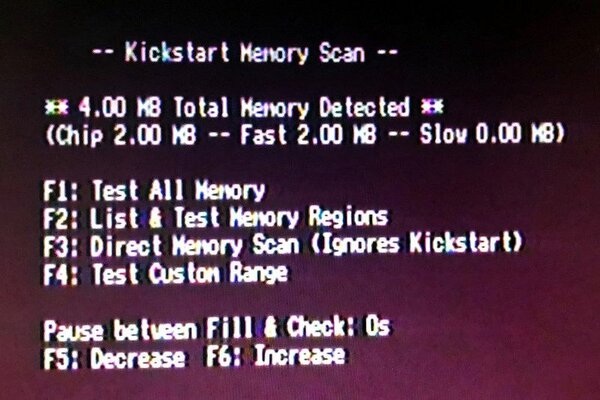
Today I decided to try if the machine works and boots. More about that later.
Prettyprettypretty:



 so that doesn't help me much. So, now I must order new adapters and proper cables to successfully use PiStorm + CaffeineOS. And so I will. Maybe I will do some other flavor of PiStorm setup too. as my original plan was to use the PiStorm as an accelerator only.


