As a last resort effort: is there any printer wizards out there? I have this neat ML-2525 Samung laser printer that I used for years, never gave me a headache, always been a reliable printing workhorse. Few weeks ago however it started acting up, and very randomly.
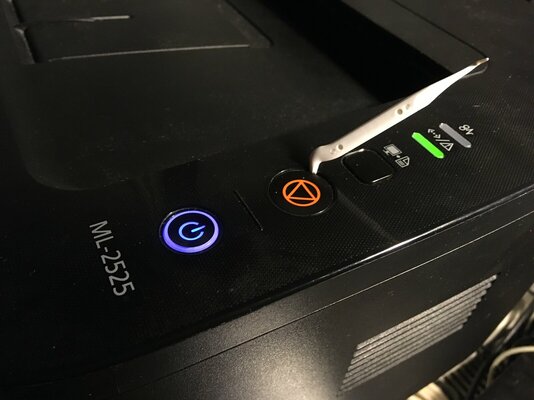
Nothing seems to be wrong when it prints, toner is good (according to driver sw) but it started to "reset" itself every once in a while, when receiving a print job. That is, when the job comes, it flashes 2 orange LEDs once, starts up the spoolers briefly, then it returns to idle like job well done. The print job also goes out from the Windows print queue like all is well.
 Except, the thing doesn't fricking PRINT. It used to happen sometimes, now I'm lucky if something prints after like 10-15 tries. It's like I'm printing to a black hole. Print->Gone. See video below.
Again, when it prints the print is fine, no fading or lines, nothing. It drives me nuts.
if it wouldn't print at all then it would be an easy decision, but it does, just I can't anticipate when Mr. Samsung is in the mood to do so. All I can do is mostly just wonder what sound it would make when it hits the pavement 5 floors below my hobby room window.
Things I've tried:
Tried from another PC (with the latest driver) - Nope
Changed USB cable - Nix
Tried opening/closing all trays/service doors, reinserted toner etc - Nej
Tried loading different types and different quantities of paper - Niente
Tried googling and searching Samsung/HP support - Nada
Tried printing when the Moon was in a different phase - ʻAʻole
Anyone has any last resort ideas? Maybe someone has seen this before?
Nothing seems to be wrong when it prints, toner is good (according to driver sw) but it started to "reset" itself every once in a while, when receiving a print job. That is, when the job comes, it flashes 2 orange LEDs once, starts up the spoolers briefly, then it returns to idle like job well done. The print job also goes out from the Windows print queue like all is well.
Except, the thing doesn't fricking PRINT. It used to happen sometimes, now I'm lucky if something prints after like 10-15 tries. It's like I'm printing to a black hole. Print->Gone. See video below.Again, when it prints the print is fine, no fading or lines, nothing. It drives me nuts.
if it wouldn't print at all then it would be an easy decision, but it does, just I can't anticipate when Mr. Samsung is in the mood to do so. All I can do is mostly just wonder what sound it would make when it hits the pavement 5 floors below my hobby room window.
Things I've tried:
Tried from another PC (with the latest driver) - Nope
Changed USB cable - Nix
Tried opening/closing all trays/service doors, reinserted toner etc - Nej
Tried loading different types and different quantities of paper - Niente
Tried googling and searching Samsung/HP support - Nada
Tried printing when the Moon was in a different phase - ʻAʻole
Anyone has any last resort ideas? Maybe someone has seen this before?
Last edited: