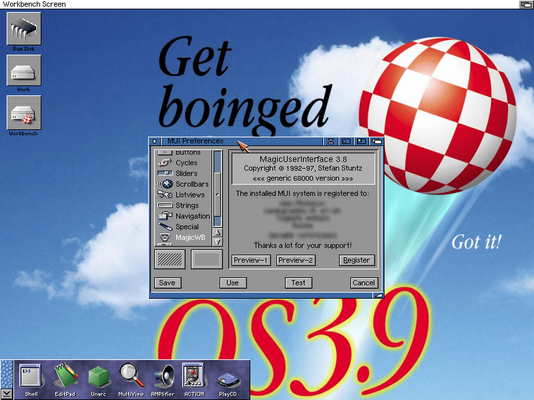
It seams Stefan needs some help with his registration A3000

You are using an out of date browser. It may not display this or other websites correctly.
You should upgrade or use an alternative browser.
You should upgrade or use an alternative browser.
SOLVED - MUI Key retrival from Sasg
- Thread starter cugar124
- Start date
- Replies 32
- Views 3128
I think not.It seams Stefan needs some help with his registration A3000
This is his generic email send to people at least since 2005. Look here - post #4
Put in Google his
"due to a hardware failure of my good old a3000, i am unable to create personalized keyfiles at the moment"
And you'll find the same message repeated across the time.
I think that during 20 years time if you want you can make your Amiga work again. Especially that the genuine Amiga hardware was much easier to obtain 20 years ago than now.
Last edited:

Just throwing this in here...
Got mine a year ago personalized after showing my receipt from SASG.
And yes, I am using MUI 3.8 - 3.9 has some bugs and 4.0 or 5.0 are slowing down the Amigas, even with PiStorm installed. 3.8 is all you need.
Got mine a year ago personalized after showing my receipt from SASG.
And yes, I am using MUI 3.8 - 3.9 has some bugs and 4.0 or 5.0 are slowing down the Amigas, even with PiStorm installed. 3.8 is all you need.

MUI 3.9 was last updated 2015 I believe? Also has the missing components you need for IGame etc..Just throwing this in here...
Got mine a year ago personalized after showing my receipt from SASG.
And yes, I am using MUI 3.8 - 3.9 has some bugs and 4.0 or 5.0 are slowing down the Amigas, even with PiStorm installed. 3.8 is all you need.


What do I need to get my personalized license ?Just throwing this in here...
Got mine a year ago personalized after showing my receipt from SASG.
And yes, I am using MUI 3.8 - 3.9 has some bugs and 4.0 or 5.0 are slowing down the Amigas, even with PiStorm installed. 3.8 is all you need.
It‘s all written in the mentioned post.What do I need to get my personalized license ?
I think that when registering you can expect personal key from the author.
Let's face it - most probably you bought it as a token of appreciation for his work.
Free mui.key is available almost officially for a decade now. So it is not the need of a key that compels people to register but more an expression of gratitude.
If you didn't know the same generic mui.key registered to David Gerber is in AmiKit - in L directory if I remember correctly.
As AmiKit X is free (pay what you want) the same MUI key that you received is freely available. If you use AmiKit, you have MUI key.
So in my opinion the least author could have done as a "thank you" for your registration is making your own personal key, not sending a generic, freely available one.
Let's face it - most probably you bought it as a token of appreciation for his work.
Free mui.key is available almost officially for a decade now. So it is not the need of a key that compels people to register but more an expression of gratitude.
If you didn't know the same generic mui.key registered to David Gerber is in AmiKit - in L directory if I remember correctly.
As AmiKit X is free (pay what you want) the same MUI key that you received is freely available. If you use AmiKit, you have MUI key.
So in my opinion the least author could have done as a "thank you" for your registration is making your own personal key, not sending a generic, freely available one.
Hey Picard, I followed your advice and got Amikit. I found the files mui.key and mui.key.license in the the L directory. I installed MUI38usr and magicwb21p on my A2000, and put the those two files in the L directory of the OS3.1 install. I still see register reminders when clicking on icons. Is this expected, or are those two files not being recognized by mui and magicwb? Thanks for any advice!I think that when registering you can expect personal key from the author.
Let's face it - most probably you bought it as a token of appreciation for his work.
Free mui.key is available almost officially for a decade now. So it is not the need of a key that compels people to register but more an expression of gratitude.
If you didn't know the same generic mui.key registered to David Gerber is in AmiKit - in L directory if I remember correctly.
As AmiKit X is free (pay what you want) the same MUI key that you received is freely available. If you use AmiKit, you have MUI key.
So in my opinion the least author could have done as a "thank you" for your registration is making your own personal key, not sending a generic, freely available one.

You DO NOT have key for MagicWB in AmigaKit. Only for MUI.Hey Picard, I followed your advice and got Amikit. I found the files mui.key and mui.key.license in the the L directory. I installed MUI38usr and magicwb21p on my A2000, and put the those two files in the L directory of the OS3.1 install. I still see register reminders when clicking on icons. Is this expected, or are those two files not being recognized by mui and magicwb? Thanks for any advice!
I have my key in S directory. Took my mui.key from AKReal (AmigaKit for real Amigas) which is/was a paid software.
mui.key.license is a text file (a license). Where did you check if your MUI installation recognize the key ?
Open MUI prefs program and check there