SOLVED - WarpEngine 060-80mhz SCSI Issues

  • Thread starter Thread starter Pior
  • Start date Start date
  • Replies Replies 6
  • Views Views 771

Pior

Active member
AmiBayer
Joined
Feb 17, 2018
Posts
932
Country
United States
Region
Arizona
I have a problem with the SCSI on my Warp Engine 060-80Mhz in my A3000 tower with 3.2.2. I have a ZuluSCSI with 3.2.2 OS and roms I seam to be able to make large partitions over 4GB using the 3000T on board SCSI and works fine if I move the Zulu card over to my WarpEngine SCSI with the onboard one no longer hooked up it will not recognize any Partition or Drive over 4GB.
Why would that be and is there something I need to change with the WarpEngine or the device drive. I would think it would recognize them. I shows the partitions or Drives under 4GB

Any Ideas or help from this great AMIGA Team.
 
Hi Pior!

I don't know the limitations coming with ZuluSCSI, but firtst I would look for the latest firmware for this device. There is always progress in this case.
If you have the latest and it wont work it could be really a (temp) limitations within ZuluSCSI.
My choice would be actually the PiSCSI from what I've read recently (comparison between SCSI2SD, ZuluSCSI, BlueSCSI and PiSCSI).
 
Is this an issue? (From ZuluSCSI Github page)
"If you need to use image files larger than 4GB, you must use an exFAT-formatted SD card, as the FAT32 filesystem does not support files larger than 4,294,967,295 bytes (4GB-1 byte)."
 
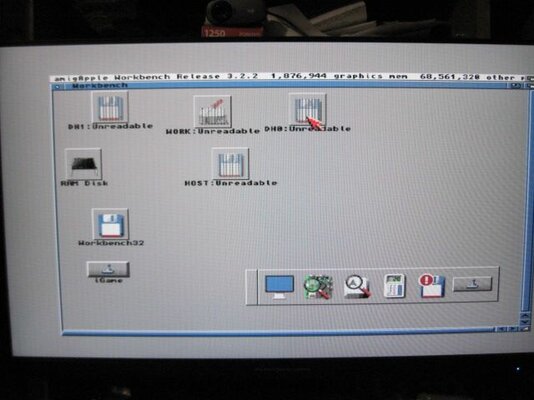
I am using the exFAT format and it works fine on the 3000T with on board SCSI all partitions show and work perfectly It is just when i swap it over to the WarpEngine scsi it has this limitation of only the boot partitions is active, See photo of when it is hooked up to WarpEngine Scsi..
 

Attachments

  • IMG_9916.JPG
    IMG_9916.JPG
    36.7 KB · Views: 14
I've got a 32GB SD card on my WE through a SCSI2SD and it works ok 99% of the time.

Now and again I have to validate the boot partition.

I read somewhere that the WE is limited to 2GB HD but I can't remember where I read it - I've looked in the manual and it's not in there.

Update

From the 3.2 FAQ
When using a WarpEngine accelerator, please remember (from within HDToolBox) to edit the partitions, select the "Direct SCSI" check box, save the partitions, reboot and all will be fine.
 
Last edited:
Well I got info from A1K site and all I had to do was to check the Direct SCSI Transfer in the partition drive setup and that made where are the Partitions are now active and working at 7 GB

Hope this helps others as well.
 
Back
Top Bottom