The Good, the bad and the fugly

  • Thread starter Thread starter mike_cc
  • Start date Start date
  • Replies Replies 33
  • Views Views 5528

mike_cc

Member
Joined
Oct 24, 2011
Posts
459
Country
UK
Region
Harrow, Middlesex
For those of you familiar with the retronephew thread...

https://www.amibay.com/showthread.php?t=22468


I've been trying to learn how to thread a needle with one foot, whilst clapping the other foot and one of my hands together repeatedly. At least, that's what it feels like.

Obviously I'm using the other hand to type and to wipe away salty tears of frustration.


I've also asked for help here.


https://www.amibay.com/showthread.php?t=22617


The summary is that I have one working CF WHDLoad in a A1200 and I've bought a blank CF card and adaptor to try to do it again without all the pre-loading. But I've a lot of conflicting and unconnected information about this and my head is now well and truly wrecked.

I've been doing some reading and some more experimenting. Whilst nothing as yet has enabled workbench's HDToolbox to notice the USB connected CF card, I have come up with some ideas which might work.

-WinUAE

No matter what I select in the WinUAE configuration area, all windows drives are mounted and shown on the WB screen within WinUAE. When I change the HDToolbox info from .scsi to uaefd, or whatever it is, and it gives the option of partitioning a HD, it refers to the drives as numbers between 0 and 6, so I have no idea which one it's referring to and can't risk wiping my pc's mind!
However, I've seen that previous versions of WinUAE had a disablesafetycheck function which seemed to allow people to do what they wanted with drives - worth a look? Which version?

-Compact Flash Card

A partitioning program I got from CNET Download can delete partitions, create them etc, but will only format in windows filesystems. I thought that deleting the partition so that the card was completely unformatted would mean WB_Install could do something with it in WinUAE, but the problem remains. Only difference is a warning is spammed up for every single click in the configuration area!

-USB removable media Vs IDE connected media

I have ordered a 2.5" to 3.5" adaptor so that I can plug the CF card in as if it were a 4Gb 3.5" IDE had disk. I'm hoping that it will be properly detectable by WinUAE as a proper drive and I'll be able to partition and format it. Is that likely to work or will it still be treated like a removeable media “superfloppy” by windows and ignored by WinUAE?


-The A1200 & A600

The A600 has a working floppy drive. The A1200 doesn't. But I could transfer the working drive into the A1200, then transfer the WB adfs over by Amiga Explorer. Then, write WB adfs to actual floppy disks using the working drive. Surely then, the installed CF HD could be unplugged from the A1200, replaced with the blank one, before using the newly created WB disks to partition, format and install WB3.1.

Does that sound like it might work? Don't call you Shirley?

-The good, the bad and the ugly


Good would be getting the whole thing set up in WinUAE and to transplant into the little A600, with classicwb or betterwb all ready to go.

Bad would be installing an earlier version of WinUAE, and then doing something which might endanger my aging PC.

Ugly... Fixing AE, then transferring 5x 880kb adfs to the A1200, replacing its disk drive, then hoping I have enough DD disks still working to create WB copies, which, incidentally, I have no idea how to do. Then hoping that the A1200 recognises the CF card, despite everything I've done to it so far.


This could get ugly!
 
USB To CF will work fine for WinUAE :thumbsup:

From the top of my memory. To get UAE to work with a CF card.

open a command prompt in windows, type diskpart . then type the following.
list disk
select disk # (# = whichever number your CF is being called by diskpart)
clean

close the cmd prompt.


Right click winuae, run as administrator.

Click on HDD section, add hard drive, should list your CF card. Select it.

Load up your 3.1 install floppy.

Go to HDToolbox. select it by clicking once with lmb. right click and select information from the top menu.

in tooltypes change scsi.device to uaescsi.device. click enter. load up hdtoolbox and it should appear as a drive for you to partition. :thumbsup:


I must admit, I usually partition my CF's on an amiga, as uae is a PITA to get setup properly. Then I drop my amiga formatted CF into my PC and go from there with the installs etc.


IF you want to copy your A1200's setup to another CF then you need to do this:

Run winuae as an admin.
go to HDD section.

Add hardfile HDF option, call it.
Add your working CF card also.
Boot from WB3.1 install disk
Load HD toolbox using above method. format the HDF drives using HD0, HD2 etc.

now open a new shell. type. Copy DH0: all HD0: (Do this for as many partitions as you have.)

Once done. quit uae. insert your new CF card adding it the uae's hdds. format the card as above, this time calling them DH0 DH1 etc.
open a shell, type: Copy HD0: all DH0: (repeat for as many partitions you want copied)


Struggling to type properly and be more descriptive, doing this from a phone :p

There are probably easier methods to do this, but no one has shared their ways with me yet :)


Boot from
 
Quick UAE Hints.

If using Vista or Windows 7, you need to make sure UAE is running as administrator. I only have XP here @ work so can only guess at how you do it.

Find winuae.exe, right click and "create shortcut"
Right click on "shortcut to winuae.exe" and select Properties

Win7/Vista Only:and you should see a "run as administrator" checkbox. Hit it.

All Windows:
In the "Target" box, you need to add at the end of the text:
"-disableharddrivesafetycheck"


Ok the dialog, then double click on the link to launch WinUAE as admin & with hard drive checks disabled.

In winuae options, you need to go to the "Hard Drive" options, and select "Add Harddrive". In the list you should see your 4GB CF Card. Select it, name it something useful (such as HD0), and select "IDE" as the port. okay it and start up the virtual amiga using the disk with hdtoolbox & hdsetup on (its name has been forgotten temporally)

In HDSetup, it should ask for a drive channel. It suggest a number for the A1200 - I think it's 5.

Let HDSetup do it's nasties, then you should be okay with HDToolbox to delete all the partitions then repartition the drive.

Hope this makes sense? Its all from memory, and I have neither an amiga, nor winuae here to help me!

:)
 
"-disableharddrivesafetycheck" is not needed any more
 
Thanks for helping me out with that Gouldin, I'm going to try these steps out when I get home. Fingers crossed it'll all work just fine. Even if there are hiccups, at least it's a starting point. I did just want to clarify a couple of things about what you suggested, so it's clear before I get back and try it out.

open a command prompt in windows, type diskpart . then type the following.
list disk
select disk # (# = whichever number your CF is being called by diskpart)
clean

My assumption is that the 'list disk' command brings up the numbers of each drive. Will it be obvious which is the CF? i.e, will the sizes or labels be there.

Then I type the rest in turn so that it will select the disk and "clean" it. That makes sense.


Right click winuae, run as administrator.

Well that's something new I've learned today, I can be an administrator, whoo hoo!:D

When I select the CF card as a hard drive, can the controller remain as UAE and not have to be changed to IDE or SCSI?

IF you want to copy your A1200's setup to another CF then you need to do this:

Struggling to type properly and be more descriptive, doing this from a phone :-P

There are probably easier methods to do this, but no one has shared their ways with me yet :smile:

This is great, I really appreciate your help, thank you.

:thumbsup:
 
Diskpart - It should be obvious, it lists them with size only. (So unless your HDD is 4gb you should be ok :p ) Usually disk 1 or 2

The clean command does what it suggests, removes any MBR tables or other boot type thingies so your amiga can RDB all over it :D


UAE Disk Controller - Leave it as UAE. ide and SCSI do nothing for me. Literally :lol:


Good luck. :thumbsup:


(Your next question, once you have mastered this little lot will no doubt be how to use SFS on every partition once you realise FFS isn't too great with 4gb drives. But that's for another time :lol: )
 
If using Vista or Windows 7, you need to make sure UAE is running as administrator. I only have XP here @ work so can only guess at how you do it.

Hi Chinners, I also only have XP but I'm hoping the help from Gouldin and yourself will enable this to work.

In winuae options, you need to go to the "Hard Drive" options, and select "Add Harddrive". In the list you should see your 4GB CF Card. Select it, name it something useful (such as HD0), and select "IDE" as the port.

Ahh, this is what I was asking above, IDE, ok.


In HDSetup, it should ask for a drive channel. It suggest a number for the A1200 - I think it's 5.

Right, that's the bit that goes from 0 to 6 right? It says 6 is SCSI so 5 is IDE then, from what you're saying. Cool.

Let HDSetup do it's nasties, then you should be okay with HDToolbox to delete all the partitions then repartition the drive.

Doesn't HDSetup begin by partitioning and formatting the drive? Either way, that's fine.

Hope this makes sense? Its all from memory, and I have neither an amiga, nor winuae here to help me!

It's great, thanks for this. If I had to do everything from memory I'd just sit in a corner facing the wall all day. Oh, hang on...

There was a time when all this stuff came intuitively to me. I was a solid Amiga user from 1994 to 2000 and I had an escom with the dodge drive problem but no reliable internet access at home or at college. So I had to dope out a lot of stuff for myself and come up with workarounds for the disk drive regularly messing up and the fact that my WB came without one of the disks (I believe I copied files over from some other source but it still never worked properly). Everyone on Amibay has been helpful and patient, despite me asking childish questions like a noisy kid who too lazy to think for themselves!

I've got a wedding rehearsal (not mine) tonight but if I have time to try this I'll let you guys know how it went (the Amiga drive, not the rehearsal).

Thanks a bunch :thumbsup2:

---------- Post added at 14:45 ---------- Previous post was at 14:43 ----------

Diskpart - It should be obvious, it lists them with size only. (So unless your HDD is 4gb you should be ok :p ) Usually disk 1 or 2

The clean command does what it suggests, removes any MBR tables or other boot type thingies so your amiga can RDB all over it :D


UAE Disk Controller - Leave it as UAE. ide and SCSI do nothing for me. Literally :lol:


Good luck. :thumbsup:


(Your next question, once you have mastered this little lot will no doubt be how to use SFS on every partition once you realise FFS isn't too great with 4gb drives. But that's for another time :lol: )

Thanks for clarifying, I feel equiped to do it properly now!
 
(Your next question, once you have mastered this little lot will no doubt be how to use SFS on every partition once you realise FFS isn't too great with 4gb drives. But that's for another time :lol: )

Well, that is where I am stuck... I keep trying and failing.

I have successfully used winuae to prep a 30gb hdd using SFS... A nice juicy 29gb partition for, um, everything.

I just cant get another drive to do the same (??!!!)

But will struggle on. I try following guides, but my mind wanders thinking it knows better. :Doh:
 
I'll do a nice topic at the weekend to help folks with SFS setups, though it'll be more of a Q&A session as peoples setups are different to mine. (CD32)

1st top tip for using a big HDD and SFS though, is to leave the Transfer Mask and Transfer size at the defaults HDToolbox suggests. Only CF cards need the transfer size changing as they're rubbish :D
 
Hey Mike,

This is indeed confusing stuff, but once you understand it's easy :)

MBR, RDB etc
There is no need to create any windows partitions!

Amiga partitions are different from windows partitions.
Amiga partition system is based on a Rigid Disc Block (RDB), not a Master Boot Record (MBR) like most pc's.
You need to *REMOVE* the MBR (Master boot record) of your CF card.
This because WinUAE will not accept writes to any disk with active PC partitions. (to protect users from damaging their PC partitions)

Only Vista and Win7 versions of diskpart work for removable media like CF cards.
Use Easeus that you already downloaded to remove the MBR under winXP.
On Linux you can use the DD command, and on Mac OS the disk utility.

How to add the CF in WinUAE
Remember to enable read/write.
You may select either IDE0 or UAE access mode in WinUAE. (This makes no changes to the drive itself and can be changed any time.)
The HDToolbox tooltype SCSI_DEVICE_NAME must be changed from scsi.device to uaehf.device if you use HDToolbox with UAE mode.
I always used IDE0 for partioning, and change it to UAE afterwards for faster file copying.
This way I never had to change any tooltype.

Other info
First, Set maxtransfer to 0x1fe00 for ALL partitions. This is extremely important to avoid data corruption.
This applies to all drive types (CF/SD/HDD/SSD) used with scsi.device IDE driver. (Which is stored inside your a600 and a1200 kickstart ROM)
Other IDE drivers (like the ones for Gouldin's third party a500 IDE controller) may behave differently.
See this thread for more info.

Second, it does not matter if you connect your CF to the PC with USB or IDE adapter.
WinUAE can access it in both cases, but will not let you use it as long as there are active windows partitions on the card.

See also my CF/SD troubleshooting thread here.
 
Last edited:
Gouldin, it's only listing Disk 0 - 496Gb (the main HD in my pc) when I use diskpart. It is cos it's usb? 2.5" - 3.5" IDE adapter arrived today, should I try it with that?

Edit:

Ahhh hang on, maybe that other program successfully removed the MDR thing, perhaps that's why it doesn't detect it?

Right, ok I did everything according to your post and as above nothing showed in diskpart and the drive does not show in hdtoolbox after changing to uaescsi.device

I'm going to try using the adaptor now, I'll let you know how it goes.

Only Vista and Win7 versions of diskpart work for removable media like CF cards.
Use Easeus that you already downloaded to remove the MBR under winXP.

Ahh, right ok. I'll give it another going over with Easeus first. Cheers
 
Hi, thanks but so far everyone had told me to use either diskpart or easeus to remove MBR from the CF disk, and here is what I've encountered:

At no point, so far, has diskpart detected anything other than my 3.5" 500Gb pc HD.

That includes when the CF was unpartitioned/formatted and when it was partitioned and formatted with FAT32. Diskpart and I aren't talking at the moment, it's been a poor introduction to our relationship.

Easeus happily does something called 'delete partition' but there is no mention of deleting MRB, although it does have a function called 'rebuild MDR' which doesn't sound like what I want. It seemed right though because then the drive drops off windows 'my computer'. At least when connected by usb anyway. So I thought at least that would be enough to use it with WinUAE. No.

Whenever this drive is used with WinUAE, either connected by USB or by IDE adaptor, it complains it is non-empty (not true) and isn't an RDB drive upon startup. I ignore this and add it as a uae/read-write hard drive and start WinUAE.

Having changed the hdtoolbox information to uaehf.device, the device still doesnt, and up til this point has yet to, show itself in the device list.

Now I'm sure I'm doing something wrong, but I'm following all the above advice to the letter, including what Goul, Frog and John have suggested. I'm going to go back over everything that's been written in this thread and see if I've missed something.:coffee:

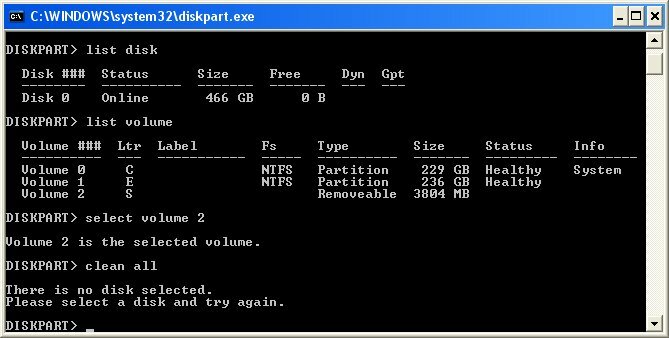
Quick update additional: Diskpart detects the drive as a volume, not a disk. I can select the volume but when I tell it to 'clean' the volume it tells me I haven't selected a disk! Discuss.
 
Last edited:
attachment.php
 

Attachments

  • Image1.jpg
    Image1.jpg
    41.8 KB · Views: 5
Hmmm, sorry, I should have noticed your on xp. I haven't used xp in a long time, but what Frodegh says is true.

Diskpart in windows xp won't work. :(

Not too sure other than following Frodeghs advice for xp.

Sent from my R800i using Tapatalk
 
Diskpart in windows xp won't work. :(

No worries, the other program did enough.

I'm halfway through John's guide and only have one little bitty issue. Under file system characteristics, he says to choose file system: SFS\00. However in my view, the closest to that is SFS\03! I'm going to choose that and continue but John, please pipe up if I'm wrong to do so.

Progress: By following John's guide I've started setting up the CF in WinUAE, which finally recognises it. However, I have to admit something pretty bad.

The whole time it wasn't working, I was using WinUAE 1.5.2....

Now I'm in 2.3.3 and that's where I'm at, setting up the filesystem on the partitions as I go. Not long now I'm sure...
 
hi as long as the identifer, mask and maxtransfere are the same it will be ok following the guide

dont forget to press enter to every change in hdtools
 
hi as long as the identifer, mask and maxtransfere are the same it will be ok following the guide

dont forget to press enter to every change in hdtools


Ok, will do. It crashed by the way. It was ok alt tabbing between the pdf and the windowed uae but posting in firefox halfway through was too much for it! So I'm going to resume tomorrow when I have more time.

Watch this space!
 
try to fit it all on the screen and use the scroll button to temp coming out of uae
 
Back
Top Bottom