The WEIRDEST composite video problem in the WORLD!

  • Thread starter Thread starter tbtorro
  • Start date Start date
  • Replies Replies 12
  • Views Views 3095

tbtorro

As you wish.
Donator
AmiBayer
VIP
Joined
Mar 21, 2011
Posts
5,185
Country
Denmark
Region
Sjæland
:) Er.. well maybe not the weirdest but if some video hw. guru has any idea about how to fix this please DO let me know, as it's driving me NUTS :censored: If the HDD is in use (IDE port populated) the flicker seems to be more frequent, but it still happens with no HDD connected (just less times). RGB out is completely fine and crisp.

Hard to explain the fault but check the videos - seems like RED turns to green/blue and back..

https://www.youtube.com/watch?v=DcrOxOgYbrg&feature=youtu.be
https://www.youtube.com/watch?v=2zFeLJsVfJ8&feature=youtu.be

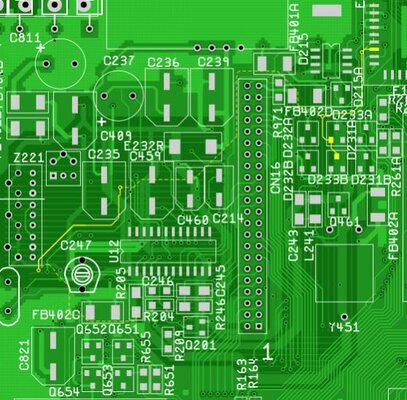
All obvious has been checked already (cables, monitor, ports, connectors). Checked all the filter beads, resistors, ceramics for cracks around the composite out and related circuits and I have changed all the ceramic caps (C211-213) at the composite encoder input to be on the safe side, and I've even changed the CXA1145 - to no avail..

Oh and it's an A1200 1.D4 ;)
 
Last edited:
:) Er.. well maybe not the weirdest but if some video hw. guru has any idea about how to fix this please DO let me know, as it's driving me NUTS :censored: If the HDD is in use (IDE port populated) the flicker seems to be more frequent.. RGB out is completely fine and crisp.

Hard to explain the fault but check the videos - seems like RED turns to green/blue and back..

https://www.youtube.com/watch?v=DcrOxOgYbrg&feature=youtu.be
https://www.youtube.com/watch?v=2zFeLJsVfJ8&feature=youtu.be

All obvious has been checked already (cables, monitor, ports, connectors). Checked all the filter beads, resistors, ceramics for cracks around the composite out and related circuits and I have changed all the ceramic caps (C211-213) at the composite encoder input to be on the safe side, and I've even changed the CXA1145 - to no avail..

Oh and it's an A1200 1.D4 ;)

It might be that the RED channel on Pin 26 for the Video DAC is being grounded by another signal either by a faulty component or a bit of stray solder?

Route of Pin 26 highlighted below..
Capture2.jpg
 
I`m no expert but I know the delay line @ Z222 and BPF @ Z221 can start to go flakey just like on the A600 and the composhite output can eventually fail, and they are a pig to source and replace :(
 
Last edited:
:) Er.. well maybe not the weirdest but if some video hw. guru has any idea about how to fix this please DO let me know, as it's driving me NUTS :censored: If the HDD is in use (IDE port populated) the flicker seems to be more frequent.. RGB out is completely fine and crisp.

Hard to explain the fault but check the videos - seems like RED turns to green/blue and back..

https://www.youtube.com/watch?v=DcrOxOgYbrg&feature=youtu.be
https://www.youtube.com/watch?v=2zFeLJsVfJ8&feature=youtu.be

All obvious has been checked already (cables, monitor, ports, connectors). Checked all the filter beads, resistors, ceramics for cracks around the composite out and related circuits and I have changed all the ceramic caps (C211-213) at the composite encoder input to be on the safe side, and I've even changed the CXA1145 - to no avail..

Oh and it's an A1200 1.D4 ;)

It might be that the RED channel on Pin 26 for the Video DAC is being grounded by another signal either by a faulty component or a bit of stray solder?

Route of Pin 26 highlighted below..
View attachment 117141

You are right - I shall check this ASAP.. :)
 
My bets are on a Powersupply issue, either a dodgy capacitor or your PSU isn't able to supply enough amps when the HDD peaks on current. Can you try a different PSU or remove any other expansions that are using power?

Bryce.
 
My bets are on a Powersupply issue, either a dodgy capacitor or your PSU isn't able to supply enough amps when the HDD peaks on current. Can you try a different PSU or remove any other expansions that are using power?

Bryce.

Actually I've already tried this with another PSU, but my bench PSU is a converted ATX one which is more than strong enough and I'm using it continuously with other boards - yet only this one shows these symptoms..

- - - Updated - - -

My A600 had a similar problem with composite out. To fix this, Commodore added a decoupling cap on later revisions across the CXA. I don't know if the same applies to the 1200 though.
You can see the factory added decoupling cap across the CXA on this pic:
http://amiga.resource.cx/photos/gallery/a600rev15.jpg

I've already tried that but unfortunately it didn't change the symptoms..
 
Last edited:
I've already tried that but unfortunately it didn't change the symptoms..

Then I would look towards trying to replace the filters. They are close to impossible to source new, but you probably have a dead A600/A1200 board you can grab some from. If they are out of spec, the PAL signal would also go out of spec which could cause weird colors. Since the RGB output is fine, nothing much else can go wrong besides the CXA, it's supply voltage and those filters.
 
I've already tried that but unfortunately it didn't change the symptoms..

Then I would look towards trying to replace the filters. They are close to impossible to source new, but you probably have a dead A600/A1200 board you can grab some from. If they are out of spec, the PAL signal would also go out of spec which could cause weird colors. Since the RGB output is fine, nothing much else can go wrong besides the CXA, it's supply voltage and those filters.

Well I shall look - the CXA was changed (brand new) - so not much else left to change..
 
I've already tried that but unfortunately it didn't change the symptoms..

Then I would look towards trying to replace the filters. They are close to impossible to source new, but you probably have a dead A600/A1200 board you can grab some from. If they are out of spec, the PAL signal would also go out of spec which could cause weird colors. Since the RGB output is fine, nothing much else can go wrong besides the CXA, it's supply voltage and those filters.

Filters swapped to known good set - no change in behavior. Funny thing is if I install a capacitor at C460 then this flashing/flickering color effect intensifies a great deal. Usually C460 is unpopulated on 1.D4 revisions.

Without C460 it's basically flic kers when the HDD is accessed, and when the HDD is idle then only sometimes (say 1 flicker in every 5-10 seconds) .

I'm about to give up.
 
Last edited:
Solved! demolition wins with the decoupling tip accross U12 video encoder chip (CXA1145) - interestingly I knew this but the usual 100nF decoupling didn't do any change. So I recommend to anyone who sees HDD/PCMCIA activity related flickers or video problems to experiment with different values if 100nF won't have an effect. In this case it was a 200nF that did the trick.
 
Back
Top Bottom