Thinking of getting a floppy emulator for my Amiga (Gotek or HxC slim). Some help needed

jumpinjackson

Member
AmiBayer
Joined
May 12, 2015
Posts
333
Country
UK
Region
Berkshire
Hi,

I realize this has been discussed extensively, but I've spent quite a bit of time searching and reading and there are still a few questions to which I don't (probably I just wasn't able to find) an answer.
Keeping in mind that I will go for the HxC firmware:

[TABLE="width: 900"]
[TR]
[TD]
  • What would be the advantages/disadvantages of a Gotek drive flashed with HxC firmware Vs HxC Slim? Are there limitations (read, write, etc.)?
[/TD]
[/TR]
[TR]
[TD]
  • I've managed to find a tutorial (more some pics) to connect a 2 line LCD display to the HxC slim, I've seen around that this is now feasible also with the Gotek but could not find information as to how to, anybody has a link, schematics, pics?

[/TD]
[/TR]
[TR]
[TD]
  • I've read that it is possible to add more buttons to the HxC slim. I've searched quite a bit of fora but could not find anywhere how this is done, anybody know how?

[/TD]
[/TR]
[TR]
[TD]
  • How would the Gotek two buttons work on a Gotek flashed with HxC firmware?

[/TD]
[/TR]
[/TABLE]


Apologies if this is now a boring topic or if questions have been already answered elsewhere.

Thanks to all.

JJS
 
Last edited:
I'm not an expert, but I've researched a bit because I want to buy this thing, too.

  • What would be the advantages/disadvantages of a Gotek drive flashed with HxC firmware Vs HxC Slim? Are there limitations (read, write, etc.)?
At the top of the HxC site (straight from the horse's mouth) about HxC Gotek:
(!!!!!! No Write Support !!!!! Have a look to the SD Card version for the write support!)

  • How would the Gotek two buttons work on a Gotek flashed with HxC firmware?
Uhm. Go back/forward. What else could they do?
 
I'm not an expert, but I've researched a bit because I want to buy this thing, too.What would be the advantages/disadvantages of a Gotek drive flashed with HxC firmware Vs HxC Slim? Are there limitations (read, write, etc.)?
At the top of the HxC site (straight from the horse's mouth) about HxC Gotek:
(!!!!!! No Write Support !!!!! Have a look to the SD Card version for the write support!)
I didn't get that the Gotek drive and the USB HxC floppy emulator referred in the page you linked were the same thing, but yes write support seems to be an issue (at least for the Amiga emulation): http://torlus.com/floppy/forum/viewtopic.php?f=5&t=1625

khimru; said:
  • How would the Gotek two buttons work on a Gotek flashed with HxC firmware?
Uhm. Go back/forward. What else could they do?
Change slot/cycle thorugh disk images? I don't know, that's why I'm asking :D
 
Last edited:
Writing sort of works on my Gotek (grey version) I bought several weeks ago. Not sure about firmware, it came prepared for Amiga. Display shows H-C so I guess it's HxC firmware. Selector shows v1.05.

I'm creating empty disk using this command in Linux:
Code:
dd  if=/dev/zero of=empty.adf bs=1K count=880
It's shown as NDOS when selected in Gotek because it's not formatted, of course. I can format the disk or copy another disk on it but only if verification is turned off. I can save files on it, load them later even after power cycling, no problem. However, if verification was turned on while formatting/copying then firmware gets "confused" and Amiga shows errors.

Writing from DMS doesn't work. The process is going too fast (normal format/copy is 01:20 for entire floppy, DMS is doing it in less than a minute) and Amiga shows errors.

I have other issues with this Gotek. It stopped recognizing my USB stick today, doesn't recognize any of the sticks I have, one of them (Cruzer Fit) is getting really hot when connected to Gotek. It's the same one that Gotek came with and is supposed to be most compatible. Basically, I'm having exactly the same problems I had on day one. On day two everything automagically started working... Until today.

Selector has many issues. It's using low-res with big font so longer titles are only partially visible with vital information such as disk number and virus tags in TOSEC filenames are out of the screen. It takes ages to enter a directory with several thousand ADF files. It takes ages to get from A to Z, it's reading filenames super slow. Filenames are not sorted, you can browse 0-9, A-Z and then find G-P before returning to beginning because it reads in the same order it was written. Because of that, every time I added something new to USB stick I had to run fatsort in Linux.

I'm not sure buying a Gotek was a good idea.
 
Writing sort of works on my Gotek (grey version) I bought several weeks ago. Not sure about firmware, it came prepared for Amiga. Display shows H-C so I guess it's HxC firmware. Selector shows v1.05.

I'm creating empty disk using this command in Linux:
Code:
dd  if=/dev/zero of=empty.adf bs=1K count=880
It's shown as NDOS when selected in Gotek because it's not formatted, of course. I can format the disk or copy another disk on it but only if verification is turned off. I can save files on it, load them later even after power cycling, no problem. However, if verification was turned on while formatting/copying then firmware gets "confused" and Amiga shows errors.

Writing from DMS doesn't work. The process is going too fast (normal format/copy is 01:20 for entire floppy, DMS is doing it in less than a minute) and Amiga shows errors.

I have other issues with this Gotek. It stopped recognizing my USB stick today, doesn't recognize any of the sticks I have, one of them (Cruzer Fit) is getting really hot when connected to Gotek. It's the same one that Gotek came with and is supposed to be most compatible. Basically, I'm having exactly the same problems I had on day one. On day two everything automagically started working... Until today.

Selector has many issues. It's using low-res with big font so longer titles are only partially visible with vital information such as disk number and virus tags in TOSEC filenames are out of the screen. It takes ages to enter a directory with several thousand ADF files. It takes ages to get from A to Z, it's reading filenames super slow. Filenames are not sorted, you can browse 0-9, A-Z and then find G-P before returning to beginning because it reads in the same order it was written. Because of that, every time I added something new to USB stick I had to run fatsort in Linux.

I'm not sure buying a Gotek was a good idea.

Thanks for sharing, I'm leaning more and more toward the HxC slim... If only I could find a tutorial to add another button (if it even exists and it can actually be done)
 
No problem. I have no experience with HxC slim but I'm interested in what people using it have to say about it.

My Gotek started working again today. It's like it takes a day off every 2 weeks or so. Weird.
 
Writing sort of works on my Gotek (grey version) I bought several weeks ago. Not sure about firmware, it came prepared for Amiga. Display shows H-C so I guess it's HxC firmware. Selector shows v1.05.

Thats not the HxC firmware.

- - - Updated - - -

I would go for the Gotek.
Its much cheaper than the HxC hardware (20$ shipped from China), comes with a case, basic screen & two buttons and the HxC firmware works on it.

AFAIK writing works with HFE files, dont know about ADF.
 
Writing sort of works on my Gotek (grey version) I bought several weeks ago. Not sure about firmware, it came prepared for Amiga. Display shows H-C so I guess it's HxC firmware. Selector shows v1.05.

Thats not the HxC firmware.

You're right, it turned out to be Cortex firmware by Hervé Messinger.
 
Writing sort of works on my Gotek (grey version) I bought several weeks ago. Not sure about firmware, it came prepared for Amiga. Display shows H-C so I guess it's HxC firmware. Selector shows v1.05.

Thats not the HxC firmware.

- - - Updated - - -

I would go for the Gotek.
Its much cheaper than the HxC hardware (20$ shipped from China), comes with a case, basic screen & two buttons and the HxC firmware works on it.

AFAIK writing works with HFE files, dont know about ADF.

Thanks UberFreak,

So the Gotek using HxC firmware AND HFE files works also in writing, that makes it quite interesting.
Would you know where to find instructions on how to attach a LCD display to a Gotek drive? I've scouted many fora, in many places it says that it can be done, there's also somebody selling a kit here on amibay (which I guess would contain instructions) but I'd rather get the components and find the instructions somewhere else as it would be cheaper.


Thanks
 
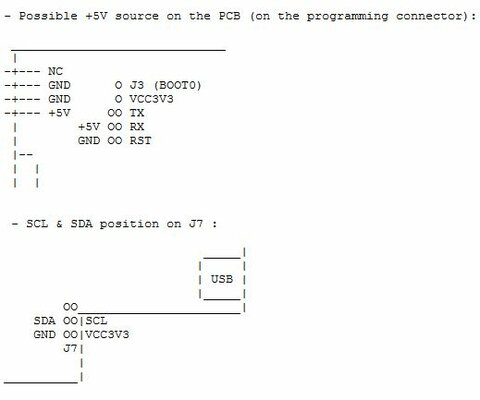
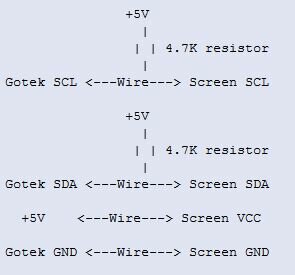
No pics around but found this in the release notes of the HxC firmware for the floppy emulator.

To connect the I2C LCD, you have to connect SDA & SCL at the J7 connector (see below).
Please note that 2 additionnals 4.7Kohms pull up resistors (+5V) are needed on SCL & SDA.
the +5V and GND wire can be connected on the programming connector (see below) :

Gotek-LCD.JPG Gotek-LCD2.JPG

Mmmmmm, maybe it's time to ge myself a Gotek drive :p
 
Last edited:
Back
Top Bottom