USB on an A1200

  • Thread starter Thread starter mike_cc
  • Start date Start date
  • Replies Replies 31
  • Views Views 2197

mike_cc

Member
Joined
Oct 24, 2011
Posts
459
Country
UK
Region
Harrow, Middlesex
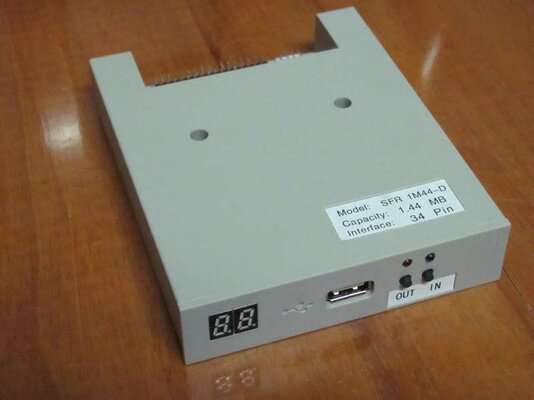
I'd like to install a USB port on my A1200 (original case) and found the Subway. But should I make it my sub of the day? Because this morning I've found something I've not seen before - USB replacement for 3.5" floppy drive.

On a different website (not "that" website, although it is there also) this was said: "Not only will this device work in PCs but, it will also work in machinery or devices that still use floppy drives".

Could be a neat way to solve the USB needs. Has anyone tried it? Shall I try it and report back?

:drool:

PS: I considered posting this in amioracle but it seemed more a conversational piece than a help request
 
if you can hack the floppy to be ami compatable then I see no reason why not to do it.

I also have a floppy with a usb thingy on it, just got to work out how I am going use it in one of my builds

sub of the day :thumbsup:
 
Most important by the way i see it, is it's forbidding price! Not going to mention numbers here, but you could get yourself a couple o Subways with that money, and have some change for a stroll down da pub!
Plus, i'm pretty sure the guys selling them will not actually guarantee that it works with an Amiga. So you might be left with an expensive doorstop.
As about USB needs, i'm not sure it would cover more than storage matters. With a proper stack and a slightly better-equipped A1200 and Subway you could be using a bit of more peripherals than just a storage solution.
 
if you can hack the floppy to be ami compatable then I see no reason why not to do it.
Agreed, so I bought one to try it

forbidding price! ... you could get yourself a couple o Subways with that money, and have some change for a stroll down da pub!
Now you're talking my language - beer tokens! However, I've found a cheaper version (much, much cheaper) which should be winging its way to me within 12-24 days (that should give you a clue as to where it's from!).

Plus, i'm pretty sure the guys selling them will not actually guarantee that it works with an Amiga.
That's a risk, for certain. I'm reassured by their "any machine with a floppy comment" and the thought that this device doesn't use either the Amiga or PC floppy file system but simply hacks the floppy port for use with flash memory. So if it doesn't work, it will make a doorstop (albeit not as expensive a doorstop as you first thought) or I'll whack it into my wintel (wamd) instead.

Another thought, perhaps this device, if it works, could be squeezed into an external disk drive case and plugged in that way.

:coffee:
 
Sorry, any chance of a link? Once you have it, how about some pics, front and back:thumbsup:

Cheers
 
Sorry, any chance of a link? Once you have it, how about some pics, front and back:thumbsup:

Cheers

Not sure what I'm allowed to link to here as I've not seen many links, especially to certain auction sites.

However, here is the picture of what I'm getting and I'll post some better pics when it arrives.

attachment.php
 

Attachments

  • floppy_drive_emulator_floppy_to_usb.jpg
    floppy_drive_emulator_floppy_to_usb.jpg
    33.1 KB · Views: 7
@Merlin & thread,

I'm waiting for one of the interfaces from Ian Stedman to fit a combined Floppy/USB drive (almost a year so far). Version 1 is sold out. Version 2 is still in development afaik.

Regards,
Ed.
 
@mike_cc

Hi mate :)

If you search a bit more you can find also the 720kb DD emulators with up to 100 DD floppys per USB stick.
 
I've seen these devices and they looked great for floppy emulation. They use them a lot as replacement drives for other electronics with built-in floppy drives, such as music keyboards. I thought about one of these before I bought my first HxC emulator. :)

Good luck! Let us know how it works out.

Heather
 
It might work with one of Ian Steadman's Amiga adapter boards for PC floppy drives.
That's a pretty reasonable assumption so I will probably not try installing it until I've gotten hold of one of those.

Version 2 is still in development afaik.
Hot dang it - now I gotta try that thingy all raw like :Doh:

Hi mate :smile:

If you search a bit more you can find also the 720kb DD emulators with up to 100 DD floppys per USB stick.
I love the idea of multiple, mounted adf files, all accessible from flash memory, is that the idea?
They use them a lot as replacement drives for other electronics with built-in floppy drives, such as music keyboards.
The one I have coming (fingers crossed) is for a Korg! I'm reassured it doesn't matter though :whistle:
 
OK, let's assume that you have to 'freestyle' this to get it working with an Amiga.

It will need the 'Disk Ready' signal enabling and that involves joining pins 1 and 34 of the connector together - this can be done via the floppy cable. It will need this to be a bootable drive. As to if it will boot and 'see' disk images, I really don't know.... if you are using images, then the 720k / 1.44Mb debate is sort of irrelevant, as the drive will cope with both. The true issue is if this will emulate a floppy that the Amiga can work with.

You may also need to check if the drive is selectable as DS0/DS1, as the Amiga wants drives that are set as DS0. PC drives are normally set as DS1 and the twist in floppy cables sorts this out in PCs, as they normally all leave the factory set as DS1 and the cable determines which is DS0 (A: drive) and DS1 (B: drive)

I think if you get a two-connector floppy cable with the twist in it between A: and B: drives, then connect pins 1 and 34 together, you may find that the Amiga 'sees' the drive on one of the connectors and displays DF0: or DF1: at the Workbench screen.
 
Agreed with Merlin,

I don't know, but because you want to play from adf's...maybe the HxC emulator is a better solution for you :)
 
@ merlinkv

I agree with you, as disk writing support could also be an issue; the HxC USB version doesn't have write support, however the SD Card version does, and I think that this drive might also fall over when asked to write data back.
 
that involves joining pins 1 and 34 of the connector together
There's nothing I like better than desecrating cables - pass the soldering iron!. No diode needed? I saw something on Aminet about a diode...

You may also need to check if the drive is selectable as DS0/DS1, as the Amiga wants drives that are set as DS0. PC drives are normally set as DS1 and the twist in floppy cables sorts this out in PCs, as they normally all leave the factory set as DS1 and the cable determines which is DS0 (A: drive) and DS1 (B: drive)
I'm going to have to run through all this when it arrives. In the meantime, there's Frontier: Elite II :D

merlinkv Agreed with Merlin,

I don't know, but because you want to play from adf's...maybe the HxC emulator is a better solution for you :smile:
and

Merlin @ merlinkv

I agree with you, as disk writing support could also be an issue; the HxC USB version doesn't have write support, however the SD Card version does, and I think that this drive might also fall over when asked to write data back.
Who and the what now? Soldering iron: Check, Any kind of clue what you're talking about: Nein. I wish I'd paid attention in electronics class :huh:

Suffice to say, I'm certainly not concerned about writing, copying, formatting or saving disks. I simply want to be able to transfer data to and from the machine, without using a network connection because Amiga Explorer is boiling my **** at the moment. Data will include adf files, I expect, as there is little or no productivity software on the CF HD, but shed loads in my downloads folder on my 'PC'. I just want to be able to put files and programs of indeterminate size on the Amiga 1200 and then, having done some truly creative things with 1's and 0's, then remove them to show off on the interweb.:sos

--------------------------------------------------------------------------------------------------------------
Edit: Just looked up the HxC Floppy emulator. It looks pretty cool, although lot more expensive. I'm going to wait and see what this thing does first and then turn to HxC if I need to.
 
You shouldn't need a diode in the wire between pins 1 and 34. Most 1.44 PC floppy mods to make them Amiga compatible use this link wire without a diode. A simple link wire between the two should do it.

Pin 1 (Ground) just ties Pin 34 (Disk Change / Ready) low, so that any disk inserted is intialised by the drive.

Who and the what now? Soldering iron: Check, Any kind of clue what you're talking about: Nein. I wish I'd paid attention in electronics class :huh:

OK, let me try to explain it a little better. A true floppy drive has read/write capability, however, the HxC Floppy Emulator comes in two versions; a USB one and one that has an SD Card slot.

As I understand how these devices work, the USB versions buffer the disk image into the device's memory and this is what gets read by the computer. This buffered image cannot have data (such as game saves) written to it. The device you have bought may also have this limitation.

The SD Card version of the HxC Floppy Emulator can read and write and behaves pretty much like an original floppy drive, except that everything is solid state electronics, so saved games are not a problem.

Has that made things any clearer?

Maybe a PCMCIA to CF Card adapter might be a better way for you to transfer files...?

http://amigakit.leamancomputing.com...id=440&lcsid=b81f10849b7f066b8184e3f5a996d6fc
 
Thanks Merlin, that is much clearer (although the cold light of day and not having a glass of ruby port in my hand helps too :shhh:).

I was considering getting a squirrel scsi interface + cd-rom drive but the PCMCIA CF option is cheaper and probably a lot less fuss.

I've now tried so many different configurations of amiga explorer that I'm beginning to suspect my serial port is flummoxed on the mig. So this solution may be the fix I'm looking for, although I'm far to stubborn and bl00dy minded to let the networking problems go. If this wonderful old computer is going to be more to me than a games console, it's going to have to fire on all cylinders.

:deadhorse
 
Not pin #1!!!!!!!!!!!!

You must swap pins 2 x 34, on floppy units ALL ODD PINS ARE GROUND. Also the unit might not have the ready signal, so you can do a little hack: join pins 30 & the "new" 34 so when the data signal transmit it will fool the ready signal the Amiga is expecting.

Also remember the unit must be set to DS0 instead of DS1 from pc-world.
 
pins shmins

pins shmins

Not pin #1!!!!!!!!!!!!

You must swap pins 2 x 34, on floppy units ALL ODD PINS ARE GROUND. Also the unit might not have the ready signal, so you can do a little hack: join pins 30 & the "new" 34 so when the data signal transmit it will fool the ready signal the Amiga is expecting.

Also remember the unit must be set to DS0 instead of DS1 from pc-world.

Thanks for the warning dude, I knew that guy must have been crazy, talking about pin 1 like that. You've got my back, I know you have, we have to stick together now as they'll be after us. Don't trust anyone ok, if it looks suspicious, it probably is suspicious and don't think you're being paranoid. You're with them aren't you. You double crosser, after all this time, I can't believe it, you've betrayed me. NO I WON'T PUT DOWN THE GUN...

rkauer, do you see how these things can escalate? Please think twice before contradicting another member of the community because next time, it could be you trying to talk down a ficticious gun nut.
 
Back
Top Bottom