
You are using an out of date browser. It may not display this or other websites correctly.
You should upgrade or use an alternative browser.
You should upgrade or use an alternative browser.
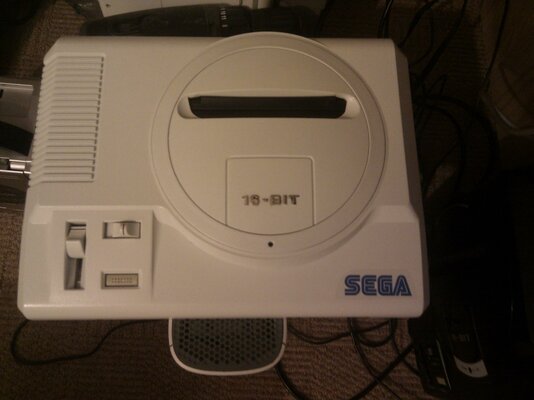
White Multiregion 60Hz HD Megadrive
- Thread starter AmiNeo
- Start date
- Replies 96
- Views 15593


 oh:
oh: So I attempted to install the oscillator last night. I got it done and put it in a permanently OC'd state until my toggle switch arrives... Turned it on... dead
Need to look deeper, it may be the oscillator or a bad connection, but I may need a new board for this. Think I've screwed up somewhere...

Got a friend visiting today so means I wont get a good look at it until this evening either :dry: lol


@Phips - I'm using a 12.5MHz oscillator as 12.5 MHz seems optimum for the Megadrive based on the research I've done. 
---------- Post added at 22:06 ---------- Previous post was at 21:46 ----------
You have a counter PM mate
---------- Post added at 22:06 ---------- Previous post was at 21:46 ----------
I'm afraid the results for the transfer paper have been poor buddy. It looks like my printer is not upto the job. I've sent you a refund and a PM.
You have a counter PM mate
Okay we've hit a snag on this one... The decal paper aint performing well, is there anyone else who will be willing to try to print them for me? preferably someone who has done rub off decal paper before? It seems to be fussy what printers it wants to work in. r0j suggested a laser printer may be best... ?? 
Last edited:
Have used water peel of decal paper before (to decorate candles mainly) which worked pretty well, and used an inkjet for that IIRC. I have a colour laser here but no decal paper to try, and that decal paper isn't cheap otherwise I'd get some and see what I could do.


Hey guys, I'm a bit stuck for the design on the logo, could use some input.
Hey, I'm sorry to be the bearer of bad news but I thought I better warn before it's late.
I hope you didn't apply the decal because the katakana for Megadrive is wrong.
The proper Katakana for Megadrive is: メガドライブ (so you are missing two characters).
Source, case you doubt: http://ja.wikipedia.org/wiki/メガドライブ


RED IMPACT
Active member
Update... Found this logo pre done on t'other bay... Leaving the plastic on until I get the rest sorted...
Just need the small text now and the japanese doing...
Nice job
Thanks guys, just wish I could get the rest done somehow to finish it off.
I know to be this good takes AGES but this is taking the mick!
---------- Post added at 04:32 ---------- Previous post was at 03:33 ----------
Right does anyone have a laser printer handy that would be willing to have a stab at doing some decals? It will need to be colour as the text needs to be blue.
And I dont have any paper spare, so will need to buy some for the kind soul that offers...
I know to be this good takes AGES but this is taking the mick!
---------- Post added at 04:32 ---------- Previous post was at 03:33 ----------
Right does anyone have a laser printer handy that would be willing to have a stab at doing some decals? It will need to be colour as the text needs to be blue.
And I dont have any paper spare, so will need to buy some for the kind soul that offers...
Hey guys! Wow this is a blast from the past. Thinking of rebooting this project as the shell is still sitting here. Does anyone (having read the thread and familiarised themselves with the issues) have a way forward on this? If someone can manage to print off the decals for me, I can finis this off.
Similar threads
- Locked
- Replies
- 0
- Views
- 1K

- Replies
- 0
- Views
- 1K