CU_AMiGA
Member
Hey Yo!
Basically my problem is i currently have a laptop with Windows 8 installed. I was planning on upgrading to Windows 8.1, then possibly Windows 10. Now the current problem i have is that the Windows 8.1 upgrade literally refuses to download/install! I read on google that you have to install any "minor" updates that are still outstanding. I have tried this, and unfortunately a couple of these installs also refuse to download/install! So, has anyone on here come across this problem and know where i can go from here?
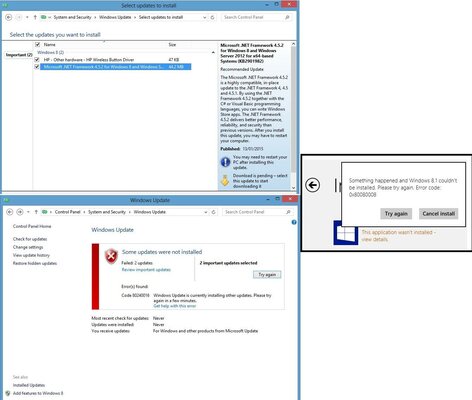
I thought i would put a screen grab up of the 2 updates that wont install, and the Windows 8.1 error message, both with the error codes. It's actually been giving me other error codes when i tried it yesterday, but haven't been able to reproduce them. Things that i have tried: 1) I used antivirus and malware checkers (no trouble from either of them) 2) Tried using Fixit, and it didn't seem to solve the problem. I have looked at the error codes on google and it seems to point to some kind of corrupted update files or something (a little bit over my head to be honest!). Next thing i was gonna try was maybe having a go at resetting the Windows update files (something like that , that i read!) and maybe download the Windows Update Manager. Anyone else have any ideas? Is it possible to download an offline version of the Windows 8.1 update and install it manually?
Thanks for your time.
Basically my problem is i currently have a laptop with Windows 8 installed. I was planning on upgrading to Windows 8.1, then possibly Windows 10. Now the current problem i have is that the Windows 8.1 upgrade literally refuses to download/install! I read on google that you have to install any "minor" updates that are still outstanding. I have tried this, and unfortunately a couple of these installs also refuse to download/install! So, has anyone on here come across this problem and know where i can go from here?
I thought i would put a screen grab up of the 2 updates that wont install, and the Windows 8.1 error message, both with the error codes. It's actually been giving me other error codes when i tried it yesterday, but haven't been able to reproduce them. Things that i have tried: 1) I used antivirus and malware checkers (no trouble from either of them) 2) Tried using Fixit, and it didn't seem to solve the problem. I have looked at the error codes on google and it seems to point to some kind of corrupted update files or something (a little bit over my head to be honest!). Next thing i was gonna try was maybe having a go at resetting the Windows update files (something like that , that i read!) and maybe download the Windows Update Manager. Anyone else have any ideas? Is it possible to download an offline version of the Windows 8.1 update and install it manually?
Thanks for your time.