
Hi all
I am really needing some advice please on this, pulling my hair out.
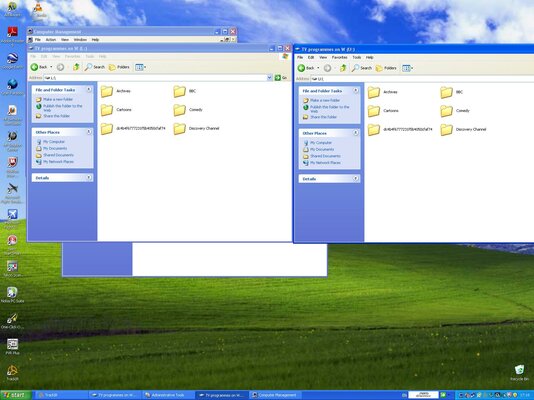
My dual boot PC messed up big time thanks to a microsoft update and now constantly reboots, so thats it. But my other boot partition was ok, so I had to transfer my Carbonite online backup software to that 'system'. I have had to rename that system to that of the duff partition that does not boot and create an account with the same name. So far so good. However, Carbonite must see the same file path/directory structure as per the backup they have for it to see it as no change. This is the problem, for some reason I have the same hard drive in the PC being seen twice, with different drive letters, 'L' and 'U' (see attatched grab). I need to use 'U:' drive letter for mapping to a shared drive so my Synology backup software writes to and creates the correct directory tree in my other drive (R: )
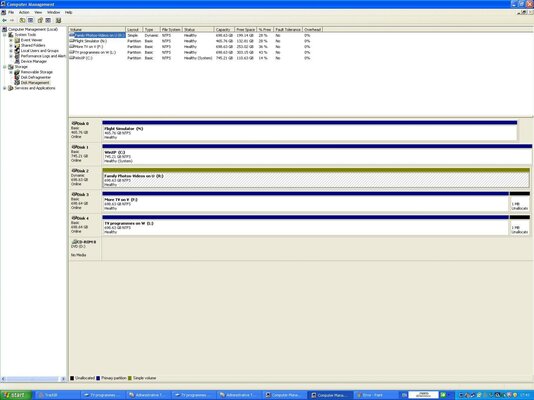
I have looked in the drive management in Win XP and see no referance to drive 'U:' but it's there on my 'Computer' window and accessible.
I don't have long to sort this out as my subscription expires as well soon on Carbonite...and risk waving bye to 3 years/750gb of online back up
:help:
Thanks
I am really needing some advice please on this, pulling my hair out.
My dual boot PC messed up big time thanks to a microsoft update and now constantly reboots, so thats it. But my other boot partition was ok, so I had to transfer my Carbonite online backup software to that 'system'. I have had to rename that system to that of the duff partition that does not boot and create an account with the same name. So far so good. However, Carbonite must see the same file path/directory structure as per the backup they have for it to see it as no change. This is the problem, for some reason I have the same hard drive in the PC being seen twice, with different drive letters, 'L' and 'U' (see attatched grab). I need to use 'U:' drive letter for mapping to a shared drive so my Synology backup software writes to and creates the correct directory tree in my other drive (R: )
I have looked in the drive management in Win XP and see no referance to drive 'U:' but it's there on my 'Computer' window and accessible.
I don't have long to sort this out as my subscription expires as well soon on Carbonite...and risk waving bye to 3 years/750gb of online back up
:help:
Thanks


 s up on you lol.


