
WINuae not detecting CF card correctly.

  • Thread starter Thread starter mamejay
  • Start date Start date
  • Replies Replies 18
  • Views Views 10516

mamejay

Member
Joined
Sep 22, 2012
Posts
137
Country
Australia
Region
Melbourne
Hi everyone,
I have another problem with WINUAE trying to setup a CF card. When I try to add a 8GB card I get the following screen shot.
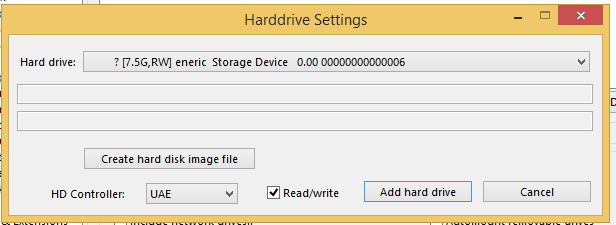
8gb.PNG
When I go into the ClassicWB I setup it shows the following when trying to setup the disk with HDTools
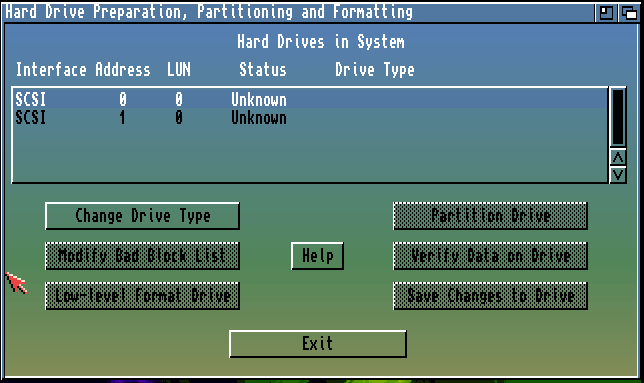
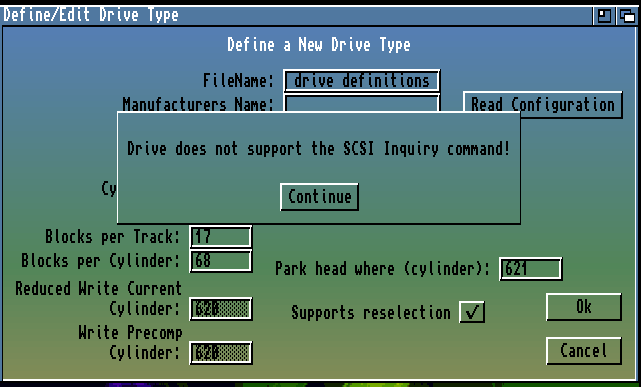
Diskprep8gb.PNG
Diskprep8gb2.PNG

With a 4gb CF I prepare about 12 months ago I get this when adding the CF card
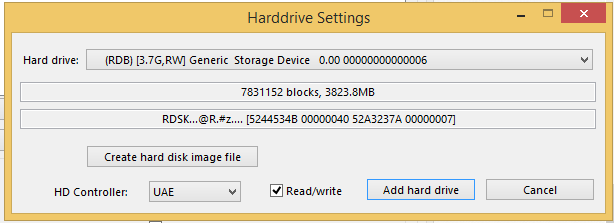
4gb.PNG

What am I doing wrong?
I have done this at least 40 time about 12 months ago but now I cannot set them up. I have the icon with the correct -"C:\Program Files (x86)\WinUAE\winuae.exe" -disablehardrivesafetycheck
I have also cleaned the card using diskpart and the clean command in windows. Only difference I can see from 12 months ago is that I am using WIN8 instead of WIN7.
Please if anyone can help let me know.
Thanks
 
If this is the first time you have tried to setup a CF card for WinUAE since you made the change to Windows 8....there must be the answer. I havent got Windows 8...no interest for me, but have you tried running WinUAE in administrator mode (assuming W8 still has that?). I recall previously Windows would disallow, without telling you, writing to the "boot block" (non technical version here :) ).
After you clean the card, if you remove it and reinsert I assume Windows asks to format the card? I had trouble with WinUAE and Win 7 on my machine a while ago....trying to recall exactly the problem....but with a USB memory stick or other memory card in the PC, I couldnt setup the CF card for WinUAE. Try removing other removable storage to set it all up?

I dont know if any of that will help....

Have you tried to setup a smaller CF card.....then with same or different results?

Assuming you no longer have access to a Win 7 machine with WinUAE?

Hopefully you solve the problem, or others can make suggestions.

Just for the record....Windows 8 blows, so I doubt YOU are doing anything wrong!! They gave me a W8 PC at work...and I just didnt like having to relearn Windows all over again...so I gave it back :)
 
After you done the diskpart and clean did you removed the CF and inserted again on card reader? I had problems because I never removed the card.
Could you try somethings?

1) Open WinUAE in "compatibility" mode for W7 is possible?
2) VirtualBox and install W7 (boring solution)
3) Try with another CF card
 
Last edited:
Most likely nothing to do with WinUAE.

Check Windows disk manager, if (it most likely will) shows same corrupt information and missing/zero disk size: your reader is incompatible or bad or card is incompatible with newer USB features or modes (that Windows 8.x may now support). Not too rare, similar hardware/firmware compatibility problems have happened previously with USB devices.

Try another card, if same problem: try another reader.

("Works fine here", even in Windows 10 preview)

btw, disableharddrivesafetycheck has been done nothing for years..
 
I solved all my CF issues in Win8 with...

- Open a CMD window in Admin mode
- Execute command DISKPART
- Type DISK LIST and you can see your CF as Disk XX
- Type SELECT DISK XX (be careful, if you select the wrong disk all data will be erased in the next step)
- Type CLEAN
- Type CREATE PARTITION PRIMARY (To create one empty primary partition without any information)
- Type DISK LIST again to test if everything is OK
- Leave DISKPART with EXIT

Start WinUAE in Admin mode, select Hard Drive, .........

I hope this help. :)
 
Last edited:
Normally yes but I don't think it helps with OPs problem (and most likely diskpart also refuses to work with it), drive name string is corrupted and it comes from firmware, same for total drive size information.
 
-disablehardrivesafetycheck isn't used anymore.

You could create the RDB on a real Amiga, then hopefully the CF might work fine with WinUAE after, I've used this method for troublesome cards in the past.
 
I have found similar issues in the past with different readers & CF's. But after using DISKPART I solved all of them, and I can use all my CF's (and SD's) in WinUAE and/or prepare them to use in real Amigas.
 
Last edited:
Same or similar issue?

Windows Disk Management also shows bad name and drive size as zero bytes but after drive has been cleared, it shows correct name and size? It makes no sense.
 
Well I'm speaking about issues I had in the past and using Win 8.1 ....

When adding the Hard Drive, WinUAE don't recognize well the CF (as you say)

HDInstTools (UAE or IDEX)

- Empty&Clean or used CF detected as two or three SCSI devices with different IDX
- Can't write in "Zero Sector"
- Can't write (use) drive "unit type 25" (or something like that, I don't remember)

These issues appeared independent of the CF / SD or reader used

-----

Tired of this issues, I found the DISKPART "solution", the only difference I use is the step to CREATE PARTITION PRIMARY after CLEAN (not explained in other forums I have readed)

After that, WINUAE recognize the CF as UNK drive (?) but with correct size and parameters and I can use HDInstTools to setup the drive, create partitions, .... Save changes, leave WinuAE, and start again... the drive is recognized as RDB one. and work fine also in real Amigas.

:)
 
Last edited:
Thanks everyone. I managed to get it going by using an older version of winuae.
I have a nice 8gb setup. I have made a cfcard dump now so am ready for any crash or problems
 
Could someone check Windows Disk Managament when this situation happens. It is impossible to fix this (I still assume old versions just ignore the problem, safety always comes first when writing to drives directly.) without knowing if it is Windows returning bad data!
 
Could someone check Windows Disk Managament when this situation happens. It is impossible to fix this (I still assume old versions just ignore the problem, safety always comes first when writing to drives directly.) without knowing if it is Windows returning bad data!

I will check this evening/night. :)
 
Thanks. Include also winuae drive numeration log part (winuaebootlog.txt, does not need complete log, need only lines after first "opening device.." that appear when "add harddrive" button is clicked. Must be run as admin.).
 
Thanks. Include also winuae drive numeration log part (winuaebootlog.txt, does not need complete log, need only lines after first "opening device.." that appear when "add harddrive" button is clicked. Must be run as admin.).

Hello Toni,

Sorry my friend, yesterday I started the WinUAE 3 translation to Spanish and I forgot about this matter... I will try to test this weekend.

Kind Regards
 
Hello Toni,

Sorry mate, but I can't reproduce now these issues with my actual CF/SD/Readers (all are working fine without special tasks).


As I told you before, I have found these issues in the past .... long time ago.


Sadly I can't help you this time :(
 
Perfect!! that did it. I suspect it is something to do with how windows clean command works on WIN8 as opposed to WIN7.
Thanks so much for that one.


I solved all my CF issues in Win8 with...

- Open a CMD window in Admin mode
- Execute command DISKPART
- Type DISK LIST and you can see your CF as Disk XX
- Type SELECT DISK XX (be careful, if you select the wrong disk all data will be erased in the next step)
- Type CLEAN
- Type CREATE PARTITION PRIMARY (To create one empty primary partition without any information)
- Type DISK LIST again to test if everything is OK
- Leave DISKPART with EXIT

Start WinUAE in Admin mode, select Hard Drive, .........

I hope this help. :)
 
In my case I had exactly the same issue and the following things solved it:
- cleaning the disk using diskpart (diskpart, select disk 3 in my case, clean, eject reader, re-insert reader)
- running WinUAE as Administrator and not normal user - I hate to say it, it solved the issue. As normal user the CF would look exactly as in this post, as Administrator will correctly see the disk and then the disk will be available in the HD Tools in the Install disk of Workbench.

Since the CF was already in this dust ridden Amiga I bought and had indicated some sectors were 'bad' I did a slow full format.
 
Back
Top Bottom