Z3 fastlane with 16mb Simms problem

  • Thread starter Thread starter fitzsteve
  • Start date Start date
  • Replies Replies 33
  • Views Views 4657
I've never heard of closing a flashrom; it just holds data, but if the flashrom is over-capacity, i.e. if the Rom is a 27c512 as opposed to the 256, you may have to pad the data so that it resides in the correct bank the card expects. I.e. I'd fill the first half with FF, and the second half would be the Fastlane boot Rom.

Other potential problem I can see is that the data may need to be byteswapped.

Not familiar with how PIC chips are programmed, but I dont think we're dealing with any PIC chips here.
 
I've never heard of closing a flashrom; it just holds data, but if the flashrom is over-capacity, i.e. if the Rom is a 27c512 as opposed to the 256, you may have to pad the data so that it resides in the correct bank the card expects. I.e. I'd fill the first half with FF, and the second half would be the Fastlane boot Rom.

Other potential problem I can see is that the data may need to be byteswapped.

Not familiar with now PIC chips are programmed, but I dont think we're dealing with any PIC chips here.

I really wish I hadn't binned that failed v8.5 burn. I could have sent it to you for a read. :/

& yeah. You could be right about my PIC chip description. It's meh age. :P

Kin
 
Thanks for all the further info.

I've found my 4mb Simms and will get a screenshot of sysinfo a little later if I can.

Sitting here with a whole bunch of Amiga stuff in parts becuase yet again I thought it would be a good idea to take on another project!

Lounge is a workshop again but its a true harware pr0n fest so its all good!

Steve.
 
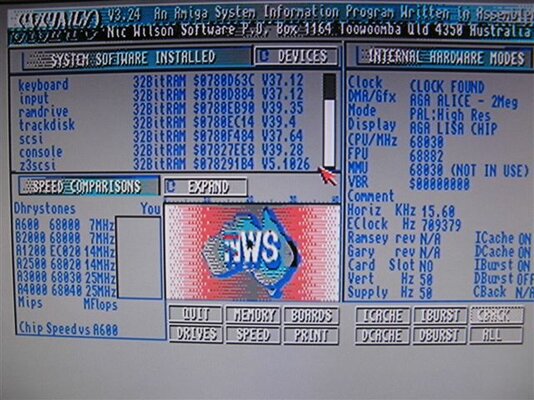
Here's the screenie:
 

Attachments

  • IMG_0596.JPG
    IMG_0596.JPG
    74.8 KB · Views: 6
System software installed ------> Devices

click on the Devices TAB & scroll down to the Fastlane entry
 
@d0pefish

My friend the 27c256 and 27c512 are only 8bits (one byte) cells - theres nothing to swap =D

Padding the end of a ROM is good, only if its a small amount - in the case of programming a 32k firmware into a 64k chip - then its best to shadow i.e. burn two 32k blocks one after the other - you can do this by creating a file with two copies of the same file one after the other by using DOS "join" command - easy enough if you need to =)

The only reason you would do this is when using a firmware based for a 27c256 and storing it on a 27c512 is that the extra address line thats not used in the 27c512 can be left floating - when tasked by the device - it could give results in the upper half of the ROM - hence padding a the whole lot can cause problems and its better to just burn both halfs with the same 32k firmware.

You can however run the upper address line to ground and burn the bottom half of a 27c512 =)
 
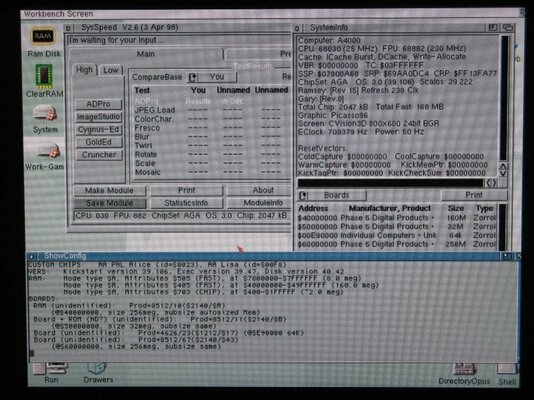
Well I finally got round to testing with mixed 16mb/4mb Simms (same type of simm in each bank)

So bank 1 & 2 16mb Simms and Bank 3 & 4 had 4mb simms for total 160mb.

The Ram is displayed correctly as per attached however I noticed straight away workbench was not as quick as before and icons loading a bit, stopping and then starting again.

I tried to copy some files to Ram and after 60mb was filled the system hung :(

I think there is a problem with bank 3, maybe I'll bring the Z3 Fastlane Zetr0? Perhaps you could take a little look?

Although I'm thinking just to keep it 128mb and not take any risks with the board.

Can anyone suggest a good memory testing tool? Or is it even worth it since we kind of know where the fault is?

Cheers!

Steve.
 

Attachments

  • IMG_0608.jpg
    IMG_0608.jpg
    133.4 KB · Views: 3
Here's the screenie:

& there lies your problem. You need an 8.5ROM to get 8.5 showing on the SysInfo Screen & then all your 256Mb should work fine. Unless of course, the chap you bought it from pulled & swapped the socketed MACH/GAL chips too. Unlikely, though he must have swapped the ROM out as Rev 2.4 Z3's always shipped with version 8.5 of the firmware. :dry:

I am 99.9% sure you should be fine with the correct Rom version in place & then see your 256Mb Ram. :)

Regards.

Charlie
 
Last edited:
@Kinny will that also explain why 4mb Simms also don't work properly in banks 3/4?

Steve.
 
Probably. ....Don't forget you already have 2 x banks kitted out with 16Mb Simms already. It really has to be v8.5 to manage this size Simm correctly.
A shame you cant fully populate the whole card with 4Mb Simms to prove my point. Forget trying the card full of 1Mb Simms. Once the MACH/GAL Chips are upgraded or as in your case, have a Rev 2.4 Z3 with upgraded MACH's/GAL's as shipped, 1Mb Simms no longer work. ;)

Regards.

Charlie
 
Last edited:
@Charlie,

I have enough 4mb Simms to fill banks 1-3 and it produces red screen and 'card defective' :(

I think you're right about the FW being the problem, I'm a little hesitant to end up with a brick trying to update or change anything.

128mb is more than enough for Superfrog so I think I might just leave it as it is, enjoy it and make some much needed $$$ back on my spare 8x 16mb Simms :D

Thanks everyone for the advice :thumbsup:

Steve.
 
As I know only latest Z3 FastLane hardware revision (different GAL chips) is able to get whole 256MB of RAM. And please do not mix hardware revision with software revision installed in EPROM.

I know this because good friend of mine tried to upgrade firmware on his Z3 FL by new EPROM content only (I programmed this EPROM for him and checked if Z3 FL was working after) and it didn't work with 256MB RAM...

You can reach hiw via this site:
http://www.amiga.pekdar.net/


Annd some more info here:
http://www.amiga-hardware.com/showhardware.cgi?HARDID=1231

"
It also has provision for up to 64MB memory or 256MB with an optional upgrade, in the form of standard 30-pin SIMM modules. RAM speeds supported are 60, 80 or 100ns. The 256MB RAM upgrade option consists of replacing the ROM with a version that supports 256MB and also some of the memory (GAL) addressing chips. After the memory upgrade it will no longer accept 1MB SIMMs and 4MB or 16MB SIMMS must be used. Unfortunately, even at the time the Fastlane was released, 16MB 30pin SIMMs were extremely expensive and nearly impossible to get hold of. This probably holds true today.

It is compatible with Buster revisions -09, -10 or -11, however as with all Zorro III devices, buster Rev 11 is highly recommended to due it's increased reliability and suffers less from bugs which plague earlier versions.
Note: In order to use the Fastlane in machines with an 060 processor, the card requires at least Version 8 of the firmware (8.5 is the latest). V2.4 cards should already have the appropriate firmware on the card, however V2.1 and V2.2 cards require the firmware to be upgraded. Unfortunately, the only way to do this is by burning a new EPROM and replacing the existing one on the card. You can still however use RAM on the card, regardless of the firmware version, even if you have an 060. For fitting inside the A4000/040 with version 3.0 68040 processor boards, a 74FCT240 clock driver chip is also provided. This replaces the original 74FCT244 chip at position U103 on the motherboard, directly under the processor daughter-board.
"

 
I mis-understood Steve, sorry chap. However, the GAL chips (Excuse my earlier MACH use) are supposed to be the latest & 256Mb capable on the Version 2.4 PCB Fastlanes. However, v8.5 of the ROM needs to be in its ROM socket as well & your's is only 5 point whatever. I'm sure my old 64Mb V2.3 Z3 with v8.5 ROM would have said no to even one bank of 16Mb Simms. The GAL's were not capable of addressing Simms bigger than 4Mb. - I'd certainly be chucking an 8.5 ROM in there to find out. ;)

@ stachu100

Cheers. :thumbsup:

Kin
 
Thanks again for all your advice Charlie and the extra info Stachu :thumbsup:

I have a gut feeling this board is the way it is for a reason, call me an old tart but I'm going to leave it as it is and enjoy the 128mb ;)

Steve.
 
Back
Top Bottom