
Sold z3sdram v1.2 - a Zorro III network & memory combo card

  • Thread starter Thread starter tnt23
  • Start date Start date
  • Replies Replies 27
  • Views Views 4812
Status
Not open for further replies.

tnt23

New member
Rating - 100%
9   0   0
Joined
Oct 29, 2013
Posts
72
Country
Russia
Region
Saint Petersburg
Hi all,

I am selling one of the z3sdram v1.2 cards developed and built by myself. It is a Zorro III card carrying the following stuff:
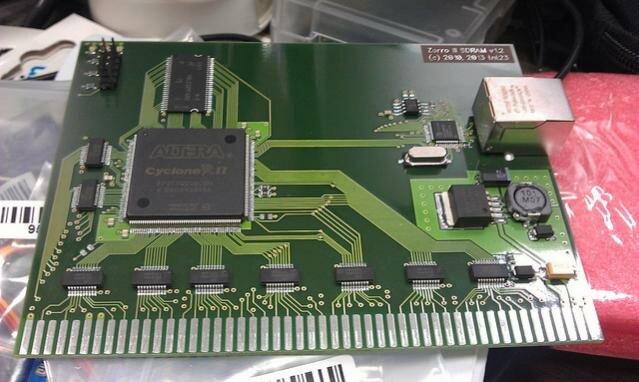

  • 64 megabytes of SDRAM
  • 10M/100M Ethernet interface

12985032625_17f9b09c17_z.jpg

The card works well on Amiga 3000 and 4000 under AmigaOS 3.x, along with the SANA-II driver I have also hacked on my own. Both the card firmware and device driver code are experimental and will be subject to further improvement, so power users are welcome to join the development.

A few shots and a description of the project can be found in the 'Photo Booth' section of the forum:

https://www.amibay.com/showthread.php?59834-Zorro-III-Network-RAM-combo-card

The price is EUR 120,- and postage is another EUR 20,-. PayPal (preferred) or bank transfer are accepted.
 
not interested since I don't have a big box amiga but wow!!! amazing piece of hardware, kudos for creating it!
 
Declaring interest, contingent on shipping costs........ PM SENT

Chuck E.
 
Last edited:
Declaring interest! For the glorious purpose of writing a NetBSD driver :pint:. Even if you don't have any more cards for sale now, please remember about me in the future, I still want to do it :cool:.
 
Last edited:
wildstar1063, payment received, PM sent. Thanks!

- - - Updated - - -

Declaring interest - second in line. I hope you got two of them at least ;)

Feel free to PM me for the second, last one :)

UPD Since the thread is marked 'Sold', and there's another card for sale, do I change it back to 'For sale' instead of opening a new thread?
 
Last edited:
According my post office the package arrived friday, but I was at work and they did not deliver it as it has to be signed for. I wont be able to pick it up until Monday, due to my work schedule.

Chuck E.
 
Ok, I picked up the card today, and installed it in my A4000 but I'm getting the red board diagnostic screen

Bard Manufacturer Product Status
1 5030 23 Defective
1 5030 24 Working

As I show no expansion memory I'm assuming the issue is with that. There are no other Z3 cards in
the A4000 just a flicker fixer in the video slot, and I
have tried all of the available Z3 slots. There is one solid red led and one blinking red led on the board.

Configuration is A4000 with Rev C Board 16 megs ram, no other cards except a flicker fixer in the
video slot. The Rev C Board has the REV 09 Super Buster soldered directly to the board. The processor
card is the A3640, according to the sticker on the
bottom of the card, it was converted to Rev 3.2. OS
3.9, 1 IDE HD and one CD Rom drive and the floppy


The card was packaged well and in an ESD bag. I checked the bag to see if any of the SMD components had popped off, but did not find anything. The board itself is well made

I will try he card tomorrow or the next day in my A3000T and see if I get the same results.

I have PMed tnt23 with this info as well.

Chuck E.
 
Last edited:
Hello Charles,

I am confused and am really sorry to hear that. Product #23 is the 64M of SDRAM, #24 is the network part. Upon startup, both red LEDs should blink, and the middle one will stay on once the board is recognized and configured with Autoconfig. The other red LED will be blinking all the time, it is an indication of FPGA being configured properly with its own core.

Do you get the red screen no matter if the 16 megs of onboard RAM are installed? In fact, only 2M of Chip onboard RAM should be enough for the system to start. Can it boot after the red screen with only network part (Product #24) available? Also, does the red screen show after soft reboot (Ctrl+Amiga+Amiga)?

I cannot think of anything that might interfere with SDRAM part of the board effectively rendering it 'defective'. Since you have tried with no other boards on the bus, I don't think the flickerfixer card can interfere in any way. Also, there should be some jumpers on the motherboard, could you please report them?

Yes please give the card a try with A3000, while I will think this issue over. In any case, I am and will be ready to moneyback you should you decide to.

Regards
Tim
 
Tim,

I tried Ctrl + AMIGA + AMIGA, and still got the red screen.
I will try with no RAM except chip tonight when I get home from work, as well as try to get the jumper settings for you.
Oh, and on boot it shows the red screen, and I hit continue, and it shows me the red screen again, and I hit continue and it boots normally. I have not tried the driver with the network part, as the 4000 is not currently near my ethernet connection.

It may be tomorrow or the next day before I can try in the
A3000T, I never open it unless it is in the garage on my workbench, and a 3000T is a heavy beast to carry out to
my workbench.

I have a 3000D, but it's apart waiting for vibros to get some GAL's programmed and sent out, he seems to be having some problems getting the blank GAL's released from customs, so he can get them programmed.

Chuck E.

- - - Updated - - -

I guess I'm going to have to get a USB Blaster, does anyone know if they have SW for these that works with intel macs?

Thanks

Chuck E.
 
Back home from work.

I tried removing all of the onboard fast ram SIMM's and at boot, still got the red screen. I Also removed the Zorro daughter card and replaced it with another one I have, and cleaned all the connectors with Deoxit 5 and still the red screen.

There are a lot of jumpers on that board, are there specific ones you are interested in?

I still have to try it in the 3000T.

Chuck E
 
For the jumpers:

J100: CLK90 Clock Source
J104: CPU Clock Source
J151: ROM Speed: 160 or 200 ns ROMs
J850: Enable DSACK (Used with 68020)

(according to http://www.zimmers.net/cbmpics/cbm/amiga/a4000jumpers.html)

Although I don't think the last two make any sense, since your A4000 works with them without Z3SDRAM. However, looking at the description of J850 it seems like I did not pay attention that you've got 3640 CPU card, and that means the 68040. This can be the problem, as I was only developing and testing with stock 68030 processor cards in both A3000 and A4000. Should you have an A3630, it'd be great to try it to check if the Z3SDRAM is OK.

Still, on the 3640 card there are couple of jumpers to try (taken from http://pink.myshoesaretootight.com/mirrors/amiga.serveftp.net/A4000_HardwareGuide/a3640ref.html):

J100: Enable *CacheDisable *MMU Disable
1-2 Closed and 3-4 Closed: Enable CDIS* MDIS* (caches and MMU disabled
at powerup and reset: default).

J400: Enable MAPROM: Enable remapping circuit for loading Kickstart into Fast RAM with a developer utility program.
1-2 Closed: MAPROM enabled (default).
3-4 Closed: MAPROM disabled.


For the J100 I believe default setting should be OK, and for the J400 I'd give the '3-4 Closed: MAPROM disabled' a try.

I'll try to borrow an A3640 card in our local community, I recall someone had that card with electrolytics soldered wrong by Commodore.

For the USB Blaster, people report running Quartus software on their Macs under virtual machines here: http://www.alteraforum.com/forum/showthread.php?t=1040&page=3 . Of course you won't need the whole Quartus suite, only the programmer tool. Let me google for Altera FPGA downloading in Mac environment a bit.

UPD VirtualBox is the open virtual machine software, also available for Mac: https://www.virtualbox.org/wiki/Downloads
 
Last edited:
Tim,

I will take a look at the jumpers tomorrow night when I get home from work

I do not have an 030 board, though the 3000's have 030's in them. The tower
has a 28mhz 040 board, but if I remove it, it will revert back to the 030, or I could
put the 3000D together enough to fire it up and try the board, I'll need to remove the 2.04 roms and put in the 3.1's I just bought. Do you know what RAMSEY, SUPER BUSTER and SUPER DMAC are in the A3000 you use for testing?

Chuck E.
 
Charles,

Have just teared my A3000 apart, here are the chips:

- 51-Ramsey 390541-04
- 45-Super Buster 390539-11
- 81-Super DMAC 390537-02

I've also got KS3.1 in it.

Another guy's A3000 has Super Buster-7, also running on a stock 030 CPU card with no issues.

I'd suggest pulling 040 board off your tower for a quick test, if it really reverts to 030 and the card works OK with it then it definitely is something 040-specific in it.

UPD A friend kindly agreed to lend me his 060-equipped 4000 next week for testing, not a 040 but should be similar in terms of caches/bursts I believe.

Regards
Tim
 
Last edited:
Tim,

I put the 3.1 roms in the 3000D and put it together just enough to get in to the
early boot menu and look at the card diagnostics.

The card diagnostic on the A3000D with the stock 030 says the card is GOOD

So what were seeing here might be an issue with the 040. I'll still try the 3000T
this weekend, but hopefully this is pointing in the right direction.

Chuck E.


I got AmigaDOS to load without the WB and no startup-sequence, I navigated to the C: directory
and used the Avail command. This is what I got for Maximum fast ram 71303168 which I believe is about 68Mb (there are 4 megs on the motherboard)
 
Last edited:
Status
Not open for further replies.
Back
Top Bottom