Are there any other Acorn 3000 series users on here?

  • Thread starter Thread starter Merlin
  • Start date Start date
  • Replies Replies 35
  • Views Views 6772

Merlin

Ministry of Retr0bright and Street Judge
VIP
Joined
Nov 24, 2007
Posts
15,602
Country
UK
Region
Manchester
I am picking up an Acorn 3020 tonight for the grand sum of nada, zilch, free!!

Are there any other users of these machines on Amibay, as I know as much about this machine as I am paying for it....:unsure:

If so, make yourself known!!

Thanks
 
I haven't had much experience with Acorns, but I have a whole bunch of friends who know terrifying amounts about them. If you have any questions, I could pass them on, or in fact, I might try and encourage one or two of 'em to pop on here.

Either way, good work on your catch, have fun with it!
 
@Merlin

I have a 4MB A3020 with HDD & Network podule...

If you need help,, let me know...

BTW, Superb Machines for running ELITE !!!! :D

TC :cool:
 
@Merlin

I have a 4MB A3020 with HDD & Network podule...

If you need help,, let me know...

BTW, Superb Machines for running ELITE !!!! :D

TC :cool:

You speak-a my language, my friend.....:thumbsup:
 
I too have recently aquired an A3020 with hdd.

The main bit of advice I can give is don't install Elite until you have got it set up to your satisfaction or you will never get anything done. :D
 
OK,

Here's what I know so far. The machine was an old one used by a school, so it has some memory expansion (could be 4Mb) and possibly a hard drive. The guy also stated that it has a network upgrade (10BaseT?) but needed something to plug into a port on the back to convert it to Ethernet.

There's no mouse or any software at all, so my first questions are:-

1. Will a PS/2 PC mouse work on the A3020?
2. Will the 15-pin video port work with a normal monitor, or do I need a 15Khz VGA / multisync one?
3. How can re-create the RISC OS floppies and other software to re-install the operating system? Can these be created on a normal PC?

I am going to open the machine up at work tomorrow during my lunchtime, so expect some hardware pr0n pictures of my new baby soon....
 
Last edited:
Merlin,

A few quick answers,

1. No a PS/2 mouse won't work, you will need an Acorn specific mouse.

2. You should be able to use standard monitors. If you don't get a display on start up reboot the machine with one of the following keypad keys pressed:
0 - TV (SCART)
1 - Multiscan
3 - VGA
4 - VGA (possibly SVGA)

3. You should be able to format and read PC disks (Hi & Low density) using the floppy drive - I created a few using tools found at: http://grope.thruhere.net/Qube/home.html

Have Fun
 
1. Will a PS/2 PC mouse work on the A3020?
NO but you can get a 3 button seral muse to work with some drivers i got an acorn disk some where i will find it out

2. Will the 15-pin video port work with a normal monitor, or do I need a 15Khz VGA / multisync one?

15khz for games but you can use a normal monitor for playing on the os

3. How can re-create the RISC OS floppies and other software to re-install the operating system? Can these be created on a normal PC?

yes there is a program (dont know what it called)

found it OmniFlop http://acorn.revivalteam.de/?site=DiscImaging this is the easyest one i found to use
 
@Merlin

The A3010 /3020 can run a VGA monitor at 60Hz and does all the frequency conversion on board, it basically has a built in Scandoubler as it will promote most 15Khz modes (including most Games & ELITE) but it will give a letterbox effect on the screen when using a VGA monitor.

You need to check the onboard battery, probably clean it up & then recharge it.

The A3020 has onboard CMOS RAM to hold most system settings & configurations.
To reset the CMOS hold down "R" or "del" whilst switching on & keep it held down until the system boots.
Bob's advice above to set the Monitor mode after you have reset the CMOS is spot on and will need to be done.

at the * or command prompt, enter, *Status and you will get a list of the current configuration.

*Desktop... starts the GUI
*Help... will give you a surprisingly usefull index
*Help Configure... will give a list of the CMOS setting commands.

You can pickup a compatible Acorn mouse from most places & would recomend it over the serial route for 100% compatibility.

The OS is built into ROM, the floppies only have some additional fonts, utilities & applications.

Check the DVD I sent you recently & use Omniflop, which is also on the DVD BTW...

Feel free to call me anytime...

TC :thumbsup:
 
i have an acorn trackball its big but it get you where you need the mouse to go yours for free you just pay the p&p

thanks james
 
@ jimbob005

Can you let me know the postage cost and i'll arrange payment? A trackball will do for now until I can get a proper mouse.

Thanks
 
An update...

I opened the case this lunchtime and I tested the unit, to discover the following.

Full 4Mb RAM installed :)

No hard drive present :( - easily sorted from my spares pile :)

Etherlan 200 network podule made by I-Cubed Ltd. :huh: Not sure how this works, although it would seem to feed the 15-pin connector on the rear of the machine (I think it needs something called an MAU..??).

The Archie powers up :), shows a good display on a TFT monitor :D and shows as running RISC OS3, although it times out after looking for something called "Impression". "Impression" and "Kudos" show on the main screen on the 'task bar', although I don't think they are actually there.

Can anyone help explain what I have here?
 
Etherlan 200 network podule made by I-Cubed Ltd. :huh: Not sure how this works, although it would seem to feed the 15-pin connector on the rear of the machine (I think it needs something called an MAU..??).

http://acorn.chriswhy.co.uk/Network/Pics/I3_EtherLAN200.html

I wonder if the MAU is the same as an AUI transceiver (They are also 15 pin connectors). There's a non-zero chance it is, and they'll be much easier to come by.
 
You know Andy, I think you could be right about that; I can't see Acorn making something like that as a bespoke part.

Excuse my ignorance about this, but would the transceiver be transparent to the operating system and not require a driver to be loaded? If it needs a driver, things could get interesting if I use a non-Acorn adapter.....
 
If MAU = AUI, just use an ordinary AUI to Ethernet twisted pair transceiver. Cheap and up-to-date. :)
 
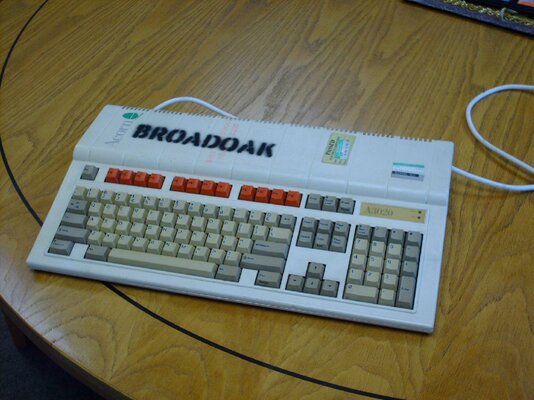
Here's a picture of my new baby... she's going to need some cleaning and possibly a new coat of paint. There are dotted security marks on the top that will need filling in and painting over to hide them. This is apart from the over-the-top black spray paint job!!

I think I can get some water-slide decal paper to replace the logo afterwards, then lacquer over the lot to finish the job.
 

Attachments

  • PICT0863.jpg
    PICT0863.jpg
    144.4 KB · Views: 4
Last edited:
You know Andy, I think you could be right about that; I can't see Acorn making something like that as a bespoke part.

Excuse my ignorance about this, but would the transceiver be transparent to the operating system and not require a driver to be loaded? If it needs a driver, things could get interesting if I use a non-Acorn adapter.....

No drivers needed, think of it as just a slightly more-sophisticated gender-changer. :-)
 
I have a A3010 but I haven't done much with it to be honest (I prefer 8 bit Acorn or 16 bit Amiga) but from what I have seen it is pretty impressive. I have Cannon Fodder for example which is basically identical to the Amiga version (ie much better than the PC version) but with much shorter loading times. I have an external CD ROM as well which I could do without so if that is of any interest let me know! I also have a dead earlier Archimedes that I keep meaning to have a go at fixing. That has an external HD. So I do actually have a spare mouse but I'd rather keep it in case I do get the old Arch working... (they are notoriously hard to come by!)
 
@ retro_junkie

How does the external CD-ROM drive connect to the machine? I've seen a Cumana one advertised somewhere (*cough*) but that was a SCSI unit with Centronics connectors, but the Archie has no native SCSI as far as I can make out. Please corrent me if I'm wrong though.

Some hardware pr0n might be required in relation to this....
 
It connects to some kind of add on in the back of the unit (I think it's SCSI but don't quote me) which is part of the package. I haven't opened the machine up but I guess this is some kind of removable equivalent of a PCI card in a PC. Like I said, I've hardly done anything with my A3010 so don't know a lot about it!
 
Back
Top Bottom