
You are using an out of date browser. It may not display this or other websites correctly.
You should upgrade or use an alternative browser.
You should upgrade or use an alternative browser.
A4000 project teaser =D
- Thread starter fitzsteve
- Start date
- Replies 46
- Views 12863


Justin
Active member
tee hee teasing is good

Little correction to the Video, 5.7mb/sec is @PIO4 but I didn't try PIO5 yet 
Where did the 16.6mb/sec stated by Elbox come from lol?
I just tested a 2.5in Kingspec IDE SSD with 40-44way adapter, and that cannot go above PIO3
So the SSD is 4.4mb/sec, slower than the CF card icard
icard
It could be the cheap adapter though, probably...
Will try the CF @PIO5 later
Where did the 16.6mb/sec stated by Elbox come from lol?
I just tested a 2.5in Kingspec IDE SSD with 40-44way adapter, and that cannot go above PIO3
So the SSD is 4.4mb/sec, slower than the CF card
icardIt could be the cheap adapter though, probably...
Will try the CF @PIO5 later
Justin
Active member
i thought CPU power had a lot to do with transfer rates, unless you were using scsi?

yummy,did you say A3640@50mhz via a qaud doubler? is that from a mac card? the doubler.
yeah,ive never ever seen a fastata do 16.6 mbs a sec,ever.but we all know its far from reality steve,maybe they should edit it at elbox to reflect the truth.even the resellers are using it.
yeah,ive never ever seen a fastata do 16.6 mbs a sec,ever.but we all know its far from reality steve,maybe they should edit it at elbox to reflect the truth.even the resellers are using it.
Hi Roy!
I don't know much about the A3640 yet it's coming as part ex against something I sold, so full info when it gets here although I've been told the 040 runs at 57mhz!
Pics and Video will be shared when they arrive
I don't know much about the A3640 yet it's coming as part ex against something I sold, so full info when it gets here although I've been told the 040 runs at 57mhz!
Pics and Video will be shared when they arrive
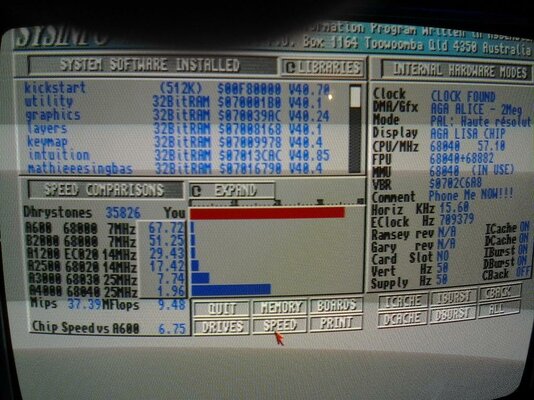
looks awsome,but i dont think i trust sysinfo for clock info.is that its actually clock speed?
Look at the MIPs though
i know
thats some serius speed for an 040.
Little correction to the Video, 5.7mb/sec is @PIO4 but I didn't try PIO5 yet
Where did the 16.6mb/sec stated by Elbox come from lol?
I just tested a 2.5in Kingspec IDE SSD with 40-44way adapter, and that cannot go above PIO3
So the SSD is 4.4mb/sec, slower than the CF card
It could be the cheap adapter though, probably...
Will try the CF @PIO5 later
Got about the same speed as you in PIO4, trying PIO5 will give me random read errors when i try to copy files.
Was hoping for alot more due to the 16.6mb/sec elbox stated on this device, atlest 10mb/s
Last edited:

I have near 9mb/s with PIO5 mode on mine  (Using a SD adapter, quality SD card, SFS and CSMKII@75Mhz). I am sure I can get 10mb/s with PFS.
It is always fun to see your projects Steevy
(Using a SD adapter, quality SD card, SFS and CSMKII@75Mhz). I am sure I can get 10mb/s with PFS.It is always fun to see your projects Steevy

lurch
Member
I'm getting close to 9mb/sec PIO5, with a FastATA / Apollo 060 @ 80MHz / 5400 2.5" Laptop drive.
Going to test with a standard desktop HDD. So interesting to see your results.
---------- Post added at 09:22 ---------- Previous post was at 09:20 ----------
That's with FFS on the small boot partition and SFS on the larger partition.
As for PFS3 (AIO) I can't get this to work 100%, constant lockups, corrupt files and I have to warm boot to get the PFS3 partitions to be detected.
Going to test with a standard desktop HDD. So interesting to see your results.
---------- Post added at 09:22 ---------- Previous post was at 09:20 ----------
That's with FFS on the small boot partition and SFS on the larger partition.
As for PFS3 (AIO) I can't get this to work 100%, constant lockups, corrupt files and I have to warm boot to get the PFS3 partitions to be detected.
Hey all,
The A3640 arrived today
Here are some pics:

Close up of the Quad doubler:

My hack-up PSU

The FastATA and ZorRam:

A3640 installed:

SysSpeed screen: (I guess it's running at 50mhz)

And SysInfo:

For some reason the FastATA is actually slower when using the A3640!

So I tried some Games, Doom is nice and playable as expected. Quake runs but is too slow.
Overall it doesn't seem any faster then a standard A3640 to be honest, still nice to see all those Mips
The A3640 arrived today
Here are some pics:
Close up of the Quad doubler:
My hack-up PSU
The FastATA and ZorRam:
A3640 installed:
SysSpeed screen: (I guess it's running at 50mhz)
And SysInfo:
For some reason the FastATA is actually slower when using the A3640!
So I tried some Games, Doom is nice and playable as expected. Quake runs but is too slow.
Overall it doesn't seem any faster then a standard A3640 to be honest, still nice to see all those Mips

It seems slow because the missing local FAST RAM, Steve. If you install this quaddoubler in 040 Apollo/Cyber card you'll see the A4000 sky rocketing.
As for the doubler, try it with a proper MC68040RC40 and then put a 28MHz crystal.
Be sure to tie the A4000 to the table, it will fly!
As for the doubler, try it with a proper MC68040RC40 and then put a 28MHz crystal.
Be sure to tie the A4000 to the table, it will fly!
Little Video update with the A3640 & Quaddoubler installed
[m]http://www.youtube.com/watch?v=yuofHOAbSSs[/m]
Will show some Emulators is the next Video as I didn't have anything setup & ready.
I had to re-prep my CF as for some reason if I run the FastATA drivers whist the A3640 is installed it corrupts my HDD, it destroyed the file system on my SSD too!
Of course I can re-do the installs, no hardware damage, just a PITA putting the data back, this time I'm trying PFS3, but the FastATA drivers are not running...
Didn't know this could be used with a proper Turbo board, what about the WarpEngine? That would be epic!
[m]http://www.youtube.com/watch?v=yuofHOAbSSs[/m]
Will show some Emulators is the next Video as I didn't have anything setup & ready.
I had to re-prep my CF as for some reason if I run the FastATA drivers whist the A3640 is installed it corrupts my HDD, it destroyed the file system on my SSD too!
Of course I can re-do the installs, no hardware damage, just a PITA putting the data back, this time I'm trying PFS3, but the FastATA drivers are not running...
Didn't know this could be used with a proper Turbo board, what about the WarpEngine? That would be epic!
i think it was made to double from 25mhz to 50 mhz im not sure if it would work on anything above that though it would partly depend on the limit of the cpu.
i would imagine it'll work in any cpu board with a main clock of 50mhz(cpu clock 25mhz)
it sure would be fun to find out.
i would imagine it'll work in any cpu board with a main clock of 50mhz(cpu clock 25mhz)
it sure would be fun to find out.
Another update! So soon you cry? Well this little fella came in the post today:

Prometheus PCI, it's the first time I've used one (although I owned one before I never installed)
I had to grab it as there's no way I could play with RTG any cheaper, since I already have the Voodoo and S3 Virge cards here I would have been mad not to give it a try.
Ideally I wanted to install this in the bottom Zorro slot:

However I found the PCI graphics card needs to be in the PCI slot nearest to the Zorro riser and therefore I wouldn't be able to install my other Zorro boards. After testing with a PCI extension ribbon (card still not detected)

I had to settle with this approach!

I don't think the cover is gong to fit now
Unless I cut a nice Voodoo length slot in it :butcher
Only kidding, I've ordered one of these so hopefully that will solve this little problem:
http://www.ebay.co.uk/itm/PC-Deskto..._Server_Accessories_Parts&hash=item2a26027161
Next up was to confirm that indeed the card was now detected:

Yippee!

Now lets try a nice 24bit Workbench


Yay \o/
For anyone else installing, I've done the hard work and found all the drivers:
www.fitzstevesamigaworld.co.uk/downloads/PrometheusPCI.zip
https://www.amibay.com/showthread.php?t=31230
---------- Post added at 14:50 ---------- Previous post was at 14:05 ----------
Short Video with Quake in Warp3D (just for fun!)
[m]http://www.youtube.com/watch?v=nHkt2LepFo4[/m]
Prometheus PCI, it's the first time I've used one (although I owned one before I never installed)
I had to grab it as there's no way I could play with RTG any cheaper, since I already have the Voodoo and S3 Virge cards here I would have been mad not to give it a try.
Ideally I wanted to install this in the bottom Zorro slot:
However I found the PCI graphics card needs to be in the PCI slot nearest to the Zorro riser and therefore I wouldn't be able to install my other Zorro boards. After testing with a PCI extension ribbon (card still not detected)
I had to settle with this approach!
I don't think the cover is gong to fit now
Unless I cut a nice Voodoo length slot in it :butcher
Only kidding, I've ordered one of these so hopefully that will solve this little problem:
http://www.ebay.co.uk/itm/PC-Deskto..._Server_Accessories_Parts&hash=item2a26027161
Next up was to confirm that indeed the card was now detected:
Yippee!
Now lets try a nice 24bit Workbench
Yay \o/
For anyone else installing, I've done the hard work and found all the drivers:
www.fitzstevesamigaworld.co.uk/downloads/PrometheusPCI.zip
- First run the installer inside prometheus.lha
- Install Picasso96-2.1c (should detect the prometheus during install) I picked 48khz as default modes work just fine on most modern LCD's
- Install PromUpdate-2.5
- Open Picasso96 Prefs and attach board like in my Photo
- Test some screen modes and save/reboot
- Now test them in Prefs/Screenmode
- Enjoy 24bit
https://www.amibay.com/showthread.php?t=31230
---------- Post added at 14:50 ---------- Previous post was at 14:05 ----------
Short Video with Quake in Warp3D (just for fun!)
[m]http://www.youtube.com/watch?v=nHkt2LepFo4[/m]

I've been told the 040 runs at 57mhz!
That's because you've been listening to Nic Wilson... If you listen to Lamonte Koop you get a more accurate story!
Similar threads

- Replies
- 187
- Views
- 57K


- Replies
- 26
- Views
- 4K