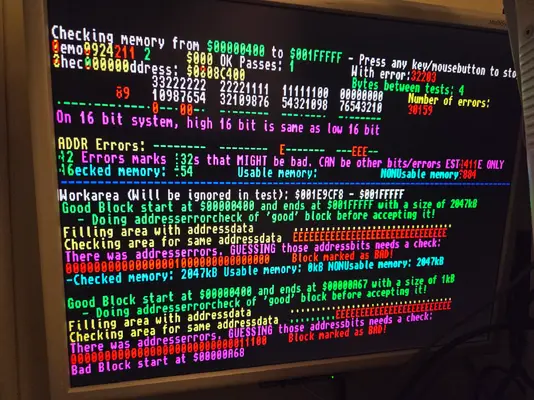
A1200: Killed chipram during HD install?

  • Thread starter Thread starter arnljot
  • Start date Start date
  • Replies Replies 4
  • Views Views 91

arnljot

Dad, gamer, nerd, amigian
AmiBayer
Joined
Feb 5, 2008
Posts
4,046
Country
Oslo
Region
Oslo
Because of confusing pictures and poor documentation on adapter for mSATA I bought, I killed my A1200.

Diagrom shows bad chip memory.

20260118_160115.webp

What's my next step, more verification or what ram chips do I order?
 
Hi,

I'm sorry to hear this :(

Assuming the problem occurred at the IDE connector and there wasn't an accidental short circuit elsewhere on the board during handling,

it would be helpful to review what was done to try and figure out where the fault might have originated. It could be a power surge on a bus line that caused a problem with the data bus going to IDE D(0-31). Most likely, the BUDGIE chip was damaged, as it's located between the RAM and the IDE.

I would focus more on what the adapter might have done beforehand rather than directly trying to find the fault; that approach might be simpler.

Hope you can solve this
.
 
The adapter was most likely installed wrong way around.
 
With this, we've applied +5V to two BUS pins of the adapter.
That shouldn't damage the Amiga, but on the other hand, we've grounded several lines of the D31:0 data bus, among other things.

This part of the bus goes VIA to the Paula Budgie and other places.
If any of these chips connected directly to the bus has a damaged pin and is interfering with the bus, then we have the problem.

I would check the D0:31 signals with an oscilloscope to see if any are dead.
This would be the easy part.

If a damaged line is found, then we would have to disconnect or figure out which of the connected components is faulty.

Turn it on for a while and check that nothing is overheating, that would be a good way to suspect something, since starting to desolder on the board without being sure, could cause damage and more problems.

 
Luckily I've got an ocilloscope.

So when you say D0 to D31 that's data lines on the PCB? I'll find them on PCB explorer?

Also, if I see "activity" that's good, but stuck high or low is then considered dead?
 
Back
Top Bottom