A4000 IDE question

  • Thread starter Thread starter ToxicToast
  • Start date Start date
  • Replies Replies 24
  • Views Views 3283

ToxicToast

New member
Joined
Jun 8, 2012
Posts
28
Country
United States
Region
Sacramento, CA
First post, so go gentle. Admin, feel free to move if I have posted in the wrong forum.

I've been a long-time Amiga fan and was lucky enough to attend an Amiga unveiling event before the A1000s started to ship. I was just a brace-faced lad back then but I was blown away by the demos and was sold...except it was going to take a whole lot of saving before I could ever afford one. FFWD 7 years later and I was a young airman in the USAF with a paycheck. Traveled to Cologne for the incredible World of Amiga event in '91. Pretty soon I had A2000 with a Toaster and a GVP 030, and later an A4000. Sold all that stuff in the mid 90's and reluctantly went to Windows. I'll always hold a special place for a computer that had immense personality, was a rebellious and a learning adventure.

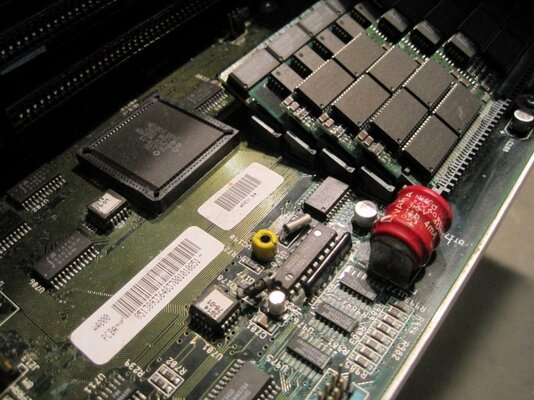
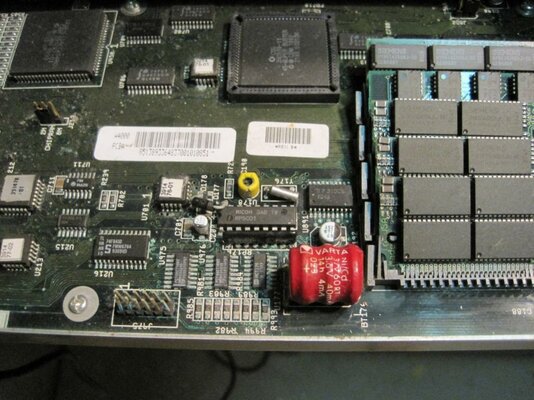
Recently, a work colleague has gifted me a whole ton of Amiga stuff. A1000, A500s, and a complete A4000 with Toaster and Studio 16 board. Ami link, tons of disks, genlocks, and all sorts of goodies. The A4000 is the one thing I really want to get working. Battery is corroded and will be replaced soon, however, I am stuck on something pretty critical and would like to get some help:

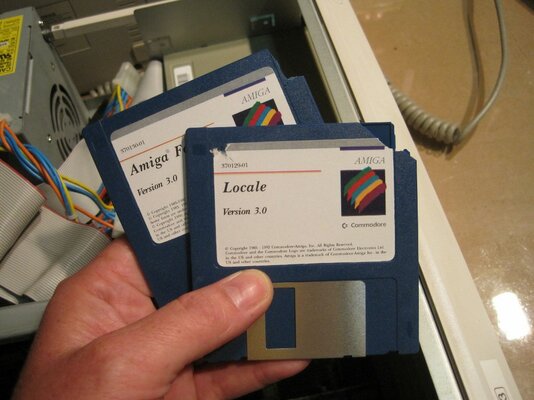
I can't get the A4000 IDE HD to show up. Its a Maxtor HD. When I attempt to use the hard disk tools on the 3.0 install disc, no devices show up. Now, it is possible that the install disk was for a SCSI A3000? I'm not really sure if I am on the right track with this. Suggestions?

Chris.
 
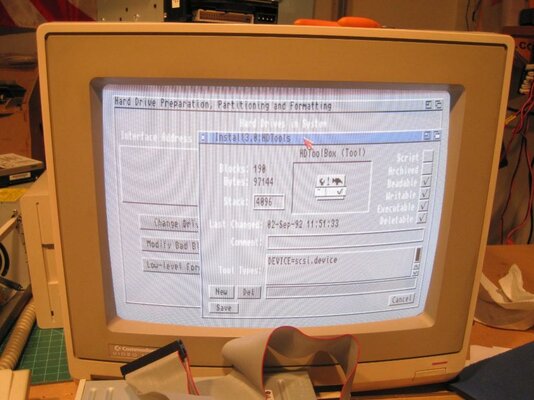
First up, I'd do a "get info" on HDToolBox and check that the DEVICE tooltype is set to something sensible (It should be scsi.device on an A4000, even for IDE)

Ideally, I'd see if you can get the newer HDInstTools from Aminet, it's a little more reliable at detecting disks. At the very worst, you might have a dead IDE hard disk, you could just replace it, they're pretty inexpensive.

Let us know how you get on!

:thumbsup:
 
He's right of course; check the tool type in the HDtoolbox Information for correct device and also look for disk activity (does it spin -- gyro effect, is there any direct hard drive led activity, any noise of heads "seeking"). If not then try a different IDE Hard disk; make sure the Master jumper is set. They are pretty straight forward unlike SCSI's
 
Thanks for the help guys. Foggy memories are starting to come back into focus on how to use these things. I had to bang keys a bunch on the CLI to remember the syntax and commands.


  • HDToolBox icon information had nothing in the available tooltypes. I manually added "scsi.device" to the entries there and saved. However, I can't find the actual file anywhere on the discs I have. I'll continue to look...
  • HD spins, heads are audible. I have multiple IDE discs <500mb and none of them show up. So I am reasonably convinced that the issue is not specifically a dead HD. It could be master/slave configuration. Was there a limitation on the terminator of the IDE? Like master DH0: and slave DH1: had to be at specific positions on the cable?
  • My cable is not keyed, so I have to align the correct edge. Red is pin 0, correct?
  • I've searched both my 3.0 WB and 3.0 Install discs high and low for scsi.device, which seems to be absent as a file. It is a file, right <foggy memory, again-sorry>. Perhaps I should check the Storage disc as well.
While I have tons of ADFs from my emu days, at the moment, getting this a4000 up and running will be the key to getting files to and from the PC. From then on it should be a simple matter to use DOS formatted floppies.

Thanks again for the help, and really glad there are dedicated Ami fans out there keeping this alive.
 
scsi.device is in the Kickstart ROM, you won't find a file for it...

Your tooltype needs to read:

Code:
DEVICE=scsi.device

:thumbsup:
 
Normally, the Master drive (dh0: drive) is the first one connected to the cable, with the Slave drive at the end.

The red stripe is Pin 1 - Pin 1 is nearest the power connector.
 
Ralph Babel has some HD config tools you download which are better than the 3.0/3.1 install disk (not as good as those in OS 3.9). Try the IDEFIX'97 files on Aminet or better yet, from Amiga Forever which has the key-file. See if it detects the device and allows mounting and formatting
 
Setting up a drive without lha (to decompress the packages) and a way to transport those to the Amiga will be a hard task.

Start from the beginning: use the command-line-interface (CLI) and type in

HDtoolbox scsi.device unit 0 (this will point to the IDE controller, first device).

The HDToolBox interface window must appear (you might to search for it in the install disk drawers). Pending the Workbench install disk version, it is in the tools drawer (type in tools, hit enter and re-type the HDToolBox command).

From the window, click on the install disk button and choose "search for drives" (something like this). If the drive shows up, leave the screen and go to the "partition drive" button.

If the old partitions shows up, then just mark the first one as bootable, quit the screen and mark "save changes to drive". Don't mind the warning telling you you'll lost everything already in the drive. Sack the install disk and reboot the machine.

If the drive shows up as unformatted (two partitions dividing the drive in two), then choose the partitions sizes (you don't need more than 50Mb on a mint 3.0/3.1 system partition). Save the modifications then sack the install disk and reboot.

Reboot again with the install disk in the drive and proceed with the installation of Workbench.
 
Boot the computer and then do a warm reset (control+both Amiga keys) and then load hdtoolbox to see if the hdd is now detected.

When booting, kickstart 3.0 often doesn't wait long enough for the hdd to spin up.

Sent from my GT-I9100 using Tapatalk
 
Thank you all for the generous suggestions and advice. Unfortunately, I think I have exhausted all my near term options. I have yet to successfully see any devices in the HDToolBox list. Unless I can get the opportunity to get a copy of some of the tools on an amiga floppy, I don't forsee making much more progress on this side. I do have a null modem cable and I may be able to jerry-up some kind of data transfer-but I am running out of available time before I TDY to Arizona for three weeks...so this may have to wait until July.

One final set of question, as it is looking more and more like the IDE interface is potentially the culprit.

  1. Are there any ICs near the battery (some corrosion) that could affect the IDE controller?
  2. I thought that Gary was the IO chip, would that have something to do with it?
  3. Are there any jumpers that enable/disable IDE? Its possible the previous owner used a SCSI interface. I'll have to ask him and see what he remembers on Monday.
  4. Long shot, but is a working battery clock critical to the IDE interface?
  5. I should try to switch out the cable, but all I have are ATA100 cables, atm. Pretty sure these won't work (?). Never thought I'd need them again so I tossed a whole lot a few years ago.
  6. These floppy disks are brittle! Three of them have had the R/W tab and frame area shatterd!
@AndyLandy - tooltype is set verbatim. Thank you for clearing me up on this.

@Merlin - Cable orientation and master/slave settings verified. Even tried a brand new (recertified) HD I picked up recently for a CNC controller PC. Nada. Dig the 2000AD mini-fig avatar, tho.

@rkauer - LHA won't be too much of an issue as I am sure I can gin-up a PC version, but you are right; file transfer is the current obstacle. I also tried the CLI with arguments. Nothing shows in the "found devices" list. Very good suggestions and crystal clear instructions.

@MZ3540 - Yes, I tried the warm boot as the WB insert screen appears pretty quickly on these A4000s. I can hear the drive spool up and a bit of initial chatter, perhaps 5s. I've let it sit for up to several minutes and then warm booted.
 
1. No, the only chip that controls the IDE is Gayle (also the PCMCIA port in A600 & A1200);

2. Nope.

3. No again. Sometimes people put a small hack in the IDE port to "kill" when using SCSI controllers. It's a diode hooked to two of the pins to make the controller to ignore devices. But people normally do this using a piece of IDE connector and the diode or a broken IDE cable.

4. No. Battery area starts corroding the clock circuit, then the mouse/joystick ports and at last goes to the RAM sockets, when the corrosion finally makes the entire board unresponsive.

5.ATA100 cables are OK. Use only the first device (master) and all will be good.

6.Pictures, please?

Oh, the Amiga LHA (program) is different from the pc-world version. You can get it from Aminet. It's called lha.run (self-extracted). Problem will be transferring it from the pc to the Amiga.

Last port of call: try the CLI again and don't pass any argument to HDToolbox, chances are it will scan all the "SCSI" chain. Hardly a problem.
 
If all else fails, PM me your address and I'll send you a bootable floppy with HDInstTools on it.
 
I'm in the US and can get you a floppy or two with any files you wish. Just pm me; or if you don't mind getting a IDE->CF card interface, I can get you a CF card you can use as a Hard drive. These have worked out very nicely for me and the Amiga just sees another HD.
 
PM sent, bdb. Thanks for the generous offer.

I'm in the US and can get you a floppy or two with any files you wish. Just pm me; or if you don't mind getting a IDE->CF card interface, I can get you a CF card you can use as a Hard drive. These have worked out very nicely for me and the Amiga just sees another HD.
 
4. No. Battery area starts corroding the clock circuit, then the mouse/joystick ports and at last goes to the RAM sockets, when the corrosion finally makes the entire board unresponsive.

OK, I guess that eliminates that as a possibility. Both ports seem to work fine and the corrosion evident is superficial. I'll still clean it up with some lemon juice.

5.ATA100 cables are OK. Use only the first device (master) and all will be good.
6.Pictures, please?
Cable swapped with no results.

#6 As you wish ;-)

attachment.php


Oh, the Amiga LHA (program) is different from the pc-world version. You can get it from Aminet. It's called lha.run (self-extracted). Problem will be transferring it from the pc to the Amiga.

Last port of call: try the CLI again and don't pass any argument to HDToolbox, chances are it will scan all the "SCSI" chain. Hardly a problem.
 

Attachments

  • IMG_7280 (1024x768).jpg
    IMG_7280 (1024x768).jpg
    117.2 KB · Views: 4
  • IMG_7282 (1024x768).jpg
    IMG_7282 (1024x768).jpg
    96.2 KB · Views: 4
  • IMG_7279 (1024x768).jpg
    IMG_7279 (1024x768).jpg
    129.4 KB · Views: 4
  • IMG_7278 (1024x768).jpg
    IMG_7278 (1024x768).jpg
    125.9 KB · Views: 4
Yep, that one should work OK.
 
yep!

yep!

Yes, those should be fine, although you may want one with a backplane mount so you can replace the CF card as you please without opening the Amiga.

bdb
 
The correct tooltype for the scsi.device is (no quotes, case sensitive):

SCSI_DEVICE_NAME=scsi.device

Any other thing written on the tooltype will be ignored.

Oh, and that battery leaked hardly on the motherboard. The SIMM holder is a bit corroded, and also all the area to left of it (the greenish thing on exposed metal). Clean it as soon as possible.
 
Back
Top Bottom