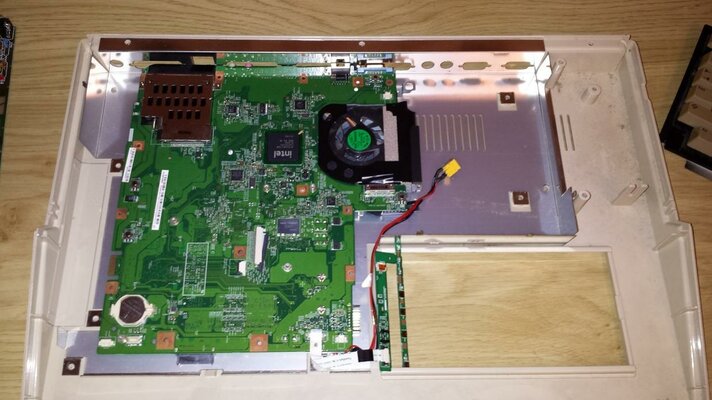
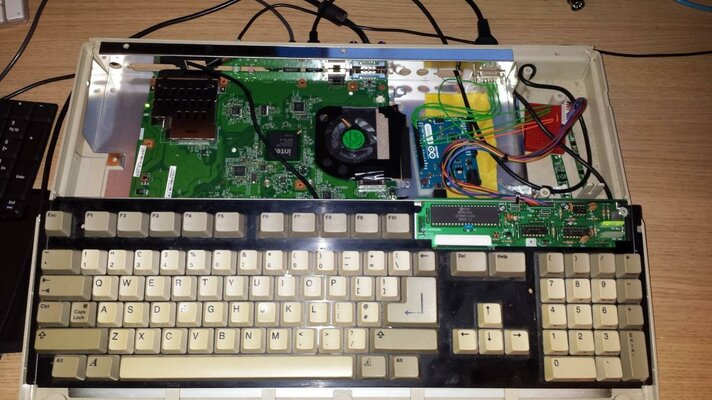
A500 powered by an old laptop

stephenfalken

Member
Joined
Jan 12, 2014
Posts
572
Country
UK
Region
Lancashire
I know this has been done before but here is my attempt at it!

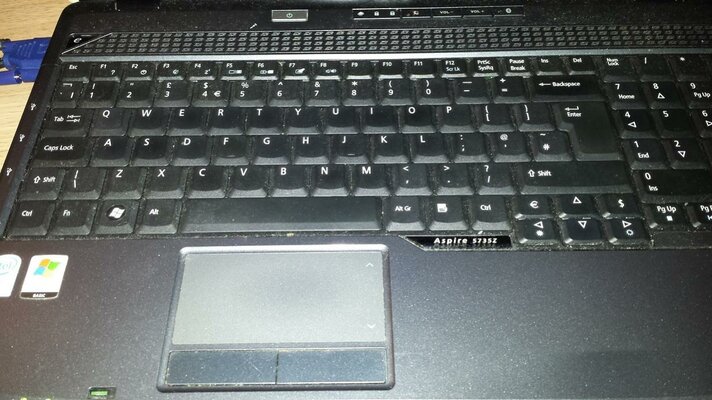
In my 'box of junk' I came across an old laptop with a broken screen, it was about 5-6 years old and running an Intel Celeron CPU.

I decided to try installing it's motherboard in my Amiga 500 case in the hope I could build an almost invisible Windows XP install which auto boots WinUAE and into Classic Workbench.

My initial goals were as follows:

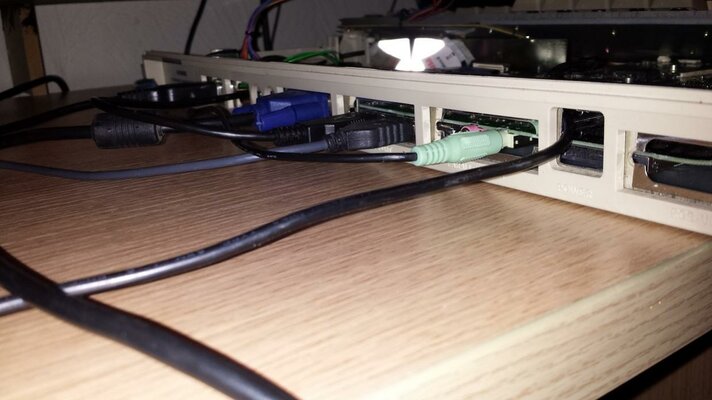
Appear on the outside as a regular Amiga
Run on ClassicWB as a real Amiga would
Make use of original keyboard
Make use of BOTH original LEDs (floppy LED on case is marked 'DRIVE' so could indicate Hard Disk activity)
Use standard 9 pin joysticks
No damage to A500 case so can be reused as a classic Amiga

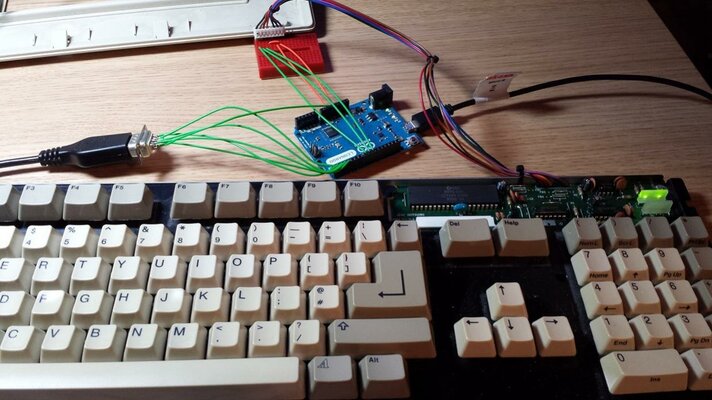
I began by looking into the keyboard and joystick issue. Now I know there is a 'Keyrah' interface available but since I am a complete cheapskate I decided to look elsewhere.

Over at the Arduino forums someone kindly provided a program for reading scan codes from an Amiga 500 keyboard and appearing to Windows as a USB keyboard and 2 Joysticks. This was ideal as I have numerous Arduino's lying around!

I also had the idea that since WinUAE can use keyboard LEDs (such as NumLock, CapsLock, ScrollLock) as output for emulated events such as disk access I could harness this and get the Arduino to output the disk activity LED.

I made a few changes to the Arduino program to do everything I needed and it worked great! I was then able to wire standard 9 pin connectors to it for the joysticks.

Onto the laptop, I installed TinyXP and stripped out any non essentials and installed WinUAE and replaced windows shell with the UAE configuration so it immediately boots my config.

After a bit of trial and error I got the laptop to run a very stable emulation of a 68040. Short video here, not great as I am terrible at holding a steady camera while operating a computer!

Any thoughts on this? Is it considered Amiga abuse? lol

[m]www.youtube.com/watch?v=MOuArBh05Gs[/m]
 

Attachments

  • 20140322_151806.jpg
    20140322_151806.jpg
    142 KB · Views: 2
  • 20140325_191534.jpg
    20140325_191534.jpg
    115.7 KB · Views: 4
  • 20140325_222934.jpg
    20140325_222934.jpg
    120.5 KB · Views: 2
  • 20140325_233108.jpg
    20140325_233108.jpg
    137 KB · Views: 3
  • 20140325_233544.jpg
    20140325_233544.jpg
    82.9 KB · Views: 2
The keyboard and joystick interfacing is particularly good :thumbsup:
I am still ment to be doing something similar but with an ITX board.
However that has died and its all on hold ATM :whistle:
 
it looks good , can you test prince of persia ?

i always slows down on my dual core laptop A500 for some reason
 
the Angels intro slows down and the prince in the game has some frame issues when running after a few screens...
 
the Angels intro slows down and the prince in the game has some frame issues when running after a few screens...

Do you run the ADF then or WHDLoad and does slowdown occur in both? Just gonna try now.

---------- Post added at 12:29 ---------- Previous post was at 11:41 ----------

the Angels intro slows down and the prince in the game has some frame issues when running after a few screens...

Well I first tried the WHDLoad version which plays perfectly well at the normal speed.

As for the ADF version, with the UAE settings left the same, the Angels intro runs fine and gets to the trainer screen, but after that hangs on a blank screen with no floppy activity!

If I change the UAE settings to 1MB/68000/1.3 Kickstart the ADF works perfectly! Must not like the 040 or something.

Regards
 
Last edited:
Got ever so excited by this as I had a spare Nano in my drawer... twas only when I was assembling everything I twigged the architecture of the Leonardo is different when it comes to USB :double
 
Could we have a link to the Arduino thread where the details come from?
This is very interesting. Congrats on your mod! :thumbsup:
 
http://forum.arduino.cc/index.php?PHPSESSID=fgdbq73g3lonsedc20rojia816&topic=139358.0

Can only be used with a Leonardo based ATMEL board
The Leonardo differs from all preceding boards in that the ATmega32u4 has built-in USB communication, eliminating the need for a secondary processor. This allows the Leonardo to appear to a connected computer as a mouse and keyboard, in addition to a virtual (CDC) serial / COM port. It also has other implications for the behavior of the board; these are detailed on the getting started page.
http://arduino.cc/en/Main/arduinoBoardLeonardo

Requires the hid.cpp library to be modified for the Joystick

Code:
Keyboard   Leonardo
Connector  IO           

1   KBCLK   8
2   KBDATA  9
3   KBRST   10
4   5v      5v
5   NC
6   GND     GND
7   LED1    5V
8   LED2    -
Code from Page 2 for a US based Keyboard

Code:
#define BITMASK_A500CLK 0b00010000    // IO 8
#define BITMASK_A500SP  0b00100000    // IO 9
#define BITMASK_A500RES 0b01000000    // IO 10
#define BITMASK_JOY1    0b10011111    // IO 0..4,6
#define BITMASK_JOY2    0b11110011    // IO A0..A5    
#define SYNCH_HI        0
#define SYNCH_LO        1
#define HANDSHAKE       2
#define READ            3
#define WAIT_LO         4 
#define WAIT_RES        5

KeyReport _keyReport;
uint32_t counter = 0;
uint8_t Joy, MemoJoy1, MemoJoy2, state, bitn, key, fn,keydown, ktab[0x68]={
  // Tilde, 1-9, 0, sz, Accent, backslash, Num 0 (00 - 0F)
  0x35, 0x1E, 0x1F, 0x20, 0x21, 0x22, 0x23, 0x24, 0x25, 0x26, 0x27, 0x2D, 0x2E, 0x31,    0, 0x62,
  // Q bis +, -, Num 1, Num 2, Num3 (10 - 1F)
  0x14, 0x1A, 0x08, 0x15, 0x17, 0x1C, 0x18, 0x0C, 0x12, 0x13, 0x2F, 0x30, 0   , 0x59, 0x5A, 0x5B,
  // A-#, -, Num 4, Num 5, Num 6 (20 - 2F)
  0x04, 0x16, 0x07, 0x09, 0x0A, 0x0B, 0x0D, 0x0E, 0x0F, 0x33, 0x34, 0x32, 0,    0x5C, 0x5D, 0x5E,
  // <>,Y- -, -, Num . , Num 7, Num 8, Num 9 (30 - 3F)
  0x64, 0x1D, 0x1B, 0x06, 0x19, 0x05, 0x11, 0x10, 0x36, 0x37, 0x38,    0, 0x63, 0x5F, 0x60, 0x61,
  // Space, BS, Tab, Enter, Return, ESC, Del, -, -, -, Num -, -, up, down, right, left (40 - 4F)
  0x2C, 0x2A, 0x2B, 0x58, 0x28, 0x29, 0x4C,    0,    0,    0, 0x56,    0, 0x52, 0x51, 0x4F, 0x50,
  // F1-F10, -, -, Num /, Num *, Num +, - (50 - 5F)
  0x3A, 0x3B, 0x3C, 0x3D, 0x3E, 0x3F, 0x40, 0x41, 0x42, 0x43,    0,    0, 0x54, 0x55, 0x57,    0,
  // modifiers: Shift left, Shift right, -, Crtl left, Alt left, Alt right, Win (amiga) left, Ctrl (amiga)right
  0x02, 0x20, 0x00, 0x01, 0x04, 0x40, 0x08, 0x10
};

void setup() {
  // Joystick 1 (Port D)
  DDRD = ~BITMASK_JOY1; // direction INPUT
  PORTD = BITMASK_JOY1; // activate PULLUP
  
  // Joystick 2 (Port F)
  DDRF = ~BITMASK_JOY2; // direction INPUT
  PORTF = BITMASK_JOY2; // activate PULLUP

  // Keyboard (Port B)
  DDRB = ~(BITMASK_A500CLK | BITMASK_A500SP | BITMASK_A500RES);  // direction INPUT
}


void loop() {
  // Joystick 1
  Joy = ~PIND & BITMASK_JOY1;
  if (Joy != MemoJoy1) {
    HID_SendReport(3, &Joy, 1);
    MemoJoy1 = Joy;
  }  

 // Joystick 2
  Joy = ~PINF & BITMASK_JOY2;
  if (Joy != MemoJoy2) {
    HID_SendReport(4, &Joy, 1);
    MemoJoy2 = Joy;
  }  
  
  // Keyboard
    if (((PINB & BITMASK_A500RES)==0) && state!=WAIT_RES) {   // Reset
    interrupts();
    keystroke(0x4C,05);        // CTRL+ALT+DEL
    fn=0;
    state=WAIT_RES;
  }
  
  else if (state==WAIT_RES) {   // Waiting for reset end
    if ((PINB & BITMASK_A500RES)!=0) state=SYNCH_HI;
  }
  
  else if (state==SYNCH_HI) {   // Sync-Pulse HI
    if ((PINB & BITMASK_A500CLK)==0) state=SYNCH_LO;
  }

  else if (state==SYNCH_LO) {   // Sync-Pulse LOW
    if ((PINB & BITMASK_A500CLK)!=0) state=HANDSHAKE;
  }
 
  else if (state==HANDSHAKE) {  // Handshake
    if (counter==0) {
      DDRB |= BITMASK_A500SP;   // set IO direction to OUTPUT
      PORTB &= ~BITMASK_A500SP; // set OUTPUT to LOW
      counter=millis();
    }
    else if (millis()-counter>10) {
      counter=0;
      DDRB &= ~BITMASK_A500SP;   // set IO direction to INPUT
      state=WAIT_LO;
      key=0;
      bitn=7;
    }
  }
  
  else if (state==READ) {        // read key message (8 bits)
    if ((PINB & BITMASK_A500CLK)!=0) {  
      if (bitn--){
        key+=((PINB & BITMASK_A500SP)==0)<<(bitn); // key code (add bits 0...6)
        
        state=WAIT_LO;
      }
      else {  // read last bit (key down)    
        keydown=((PINB & BITMASK_A500SP)!=0); // true if key down
        interrupts();
        state=HANDSHAKE;
        if (key==0x5F)  fn=keydown;  // "Help" key: special function on/off
        else if (key==0x62) keystroke(0x39,0x00);  // CapsLock
        else {
          if (keydown){
            // keydown message received------
            if (fn) {
              // special function with "Help" key 
              if (key==0x50) keystroke(0x44,0);  // F11
              else if (key==0x51) keystroke(0x45,0);  // F12
              else if (key==0x5A) keystroke(0x53,0);  // NumLock
              else if (key==0x5B) keystroke(0x47,0);  // ScrollLock
              else if (key==0x5D) keystroke(0x46,0);  // PrtSc
            }
            else {
              if (key==0x5A) keystroke(0x26,0x20); // (
              else if (key==0x5B) keystroke(0x27,0x20); // )
              else if (key < 0x68) keypress(key);  // Code table
            }
          }
          else {
            // keyrelease message received
            if (key < 0x68) keyrelease(key);  // Code table
          }
        }
      }
    }
  }
  
  else if (state==WAIT_LO) {   // waiting for the next bit
    if ((PINB & BITMASK_A500CLK)==0) {
      noInterrupts();
      state=READ;
    }
  }
}
    

void keypress(uint8_t k) {
  
  if (k > 0x5f) _keyReport.modifiers |= ktab[key];  // modifier
  else {  
    for (uint8_t i=0; i<6; i++) {
      if (_keyReport.keys[i] == 0) {
         _keyReport.keys[i] = ktab[key];
         break;
      }
    }
  }
  HID_SendReport(2,&_keyReport,8);
}


void keyrelease(uint8_t k) {

  if (k > 0x5f) _keyReport.modifiers &= ~ktab[key];  // modifier
  else {  
    for (uint8_t i=0; i<6; i++) {
      if (_keyReport.keys[i] == ktab[key]) _keyReport.keys[i] = 0;
    }
  }
  HID_SendReport(2,&_keyReport,8);
}


void keystroke(uint8_t k, uint8_t m) {
  
  unsigned short memomodifiers = _keyReport.modifiers; // save last modifier state
    for (uint8_t i=0; i<6; i++) {
      if (_keyReport.keys[i] == 0) {
         _keyReport.keys[i] = k;
         _keyReport.modifiers = m;
         HID_SendReport(2,&_keyReport,8);
         _keyReport.keys[i] = 0;
         _keyReport.modifiers = memomodifiers; // recover modifier state
         HID_SendReport(2,&_keyReport,8);
         break;
      }
    }
}

EDIT: Excuse any typos. Two bottles of wine later and my attention is rather impaired
 
Last edited:
Thanks. Here is the thread and yes, unfortunately it does have to be an Arduino Leonardo or clone so it can appear as a USB HID to the computer. They can be picked up quite cheaply however.

http://forum.arduino.cc/index.php?topic=139358.0

I will also post my modified code here later so that anyone else interested in the LED activity combined with keyboard/joysticks can use it.

Sent from my Galaxy S4 using Tapatalk 2
 
Thanks. Here is the thread and yes, unfortunately it does have to be an Arduino Leonardo or clone so it can appear as a USB HID to the computer. They can be picked up quite cheaply however.

http://forum.arduino.cc/index.php?topic=139358.0

I will also post my modified code here later so that anyone else interested in the LED activity combined with keyboard/joysticks can use it.

Sent from my Galaxy S4 using Tapatalk 2

Sounds good... Is your code modified for a UK layout?? Or doesn't that matter as the keyboard is QWERTY as opposed to any other variant?
 
Thanks. Here is the thread and yes, unfortunately it does have to be an Arduino Leonardo or clone so it can appear as a USB HID to the computer. They can be picked up quite cheaply however.

http://forum.arduino.cc/index.php?topic=139358.0

I will also post my modified code here later so that anyone else interested in the LED activity combined with keyboard/joysticks can use it.

Sent from my Galaxy S4 using Tapatalk 2

Sounds good... Is your code modified for a UK layout?? Or doesn't that matter as the keyboard is QWERTY as opposed to any other variant?

I actually tried both the original german and the later posted US code but couldnt find any difference with them with regards to the input in windows, they both responded as qwerty! I dont know if its because mine is a UK keyboard. I need to look more closely to finalise a few more niggly things with it, such as the Help key which isnt currently recognised, and the Ctrl-Amiga-Amiga combination isn't picked up by WinUAE. I am working on it :)

Regards

Sent from my Galaxy S4 using Tapatalk 2
 
Back
Top Bottom