
Adding more Amiga games to already set up CF card

  • Thread starter Thread starter AlexC1981
  • Start date Start date
  • Replies Replies 12
  • Views Views 451
Status
Not open for further replies.

AlexC1981

New member
Joined
Mar 8, 2019
Posts
61
Country
UK
Region
Essex
Hi All,

I recently bought a TF330 expansion for my CD32. It came with a card with workbench and games on it, but I would like to add Supremacy (Overlord).

I have downloaded a WHDload version of Supremacy, but it's not a simple case of adding files to it using my PC. I have looked at some guides online and downloaded WinUAE, but all the guides seem to cover setting up a card from scratch. I am worried I might mess up the card I have, if I start experimenting.

I would also like to be able to copy the card somehow so I have a backup.

Thanks.
 
your in same position i was in 3 months ago, it feels a little daunting, but once you get the hang its great.

follow a tutorial for winuae on setting up a simple a1200 + some fast ram , then u can add your cf card via a card reader to the pc, in winuae , you can add your actual cf card as a hard drive, and you can also add a directory on your desktop where u keep you amiga file,games etc. again follow a quick tutorial, its pretty easy to set up.(make sure you start winuae as an administrator or it wont let u add the cf card)

once setup , start winuae and it "should" boot into workbench using your cf card.

once into workbench , start up Dopus, select source as your directory with amiga stuff in it from the pc, and destination as the folder for example S in games for supremacy, then making sure supremacy is highlighted in the left box click on ARC EXT , and it should extract the game into its own folder in the S drawer.

if you get stuck just follow a tutorial on you tube, there's loads about and is how i got there in the end.

just be sure to backup your CF card before starting in case u mess anything up :)
hope this helps a little.

If your going to be adding stuff to the cf a lot, maybe get a longer ide cable for the tf330 so u can have the cf card resting on top of the case on the cd32 for quick and easy access , i get fed up of having to keep removing the tf330 to get to the cf card, and tbh i wasn't keen on keep taking it out so much.
as like me im sure you will find there a a fair few of the games on it that will need updating to work properly.ive hada quite a lot to update that either didn't run or wasn't running correctly, but downloading the latest version sorted it out.
 
Last edited:
Thank you both for the helpful replies. I have a bit of reading to do!

Supremacy and Wing Commander are the only games I can think of that I would want to add, however there doesnt seem to be a WHDload version available of Wing Commander.
 
Success! I managed to copy the CF card with Winimage and add some more games using WinUAE. I couldn't figure out how to use Dopus, but I created a new folder inside the Games 1 folder for my new games and dragged and dropped from the directory on the PC into the new folder and it all copied over.

Supremacy is working fine, but Wing Commander is running too fast. I downloaded a version with a slow down patch but it didn't make any difference if I ran the game through the patch or not.

Also downloaded Pool of Radiance which is working fine and Gravity Power, which worked on WinUAE in (A1200 with fast ram mode) from the CF card, but not the Cd32 itself.
 
Never really played Wing Commander much , think ive pld the little bit at the start where you blow up and thats about as far as i went lol , but seemed ok to me and didnt feel it was to fast, but not being familiar with the game it could be way to fast for all i know,have u tried some tooltypes on the WC icon ? nocache etc to see if it helps?
 
I didn't realise that when you double click on the patch file to run the game through the patch you have to leave a space after where it says "wcpatch" then type "SD=3" into the command line to make the slow down work.

Probably obvious if you are familiar with workbench, but I just used to stick a floppy in the Amiga or a disc in the C32 and play games :)

Next challenge is to find out how to make the the save game work, but I think I'll leave that for tomorrow!
 
Can also simply burn to CD what you want to transfer to the CD32's CF card and drag over accordingly, or was that too easy? :)

And if Supremecy/Overlord wasn't included on the card, wonder now what else is missing...
 
Can also simply burn to CD what you want to transfer to the CD32's CF card and drag over accordingly, or was that too easy? :)

And if Supremecy/Overlord wasn't included on the card, wonder now what else is missing...

Exactly what I was going to suggest.

Also for problematic WHDLoad games try tooltypes such as 'cache' or 'nocache'
 
Once you have WinUAE set up it's actually really easy to transfer files over. There are loads of games on the card already and lots of utilities (of which I have no idea what 99% do :lol:), I don't think anyone would find many games missing.
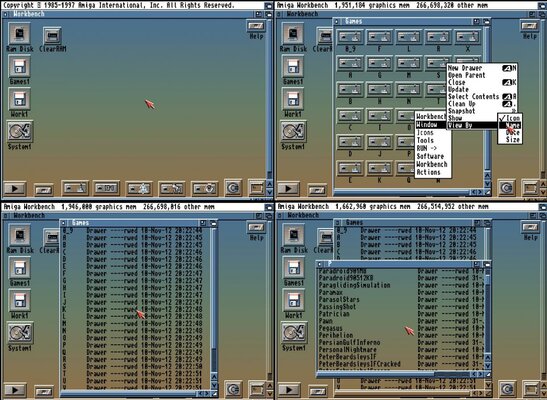
I don't find Workbench particularly easy to navigate when a drawer contains a lot of other drawers. It would be much easier if they could be in list format, anyone know if there is a way to do this?

I still haven't figured out how to save Wing Commander games. I've posted on the Ami Oracle page.
 
Yeah WinUAE is a godsend for working with your Amiga settings.

I'm guessing you might have something like Classic Workbench installed?

You should be able to change the view like this:

workbench_files.jpg
 
Thanks, it looks similar to that. That's a right click menu? I'm so used to the ribbon in Windows it might not have occurred to me to right click!
 
Thanks, it looks similar to that. That's a right click menu? I'm so used to the ribbon in Windows it might not have occurred to me to right click!

Hi, yeah it's the right click menu you can also right click on the workbench bar and access the same menu there :)
 
Status
Not open for further replies.
Back
Top Bottom