Aghhhhhhhhhhhhhhhhhhhhhhhhhhh lost cables

  • Thread starter Thread starter fitzsteve
  • Start date Start date
  • Replies Replies 48
  • Views Views 1484
I have a memory technique that works, but it only works if you know you´re going to need this thing.

If you just dump something, thinking that you´re storing it away and you dont care about it when you lose it, it will likely remain lost or you will have to do extensive searching for it.

However, if you realize the thing you´re storing somewhere or putting somewhere out of the way is something you will need later, then you can use this technique. I do this for keys, memory cards and adapters, wallet, controllers, cables and such that I dont need for a while but I know for sure I will need them later.

First of all, it will help to store all relevant things together. So I would bunch up all snes cables and adapters in one box, all keys in one chain, all usb camera and phone cables in one box, etc

Next, lets say I´m putting my keys down somewhere while I work with a computer upgrade. (dont want big keychain in my pocket or in my neckchain). I don´t just put it down, I look at it for five seconds, I imagine in my head that the keys are exploding violently and shattering into pieces. Now I can forget about the keys for a while and concentrate on what I am doing. Then I will do other things, eventually I will go to sleep.

Next morning, I will awake late, I will be in a hurry to get to the work... KEYS? Where??!?! Wait... I know what to do!... Did I detonate them yesterday, I think I did! Where did those keys explode yesterday? And then I remember because it´s such a strong mental image of the keys exploding and I will know exactly where they are.
 
Quite literally about 5 years ago I threw out 2 *full* garbage bins full of cables - "when am I ever gonna need these" I was thinking! :unsure:

Sure enough not too long after that! So now I have a "small" collection of URC (useless random crap) including cables that comes in handy every now and then! And it's been a long time since I've throw one out! Lesson learned - Mr Hoarder am I :D
 
took me 15 mins to find my Keys to go out:double

Why Dont I put on top of my BT Broadband then I will know where is :roll::picard
 
Don't get me started on lost cables! It's even more irritating when bits of hardware get shuttled between home and work. I've had a USB hub which has been at home for over 18 months, with the PSU being in the office for the equivalent length of time! Utterly useless to anyone for anything! :lol:
 
Effing USB cables - I have the micro ones, the mini ones, the normal ones, the extension ones...

Today I needed the one that's like a mini but without the little flangey bit - can I find the ONE example of it that I have ? Oooooooh no - that would be too easy.

STUFF YA THEN - STAY UNCHARGED - see if I care! :censored:

---------- Post added at 20:55 ---------- Previous post was at 20:54 ----------

took me 15 mins to find my Keys to go out:double

Why Dont I put on top of my BT Broadband then I will know where is :roll::picard

Because that day your BT Broadband will go missing (escaped with the keys!) - don't do it ;-)
 
I lost my bank cards yesterday :picard and who next for losing things? :picard
 
I have lost my Commander and conquer Zero hour Manual as I need to installed it again because of the Mod rise of reds have cock up my Zero hour game because I couldnt unstalled rise of red or couldnt even start game:picard

Whatever you do dont installed Rise of reds mod for Zero hour game as it does look good when they got Russia and european General
 
I'm in a long lengthy sorting process now, but thanks to Ikea I now have plastic see trough boxes and cables, chips, drives, expansion cards and all other stuff is now getting sorted.
I just look at the box with cables, and if I need AV leads, then I grab the one and look inside it.
 
Rarely have a problem, I used to, but now I have different boxes with "Themes" so I can keep track. Every now and then I go through them too and decide if I REALLY need 10+ USB cables of the same type and get rid.

I've got one small box nearby with all the often used cables/adapters/memory cards etc, another two semi nearby with cables I use not so often, then 5 themed boxes up in the bedroom above the wardrobe that have cables I might need one day (stereo/TV/computer/Videogame/misc).
 
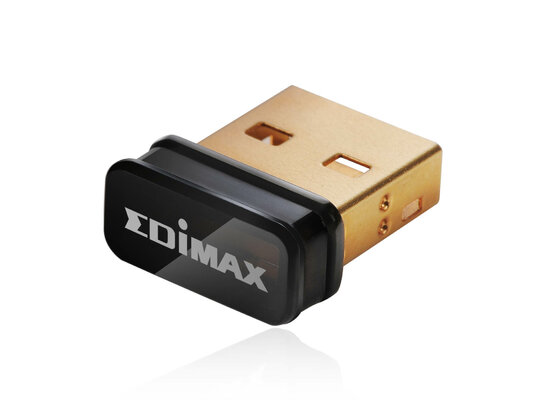
Managed to lose the tiny little USB Wifi adaptor that I KNEW was going to wander one day - grrrrr :censored:

Annoyingly it's around here somewhere, but it's RIDICULOUSLY small (I'd take a picture, but, well, it's gone now :-P)

I spent 4 hours searching through drawers it might have dropped in, plus the bit-bags I keep things "too small to track" in - all to no avail.

The stupid thing is £8 to replace - but I'm currently refusing to do that as it will arrive next day and the original will turn up as the delivery man rings the doorbell (which will make me incandescent) ;-)

Ah - a picture (if only the original was the size of this image!)
 

Attachments

  • 1311592575.jpg
    1311592575.jpg
    63.6 KB · Views: 5
Managed to lose the tiny little USB Wifi adaptor that I KNEW was going to wander one day - grrrrr :censored:

Annoyingly it's around here somewhere, but it's RIDICULOUSLY small (I'd take a picture, but, well, it's gone now :-P)

I spent 4 hours searching through drawers it might have dropped in, plus the bit-bags I keep things "too small to track" in - all to no avail.

The stupid thing is £8 to replace - but I'm currently refusing to do that as it will arrive next day and the original will turn up as the delivery man rings the doorbell (which will make me incandescent) ;-)

Ah - a picture (if only the original was the size of this image!)

Looks about life size on a 10" screen! Lol.

I have 2 USB flash drives the same size and a mouse receiver which conveniently slots into the mouse it belongs to when not needed. I feel your pain when I mis-place them!
 
you can never have enough cables but cables are like string sooner or later they going get tangled up and in knots

I have plastic bags for different types of cables, AV cables, network cables, usb cables, scsi, ribbon, etc I can then put the bags in boxes and the boxes on top of each other and still be able to find the cable i am after but it still dose involve a bit of moving and rooting but that probably cos I got a lot of cables :lol:

I here that roy about tideing up and having a good clean Its like everything has disaperd and wont turn up until u are looking for something else
 
Wrap up each cable like this with a cable tie: (if they're in a circle, they're much more likely to tangle)
usb_cable.jpg


Then they will never get tangled together. This is how I've done with all my cables. One box has computer cables, another has AV cables and so on so I can usually find what I'm looking for without too much hassle. Just tie it back together when you're done so you don't mess up the system. :)
 
:lol::picard

I have lost my PC Joypad :double

I cant find it anywhere in my room(Bedroom, living room) and it look like i have will have buy new one:picard but this time....

I will put under computer desk when i have finished playing the steam game:roll:
 
I have lost my Nexus 7 and now I need to find it where is :picard:roll:

My old teacher used say to me - "You should chain round your neck, so that way...You cant lose things! " :lol:
 
I have lost my Nexus 7 and now I need to find it where is :picard:roll:

My old teacher used say to me - "You should chain round your neck, so that way...You cant lose things! " :lol:

*Puts chain around neck... Attaches Laptop, Monitor, and TV. :lol:
 
@Fitzsteve
@ first post - you're not the only one... The feeling that you know you have the thing you need but when digging you get all but not what you want, meanwhile you're finding the cable you looked for last week :D Gosh nothing more frustrating :D
 
now if u can take a picture of the exact moment ur stuff grows feet and runs away to hide I`d be intrested in seeing it :blink:
 
I cant find my tape measure to measure the boxed:roll::picard
 
Back
Top Bottom